Conference calls can quickly become chaotic when multiple people are speaking from laptops or mobile phones.
For small to medium-sized UK businesses, the Yealink CP925 solves this problem by turning your meeting table into a dedicated conference hub with clear, room-filling audio.
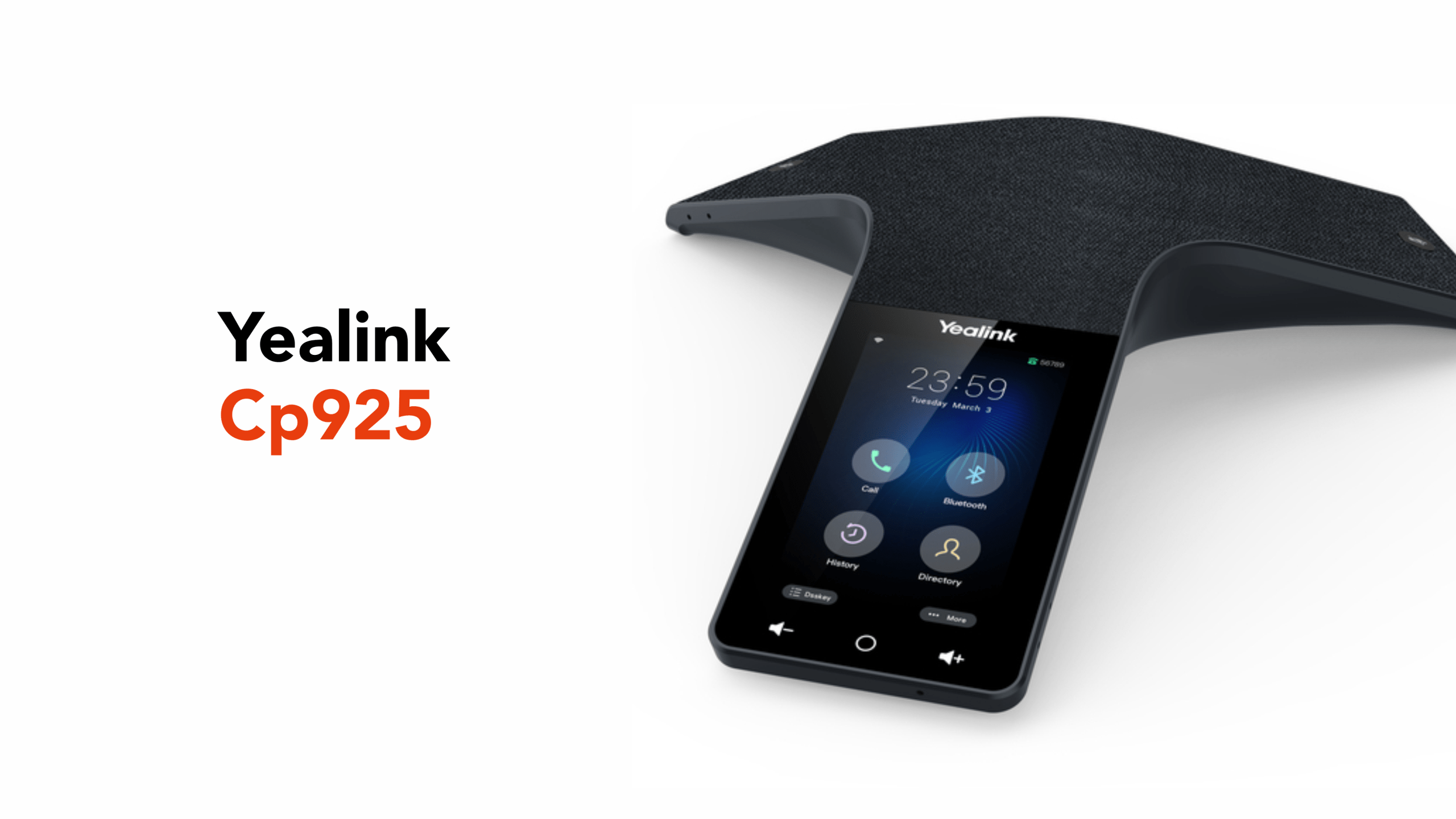
Built as a Voice over Internet Protocol (VoIP) conference phone, this distinctive Y-shaped device connects directly to your business phone system while capturing voices clearly across the room.
Before exploring its features, let’s take a closer look at what the Yealink CP925 actually is.
What the Yealink CP925 Actually Is
The Yealink CP925 is a VoIP conference speakerphone designed for small to medium-sized meeting rooms.
With its elegant, low-profile design and intuitive touchscreen interface, it looks right at home sitting at the centre of a meeting table.
Built specifically for shared meeting rooms, it provides clear 360-degree audio pickup with a range of up to 6 metres, allowing everyone in the room to participate in a call without needing individual devices.
Key technical highlights include:
- 7-microphone array for 360° voice pickup
- 20-foot (6 m) voice capture range
- HD full-duplex audio for natural conversations
- 4-inch multi-touch display for call control
- Power over Ethernet (PoE) for simple installation
- Wi-Fi and Bluetooth connectivity for hybrid meetings
In practical terms, the CP925 is designed to make meetings sound as though everyone is sitting around the same table, even when some participants are joining remotely.
Let’s review these key features of the CP925.
Key Features of the Yealink CP925
The Yealink CP925 includes several features designed to improve conference call clarity and ease of use. These features include:
360-Degree Microphone Array
The CP925 uses six microphones for voice pickup and one dedicated microphone for noise suppression, allowing it to capture voices clearly from all directions around the meeting table.
This multi-microphone array provides 360° omnidirectional audio coverage, allowing participants to speak naturally without having to lean toward the device.
With an effective pickup range of around 6 metres, the CP925 comfortably covers most small to medium-sized meeting rooms, ensuring everyone seated around the table can be heard clearly during the call.
The additional noise-processing microphone works alongside Yealink’s Noise Proof Technology, helping to filter out background distractions such as typing, paper movement, or general office noise.
This helps remote participants hear conversations clearly without common speakerphone distractions.
For typical boardrooms with 6–12 participants, this built-in microphone array is usually more than sufficient without the need for external expansion microphones.
HD Audio With Full Duplex
Alongside its microphone array, the CP925 also uses built-in echo cancellation and intelligent voice processing to keep conversations sounding natural, even when several people speak at the same time.
The device supports full-duplex audio, meaning participants can talk and respond simultaneously without audio dropping out.
This is an important feature because older or lower-quality conference systems often rely on half-duplex audio, which allows only one person to speak at a time. In those systems, the audio channel effectively switches between speakers, which can make conversations feel unnatural and interrupt the flow of discussion.
By contrast, full-duplex audio allows meetings to proceed much more naturally, with participants able to interject, ask questions, or respond without awkward pauses.
Combined with Yealink’s voice processing technologies, this helps ensure remote participants hear conversations clearly and without distortion.
In practice, these technologies work together to make conference calls sound less like a speakerphone and more like a natural conversation around the table.
4-Inch Touchscreen Interface
The CP925 features a 4-inch colour touchscreen display with a 480×800 resolution, providing a clear and responsive interface for managing conference calls.
An additional bonus is that the touchscreen’s surface is fingerprint-proof, so there are no annoying smudges.
From the touchscreen, users can quickly control most meeting functions, including:
- Starting or joining calls
- Adjusting call volume
- Adding participants to a conference
- Accessing contacts and call history
Because the device’s user interface is entirely touch-driven and easy to understand, most users can operate it with minimal training.
This makes it easy to deploy in shared meeting spaces where different teams may use the phone throughout the day.
Hybrid Meeting Connectivity
One of the Yealink CP925’s most practical capabilities is its support for hybrid meeting environments, where some participants are in the room while others join remotely or via a connected device.
The device can connect to multiple communication sources, including:
- SIP (Session Initiation Protocol) / VoIP phone systems
- Bluetooth smartphones or headphones
- Wi-Fi networks
- USB Type-C connected PCs
This flexibility allows meetings to combine several communication methods, such as:
- VoIP calls through the company phone system
- Mobile calls that are routed via a paired smartphone
- Unified Communications platforms like Microsoft Teams or Zoom, when connected to a laptop
Regardless of how participants join the meeting, everyone in the room continues to speak and listen through the same central conference speaker.
Built-In Wi-Fi and Bluetooth
Unlike many older conference phones that rely solely on wired Ethernet connections, the CP925 includes both dual-band Wi-Fi and Bluetooth connectivity.
Supported wireless technologies include:
- Dual-band Wi-Fi (2.4 GHz and 5 GHz)
- Bluetooth 5.2 support
These wireless capabilities enable several useful deployment options, including:
- Wireless network deployment in rooms without Ethernet cabling
- Smartphone call bridging via Bluetooth pairing
- Integration with laptops for hybrid meetings
Security is an important consideration when deploying VoIP devices in business environments.
Secure Call Encryption
Security is an important consideration for any business communication system, especially when sensitive information may be discussed during meetings.
The CP925 supports secure VoIP calling, helping protect conversations from interception when calls travel across company networks or the internet.
To do this, the device uses industry-standard encryption technologies, including:
- TLS (Transport Layer Security) protects the signalling process used to set up a call between devices.
- SRTP (Secure Real-Time Transport Protocol), which encrypts the actual voice data so conversations cannot be easily intercepted.
Together, these technologies help ensure that both the call connection and the audio itself remain protected during business meetings.
For organisations that regularly discuss confidential information, this type of built-in encryption provides an additional layer of security for VoIP conference calls.
If the CP925 seems perfect on paper, let’s ensure it is ideal for your business’s conference room.
Ideal Meeting Room Size for the CP925
In practical terms, the Yealink CP925 works best in meeting rooms where participants are seated around a central table rather than spread across a large boardroom.
For general guidance, the CP925’s typical room coverage is as follows:
| Room Type | Typical Participants | Recommended Use |
| Huddle room | 3–5 people | Ideal deployment |
| Small meeting room | 6–8 people | Fully supported |
| Medium meeting room | 8–12 people | Suitable when centrally positioned |
| Large boardroom | 12+ people | Wireless expansion microphones (CPW25) recommended |
For most businesses that run regular internal meetings, client calls, or hybrid conferences, the CP925 provides more than enough coverage without additional hardware.
But, for larger conference rooms or boardrooms, organisations may wish to consider adding expansion microphones or selecting a larger conference system designed for wider audio coverage.
Now that we’ve covered where the CP925 works best, the next step is getting it set up and connected to your business phone system.
How to Set Up the Yealink CP925
Setting up the Yealink CP925 is straightforward and usually only takes a few minutes once the device is connected to your network.
Before starting, it helps to make sure you have a few basic requirements in place.
Setup Requirements
Before configuring the CP925, make sure you have the following:
- Power over Ethernet (PoE) switch or injector to power the device
- Access to your network (Ethernet or Wi-Fi)
- VoIP account credentials from your phone provider (SIP username and password)
- Access to your VoIP platform or PBX (Private Branch Exchange) system
Once these are ready, you can begin the setup process.
Step 1: Connect Power and Network
The CP925 is typically powered using PoE, which allows both power and network connectivity through a single cable.
To power the device:
- Connect an Ethernet cable to a PoE-enabled switch or injector.
- Plug the other end into the LAN port on the CP925.
The phone will automatically power on and begin booting.
If PoE is unavailable, the device can also be powered by a compatible power adapter.
Step 2: Configure the Network
Once the phone has powered on, it will automatically attempt to obtain an IP address using DHCP (Dynamic Host Configuration Protocol).
If you are using Wi-Fi instead of Ethernet:
- Open the Settings menu on the touchscreen.
- Select Wi-Fi settings.
- Choose your network and enter the password.
After connecting, the phone will join the network and be ready for account configuration.
Step 3: Register Your VoIP Account
To start making calls, the CP925 must be registered to a VoIP phone system or hosted PBX.
To do this:
- Open Settings and select Account Settings on the device.
- Enter your SIP account credentials, including:
– SIP server address
– Username
– Password - Save the configuration.
Once registered, the phone will be able to make and receive calls through your business phone system.
Step 4: Pair Bluetooth Devices (Optional)
If required, you can pair the CP925 with Bluetooth devices such as smartphones or headsets.
To pair a device:
- Enable Bluetooth in the phone’s settings menu.
- Put your device into pairing mode.
- Select the CP925 from the available devices list.
This allows mobile calls or headset audio to be routed through the conference phone.
After you have happily completed the setup, make sure to do a test call to ensure that everything is working as it should.
Conference Room Use Cases for the CP925
The Yealink CP925 is designed for a variety of meeting environments where clear group communication is essential. Because the device combines a 360-degree microphone array with simple call controls, it works well in several common office scenarios.
Small Team Meetings
One of the most common uses for the CP925 is internal team meetings in smaller conference rooms or huddle spaces.
Teams often gather to discuss project updates, coordinate work, or speak with colleagues from other offices. With the conference phone placed in the centre of the table, everyone in the room can participate in the call without relying on individual laptops or headsets.
This helps keep conversations natural and ensures everyone can hear and be heard clearly.
Client Conference Calls
Many businesses regularly hold client or partner calls in which several employees need to join the conversation simultaneously.
In these situations, the CP925 enables the entire room to participate in the discussion through a single conference device. The microphone array captures voices from around the table, while the built-in speaker ensures remote participants can be heard clearly.
This setup is particularly useful for:
- client update meetings
- project discussions
- remote consultations
Hybrid Meetings
Hybrid meetings have become increasingly common, with some attendees physically present in the office while others join remotely.
The CP925 works well in this scenario because it can connect to VoIP systems, laptops running meeting platforms, or Bluetooth smartphones.
Everyone in the room uses the same conference phone, which helps keep audio consistent for remote participants.
This avoids the common problem of multiple laptops creating overlapping microphones and echo during meetings.
Regular Department Meetings
Many organisations also use conference phones for scheduled department meetings, where managers and teams connect with colleagues in different locations.
With its clear audio pickup and easy-to-use touchscreen controls, the CP925 allows meeting organisers to quickly start conference calls without needing complicated equipment or technical setup.
Let circle.cloud Set Up the CP925 for You
While the Yealink CP925 provides excellent audio for meeting rooms, its performance ultimately depends on the phone system powering the calls.
A reliable VoIP platform ensures conference devices connect securely, manage multiple participants smoothly, and integrate with modern collaboration tools used by today’s businesses.
At circle.cloud, we provide business VoIP phone systems designed to work seamlessly with conference phones like the CP925, helping teams run clearer meetings whether participants are in the room or joining remotely.
Speak to our team today to learn how circle.cloud can upgrade your business phone system and meeting room communications.