
Published: 28 July 2026 Last Updated: 28 July 2026
Reviewed By: circle.cloud Team Last Reviewed: 28 July 2026
Reading Time: Approximately 18 minutes Revision: Version 1.1
Introduction
For many UK businesses, the telephone remains a primary engine for revenue and client communication. However, choosing the right hardware is no longer just about selecting a desk handset. Modern workplaces require agile terminals that support office teams, hybrid staff, and on-site mobility while integrating with cloud-hosted telephone systems. Yealink has become a global standard in business communications by delivering a diverse portfolio that includes professional desk phones, rugged cordless DECT devices, and touch-sensitive conference units.
Because every industry operates differently, a mismatch in hardware can directly affect your bottom line:
- Care Homes & Dental Clinics require reliable, fast-charging cordless mobility to coordinate patient care on the move.
- Manufacturing & Engineering floors need dustproof, shock-resistant terminals that support lone-worker safety procedures.
- Estate Agents & Automotive Showrooms depend on smooth call handling, clear audio, and flexible desktop routing to capture every inbound lead.
This buyer’s guide breaks down the complete Yealink range to help you choose the ideal infrastructure for your business, so your operations remain resilient, productive, and well prepared for the PSTN switch-off.
Key Takeaways
- Yealink is one of the world’s leading manufacturers of business communication devices.
- Yealink phones are designed for cloud telephony and hosted VoIP platforms.
- Different employee roles require different handset types rather than a one-size-fits-all approach.
- Cordless DECT phones improve mobility in larger premises, subject to proper site coverage design.
- Conference phones enhance collaboration for hybrid meetings.
- Rugged devices are better suited to manufacturing and engineering environments.
- Pairing Yealink phones with a hosted business phone system supports long-term compatibility with the UK’s all-IP future.
- Businesses should evaluate connectivity, networking and ongoing support alongside handset selection.
At a Glance
| Category | Our Recommendation |
|---|---|
| Best Overall | Yealink W76P |
| Best Premium Device | Yealink SIP-T88W Pro |
| Best for Care Homes | Yealink W76P |
| Best for Manufacturing | Yealink W59R |
| Best for Estate Agents | Yealink W74P |
| Best Conference Phone | Yealink CP925 |
| Best Additional Handset | Yealink W56H |
| Best Hybrid Working Solution | Hosted Business Phone System + Yealink Devices + Softphone Applications |
Who This Guide Is For
This guide is designed for IT managers, business owners, and decision-makers looking to deploy a new cloud-hosted phone system, upgrade legacy VoIP hardware, or prepare their operations for the UK’s PSTN switch-off. By mapping the technical capabilities of the Yealink portfolio to specific operational environments, this guide helps communication-reliant businesses select the endpoints that suit how their teams actually work.
Why You Can Trust Our Recommendations
Unlike reviews focused solely on specs, this guide is built from a business-first perspective. Our advice comes from practical experience helping organisations that rely on the telephone to drive revenue and protect customer relationships, and we assess each handset on how it holds up in daily use, how easily it integrates with hosted platforms, and whether it delivers long-term value.
Every recommendation is mapped to the operational demands of communication-critical sectors such as care homes, manufacturing, and dental practices, alongside business broadband and PSTN switch-off requirements. We believe technology should support your business objectives rather than complicate them, which is why we recommend hardware based on operational workflow rather than the lowest price tag or the longest feature list.
Product Range Overview
Unlike many manufacturers that focus on a single type of business phone, Yealink offers a complete communications ecosystem designed to support different working environments. Rather than expecting every employee to use identical equipment, businesses can select devices based on individual roles, improving productivity while avoiding unnecessary expenditure.
The current product range available through circle.cloud includes professional cordless handsets, rugged mobile devices, premium executive phones and conference room solutions. Each product has been developed for a specific business scenario, so organisations buy devices that genuinely support the way their people work.
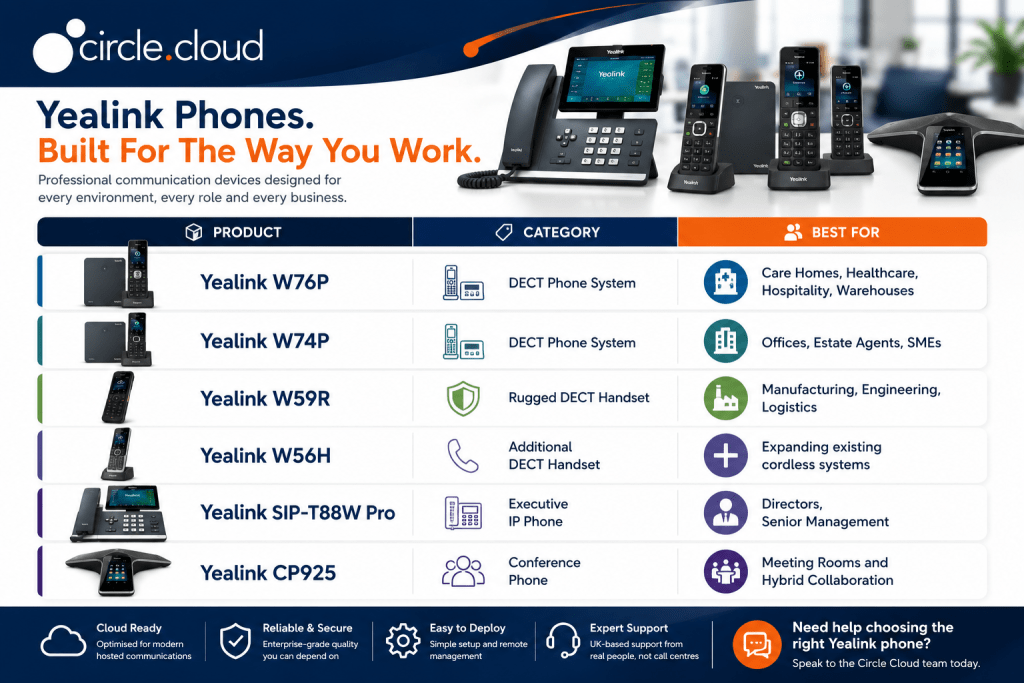
Each product has been developed for a specific business scenario, ensuring organisations purchase devices that genuinely support employee productivity.
Yealink W76P
The Yealink W76P is a versatile cordless solution designed for fast-paced, high-frequency communication environments where staff rarely remain at a fixed desk. Built on stable DECT technology, it offers an indoor range of up to 50 metres in open conditions, allowing employees to move around care homes, dental practices, or local estate agencies with dependable coverage. Range varies with building construction, so larger or multi-floor sites may need additional base stations or a multi-cell design.
By bundling the W70B base station with a colour-screen handset, the W76P supports up to 10 handsets and 10 concurrent calls on a single base, with up to 30 hours of talk time per handset. For organisations migrating to a cloud-hosted telephone system ahead of the PSTN switch-off, the W76P offers a strong balance of multi-line flexibility, high-definition audio, and long-term deployment value.
Product Spotlight
- Best For: Mobile workforces
- Rating: ⭐⭐⭐⭐⭐
Ideal Industries
- Care Homes
- Hospitality
- Healthcare
- Warehousing
- Education
- Distribution
Advantages
- Excellent wireless mobility
- Reliable HD voice quality
- Long battery performance
- Easy deployment
- Supports growing businesses
Considerations
The W76P is designed for mobility rather than fixed desk use, making it less suitable for receptionists or employees requiring multiple programmable function keys.
Yealink W74P
The Yealink W74P is a mid-range cordless solution engineered for growing SMEs, automotive showrooms, and estate agencies that require professional on-site mobility without the bulk of an industrial device. Operating on a scalable DECT architecture, it allows staff to move between meeting rooms, customer service bays, and reception areas without interrupting client calls.
With noise filtering built into the handset and the ability to add extra units as your team expands, the W74P is an efficient, scalable investment for any business that depends on consistent customer communication.
Product Spotlight
- Best For: Growing businesses
- Rating: ⭐⭐⭐⭐⭐
Ideal Industries
- Estate Agents
- Professional Services
- Automotive Dealerships
- Dental Practices
- SMEs
- Customer Service Teams
Advantages
- Professional cordless mobility
- Excellent audio quality
- Straightforward deployment
- Ideal for expanding businesses
- Comfortable everyday use
Considerations
Businesses operating in harsh industrial environments may benefit from the rugged protection offered by the W59R instead.
Yealink W59R
The Yealink W59R is engineered for harsh operational settings such as manufacturing plants, engineering warehouses, and automotive service bays, where dust, moisture, and accidental drops quickly ruin standard hardware. Certified to IP67, this heavy-duty handset is dust-tight and water-resistant, and it is wrapped in a rubberised shockproof shell rated for drops onto hard surfaces.
The W59R also supports industrial safety procedures. Its integrated G-sensor triggers programmable lone worker alarms, including man-down, no-movement, and manual emergency alerts, connecting isolated staff to your response team over your cloud-hosted telephone network. As with any VoIP device, alarms depend on a working network, power and internet connection, and on a monitored escalation process at your end, so the W59R should form part of a wider lone worker policy rather than replace one.
Product Spotlight
- Best For: Industrial workplaces
- Rating: ⭐⭐⭐⭐⭐
Ideal Industries
- Manufacturing
- Engineering
- Logistics
- Warehousing
- Construction
- Automotive
Advantages
- Rugged professional design
- Excellent wireless coverage
- Reliable HD voice
- Designed for demanding environments
- Supports business continuity
Considerations
For office-based users who primarily work at desks or in meeting rooms, one of Yealink’s desk phones or conference devices may provide a better overall user experience.
Which of These Three Models Should You Choose?
- Choose the W76P if your workforce needs dependable cordless communication across larger buildings such as care homes or healthcare facilities.
- Choose the W74P if you want an affordable, professional cordless solution for office-based teams and growing businesses.
- Choose the W59R if your employees work in manufacturing, engineering or other environments where durability matters as much as call quality.
Selecting the right model for each role gives employees the tools they need while helping your organisation get more from its investment.
Yealink W56H
The Yealink W56H is an expandable, additional DECT handset that lets you grow your existing wireless network without deploying new base stations. It acts as a cost-effective add-on terminal for growing care homes, multi-floor estate agencies, and dental practices that need to equip extra staff quickly.
Featuring a 2.4-inch colour interface and access to centralised cloud phone system directories, the W56H gives users the same familiar experience across your facility. Its lightweight, ergonomic build suits long shifts, and its battery delivers up to 30 hours of talk time, making it a practical choice for fast-moving environments where handsets are shared between teams.
Product Spotlight
- Product: Yealink W56H
- Best For: Expanding existing DECT phone systems
- Rating: ⭐⭐⭐⭐
Ideal Users
- Growing SMEs
- Additional office staff
- Care home employees
- Reception overflow
- Customer service teams
Why Choose the W56H?
The W56H provides an affordable way to expand an existing Yealink cordless deployment without investing in additional infrastructure. It delivers excellent voice quality, dependable battery performance and familiar usability for employees already using Yealink devices.
Advantages
- Cost-effective expansion
- Comfortable lightweight handset
- Excellent HD voice
- Long battery performance
- Familiar Yealink interface
Considerations
The W56H requires a compatible Yealink DECT base station and is not intended to operate independently.
Yealink SIP-T88W Pro
The Yealink SIP-T88W Pro is an Android-powered flagship smart desk terminal engineered for directors, executives, and high-volume operators who manage business-critical communication. Featuring a large 7-inch adjustable touchscreen, it replaces complex button navigation with advanced cloud-hosted call handling, custom contact directories, and multi-party conferencing.
Built to handle up to 16 SIP accounts, the terminal is highly flexible, with dual-band Wi-Fi and Bluetooth for wireless network and headset connectivity alongside standard PoE or mains power. For fast-paced professional offices or automotive sales floors, it pairs with a cordless Bluetooth handset, allowing operators to move around 10 metres from their desk depending on the environment, while AI noise cancellation keeps conversations clear and professional.
Product Spotlight
- Product: Yealink SIP-T88W Pro
- Best For: Executives and senior management
- Rating: ⭐⭐⭐⭐⭐
Ideal Industries
- Professional Services
- Financial Services
- Manufacturing
- Corporate Offices
- Multi-site Businesses
Why Choose the SIP-T88W Pro?
This premium device combines advanced functionality with an intuitive touchscreen interface, making it ideal for users who spend a significant portion of their working day communicating with customers and colleagues.
Advantages
- Premium touchscreen display
- Outstanding HD audio
- Integrated wireless connectivity
- Excellent productivity features
- Professional executive appearance
Considerations
Smaller businesses with basic communication requirements may not need the advanced capabilities offered by this flagship model.
Yealink CP925
The Yealink CP925 is a premium conference terminal engineered to anchor modern boardrooms, executive meeting spaces, and professional consult rooms. Featuring a spill-resistant fabric chassis, the device provides 360-degree voice pickup up to 6 metres (20 feet) and uses noise-filtering algorithms to reduce distracting background sound.
Operated via a 4-inch colour touchscreen, the CP925 connects to your cloud-hosted telephone system over standard business broadband or Power over Ethernet (PoE). With built-in Bluetooth and USB-C connectivity, hybrid teams can bridge a laptop or smartphone into the unit, turning it into a high-fidelity audio device for platforms such as Microsoft Teams or Zoom.
Product Spotlight
- Product: Yealink CP925
- Best For: Conference rooms and hybrid meetings
- Rating: ⭐⭐⭐⭐⭐
Ideal Industries
- Corporate Offices
- Legal Firms
- Engineering Companies
- Manufacturing Businesses
- Estate Agencies
- Professional Services
Why Choose the CP925?
The CP925 turns meeting rooms into professional collaboration spaces by delivering excellent voice quality and simplifying conference participation for both office-based and remote employees.
Advantages
- Clear conference audio
- Excellent microphone coverage
- Modern touch interface
- Ideal for hybrid meetings
- Professional meeting room solution
Considerations
The CP925 is designed for conference environments rather than individual desk-based users.
Compatible Accessories & Ecosystem
Yealink phones perform best when deployed as part of a complete business communications environment. Rather than viewing handsets as standalone products, organisations should consider the wider technology ecosystem supporting them. A typical circle.cloud deployment includes:
- Hosted Business Phone System: Provides enterprise-grade cloud telephony with advanced call handling, voicemail, auto attendants and remote working capabilities.
- Business Broadband or Leased Line: Reliable connectivity is essential for high-quality VoIP communications.
- TP-Link Omada Business Wi-Fi: Professional wireless networking helps cordless phones and softphone applications maintain dependable connectivity throughout the workplace.
- TP-Link Omada Network Switches: Managed switches provide secure, reliable network connectivity while supporting Power over Ethernet (PoE) for compatible devices.
- Automatic 4G & 5G Backup: Business continuity solutions help maintain communications if the primary internet connection becomes unavailable.
- Softphone Applications: Employees can continue making and receiving business calls through desktop and mobile applications when working remotely or travelling.
Together, these technologies create a resilient communications platform that supports business growth while preparing organisations for the UK’s all-IP future. Remember that a Yealink phone is only one component of a successful communications strategy. Businesses achieve the greatest return on investment when handsets are combined with hosted telephony, resilient connectivity, business Wi-Fi and proactive technical support from a single trusted provider.
Yealink vs Other Business Phone Brands
Choosing the right business phone isn’t only about selecting a model. Many organisations also compare manufacturers before investing in a new communications platform. While several brands produce excellent IP phones, Yealink has become one of the most widely adopted choices for hosted cloud telephony thanks to its balance of functionality, reliability and value.
| Brand | Strengths | Considerations | Best For |
|---|---|---|---|
| Yealink | Excellent value, broad product range, cloud-first design, dedicated Microsoft Teams editions available | Premium features reserved for higher-end models | Most SMEs and growing organisations |
| Poly | Premium audio quality and enterprise collaboration | Generally a higher purchase cost | Large enterprises and executive users |
| Cisco | Deep integration with Cisco ecosystems and enterprise networks | More complex deployment and licensing | Existing Cisco environments |
| Gigaset | Reliable cordless telephony and simple deployment | Smaller IP portfolio and fewer enterprise collaboration features | Small offices with basic telephony requirements |
Why Does circle.cloud Recommend Yealink?
For most UK businesses, Yealink offers a strong combination of reliability, scalability and value. The product range supports organisations of every size, integrates well with hosted VoIP platforms and provides specialist devices for offices, care homes, warehouses, meeting rooms and industrial environments.
The Yealink Phone Buying Process, Simplified
Selecting the right Yealink phone is only one part of creating an effective business communications solution. The best results come from considering how your organisation operates today while also planning for future growth. A phone that performs well in a small office may not meet the needs of a rapidly expanding business with multiple locations. Likewise, investing in premium hardware with advanced functionality may offer little additional value if employees only require basic call handling.
This buying process walks you through the key decisions to make before purchasing any Yealink device.
Step 1: Understand How Your Employees Communicate
Before comparing products, take time to understand how different teams use the telephone. Many businesses buy identical phones for every employee, despite each department having different communication requirements.
For example, receptionists typically manage high call volumes, transfer calls between departments and greet customers professionally. Directors often spend long periods on client calls and require premium audio quality and productivity features. Mobile employees need cordless devices that allow them to move throughout the building without losing connectivity.
By understanding these different working styles, you can select devices that genuinely improve productivity rather than simply replacing existing hardware.
Step 2: Choose the Right Type of Phone
Yealink’s product portfolio includes several categories of devices, each designed for a specific business requirement.
DECT Cordless Phones
Cordless DECT phones are ideal for employees who need mobility throughout the workplace. Typical environments include:
- Care homes
- Warehouses
- Healthcare
- Hospitality
- Automotive workshops
- Schools
Recommended models include:
- Yealink W76P
- Yealink W74P
- Yealink W59R
Executive Desk Phones
Senior managers and office-based employees often benefit from premium desk phones with larger displays, advanced call management and productivity features. Recommended model:
- Yealink SIP-T88W Pro
Conference Phones
Meeting rooms require specialist equipment capable of capturing voices from multiple participants while delivering clear audio for remote attendees. Recommended model:
- Yealink CP925
Expansion Handsets
Growing organisations don’t always need additional phone systems. Adding compatible cordless handsets allows businesses to expand existing installations while keeping costs under control. Recommended model:
- Yealink W56H
Step 3: Consider Your Working Environment
The physical environment plays an important role when selecting business communication devices. An executive office has very different requirements from a busy engineering workshop. Questions to consider include:
- Will employees remain at desks?
- Do staff move around the building?
- Is the environment dusty or industrial?
- Is durability important?
- Will phones be shared between shifts?
- Are meeting rooms used regularly?
Matching devices to the environment improves reliability while reducing unnecessary replacements.
Step 4: Think Beyond the Handset
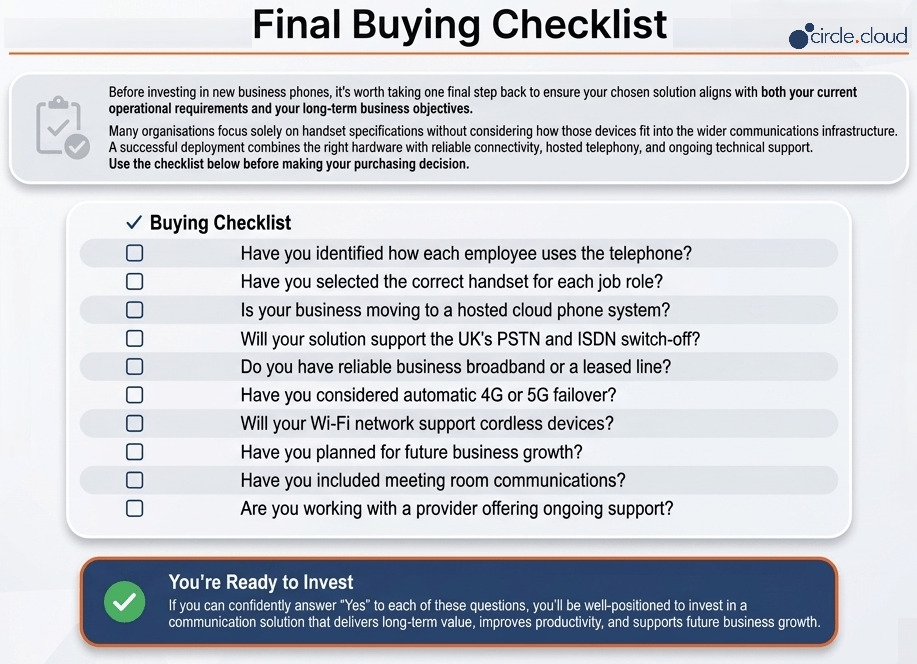
One of the biggest purchasing mistakes businesses make is concentrating exclusively on the phone itself. A Yealink handset performs best when supported by a high-quality communications infrastructure. This includes a hosted business phone system, business broadband, leased line connectivity, business Wi-Fi, managed network switches, automatic 4G or 5G failover, and ongoing technical support. A premium handset connected to poor networking infrastructure will never deliver its full potential.
Step 5: Plan for Growth
Communication requirements rarely remain static. Businesses recruit additional employees, open new offices and adopt hybrid working. Choosing scalable technology avoids unnecessary future replacement costs. Yealink’s ecosystem allows organisations to add users, handsets and meeting room devices without redesigning the entire communications environment. This makes it particularly attractive for growing SMEs.
Step 6: Consider Business Continuity
Telephone downtime affects customer satisfaction, productivity and revenue. When evaluating communications equipment, businesses should also consider how calls will continue during unexpected internet outages. Many organisations protect themselves using business fibre broadband, leased lines, automatic 4G and 5G backup, and hosted cloud telephony. Together, these services help maintain business continuity during network disruption.
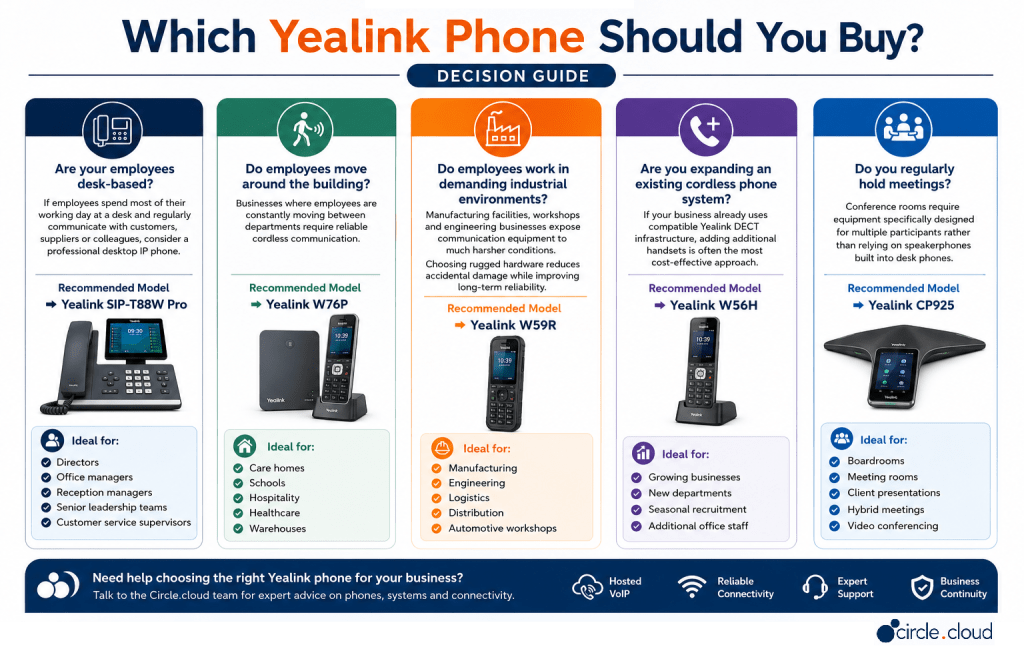
circle.cloud Recommendation: Choose handsets based on employee roles rather than standardising across the entire business. A tailored deployment delivers better productivity, improved user experience and greater long-term value.
Choosing by Business Type
Choosing the right communication terminal means matching hardware capabilities to your daily workflows. If your business depends on the phone to bring in revenue, the right endpoint makes it easier for your team to answer every call.
Depending on your core sector, your deployment should align with these operational models:
- Care Homes (Yealink W76P): Delivers wide on-site mobility and long battery life, keeping care staff reachable across multi-floor facilities so patient-care updates aren’t missed. Larger sites should have DECT coverage designed properly at the survey stage.
- Manufacturing & Engineering (Yealink W59R): Features an IP67 dust-tight and water-resistant rating to withstand harsh workshop floors, with built-in lone worker alarms to support the safety of isolated engineers.
- Estate Agents, Dental Practices & Automotive (Yealink W74P): Offers sleek cordless roaming with handset noise filtering, so staff can move from front desks to display bays while maintaining professional client conversations.
- Executive Offices (Yealink SIP-T88W Pro): Acts as a premium desktop hub for senior decision makers, combining a 7-inch touchscreen with a cordless Bluetooth handset for flexible call handling.
- Meeting Rooms (Yealink CP925): Anchors collaborative boardrooms with 360-degree audio pickup, bringing hybrid remote teams into the room over your cloud platform.
Our Top Picks
- 🏆 Best Overall: Yealink W76P, for its balance of mobility, reliability, and flexibility.
- 💰 Best Value: Yealink W74P, offering strong performance for growing businesses.
- 🛠️ Best Rugged Device: Yealink W59R, designed for demanding industrial environments.
- 💼 Best Executive Phone: Yealink SIP-T88W Pro, combining premium features with excellent usability.
- 🔊 Best Conference Solution: Yealink CP925, delivering professional meeting room collaboration.
Product Comparison & Feature Matrix
Selecting the right Yealink phone becomes much easier when the products are compared side by side. While every device supports professional business communications, each has been designed with a different user or working environment in mind.
| Model | Device Type | Best For | Mobility | Environment | Overall Rating |
|---|---|---|---|---|---|
| Yealink W76P | DECT phone system | Mobile office teams | Full site mobility | Care homes, healthcare, warehouses | ⭐⭐⭐⭐⭐ |
| Yealink W74P | DECT phone system | SMEs and offices | Full site mobility | Offices, estate agents | ⭐⭐⭐⭐⭐ |
| Yealink W59R | Rugged DECT handset | Industrial users | Full site mobility | Manufacturing and engineering | ⭐⭐⭐⭐⭐ |
| Yealink W56H | Additional DECT handset | Expanding systems | Full site mobility | Existing DECT deployments | ⭐⭐⭐⭐ |
| Yealink SIP-T88W Pro | Executive IP phone | Senior management | Desk-based, with Bluetooth handset | Offices and executive suites | ⭐⭐⭐⭐⭐ |
| Yealink CP925 | Conference phone | Meeting rooms | Fixed | Boardrooms and collaboration spaces | ⭐⭐⭐⭐⭐ |
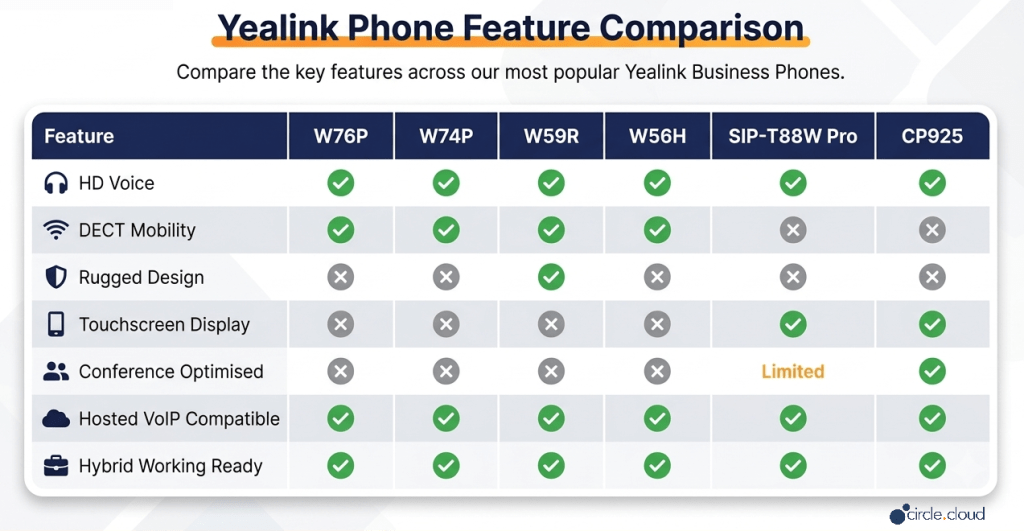
Feature Comparison
Every model in the lineup supports HD voice and hosted VoIP. The real difference is form factor: cordless DECT handsets for staff on the move, and touchscreen terminals for desks and meeting rooms.
Why Businesses Choose Yealink Phones
Business communication has changed dramatically over the past decade. Employees no longer spend every day sitting at a desk, customers expect faster responses, and organisations increasingly rely on cloud services to support flexible working. Yealink has adapted to these changing requirements by developing devices that combine professional audio quality with straightforward deployment and long-term reliability.
One of the biggest reasons businesses choose Yealink is consistency. Whether deploying ten phones or several hundred, organisations benefit from a familiar interface, consistent management tools and strong interoperability across the product range.
Another significant advantage is scalability. A business can begin with a handful of devices before gradually expanding as new employees join, additional offices open, or communication requirements evolve.
Yealink devices also support a wide range of working environments. A receptionist may require programmable keys and advanced call handling. An engineer may need a rugged cordless handset. A care assistant may rely on mobility throughout a large building. A boardroom needs clear conference audio.
Yealink provides purpose-built devices for each of these scenarios without forcing businesses into a single product category. For organisations adopting hosted business phone systems, that flexibility is valuable.
Why Yealink Is Particularly Well Suited to circle.cloud Customers
Many of circle.cloud’s customers operate in sectors where telephone communication directly influences business performance.
- Care homes rely on dependable cordless communication between staff, and on families and healthcare professionals being able to get through.
- Manufacturing and engineering businesses require durable devices capable of supporting both office and operational teams across large sites.
- Estate agents depend on rapid call handling, mobility and responsive customer communication throughout the working day.
- Dental practices require efficient appointment management and professional call handling to deliver excellent patient experiences.
- Automotive businesses often coordinate customers, suppliers, technicians and service departments simultaneously.
Across all these industries, communication is business-critical. Combined with a hosted business phone system, reliable business broadband or leased line connectivity and resilient networking infrastructure, Yealink devices provide a communications platform designed for today’s operational requirements and for the UK’s digital future beyond the PSTN switch-off.
Benefits of Yealink Phones
Deploying the right communication terminal has a direct effect on daily productivity, employee collaboration, and how your brand comes across. Yealink hardware acts as a foundation for organisations migrating to cloud-hosted telephone networks, offering specific commercial advantages:
- Enterprise-Wide Consistency: Users get a uniform interface, intuitive navigation, and the same core features across all form factors. This familiarity reduces onboarding time and simplifies internal tech support.
- Optima HD Voice Technology: Clear acoustic engineering delivers high-quality audio that reduces misunderstandings, filters ambient background noise, and protects the professional quality of client interactions.
- Targeted Workflow Flexibility: The portfolio supports different modern working styles, covering static office receptionists, roaming field engineers, mobile care staff, and hybrid executives.
- Simplified Cloud Provisioning: Devices integrate with leading cloud telephone systems over business broadband, allowing IT administrators to manage, update, and deploy large numbers of endpoints remotely, with only brief reboots during firmware updates.
- IP-Ready Architecture: Built for digital environments, the lineup protects your hardware investment ahead of the UK’s copper switch-off through native compatibility with all-IP platforms.

- IP-Ready Architecture: Built for digital environments, the lineup protects your hardware investment ahead of the UK’s copper switch-off through native compatibility with all-IP platforms.
Common Mistakes to Avoid
Viewing business phones as simple appliances rather than a strategic investment often compromises long-term efficiency and increases total cost of ownership. To get the most from your telephony deployment, avoid these frequent errors:
- Focusing solely on upfront cost: Choosing the cheapest handset often leads to inconsistent user experiences, missing cloud capabilities, and early hardware failure that outweighs the initial saving.
- Implementing a one-size-fits-all deployment: Giving receptionists, roaming field engineers, and senior executives identical hardware ignores their very different workflows and holds back daily productivity.
- Underestimating future growth needs: Fixed, non-scalable infrastructure leaves your business exposed to expensive and disruptive system replacement as head-count or site numbers grow.
- Neglecting the underlying network: Even premium endpoints can suffer dropped calls and audio problems if deployed over substandard business broadband or unmanaged, saturated Wi-Fi.
- Overlooking business continuity: Failing to pair your cloud telephone system with automated cellular failover leaves customer communication exposed during localised internet outages.
- Skipping specialist advice: Buying advanced IP endpoints without engineering guidance often results in configuration mismatches between hardware, router policies, and the hosted VoIP platform.
Overall Recommendation
Every organisation has different priorities, so our recommendations reflect specific business requirements rather than a single overall winner. If you’re deploying a completely new hosted phone system, we usually recommend combining several Yealink models rather than standardising on one device.
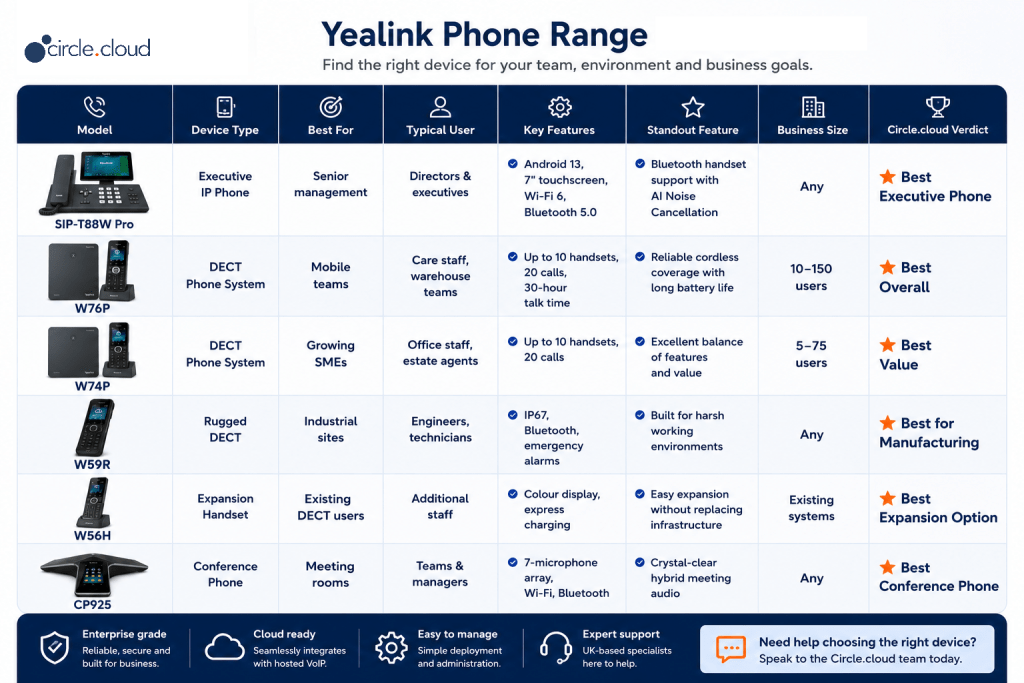
If you’re unsure where to start, the Yealink W76P is our overall recommendation for most UK businesses thanks to its balance of mobility, reliability and scalability. Organisations in manufacturing should consider the W59R, while directors and senior managers will benefit most from the SIP-T88W Pro.
Whichever handsets you choose, don’t choose devices in isolation. Consider the full platform around them:
- Hosted business phone system
- Business broadband or leased line
- Business Wi-Fi
- Automatic 4G or 5G failover
- Professional installation
- Ongoing UK-based support
Together, these services provide a resilient communications platform capable of supporting your organisation for years to come.
Why Buy Your Yealink Phones from circle.cloud?
Choosing the right handset is only part of building an effective business communications solution. circle.cloud provides Yealink devices as part of a managed service, helping organisations select the right hardware, connectivity and cloud telephony platform for their needs. By sourcing your Yealink phones through circle.cloud, you benefit from:
- Expert advice based on your industry and working environment.
- Hosted business phone systems designed for the UK’s all-IP future.
- Business broadband and leased line connectivity.
- Automatic 4G and 5G failover options for greater resilience.
- Professional installation and configuration.
- Ongoing UK-based telecoms and IT support.
- Scalable solutions that grow with your business.
Whether you operate a care home, manufacturing facility, engineering company, estate agency, dental practice or automotive business, circle.cloud can design a communications solution that combines the right Yealink devices with reliable connectivity and ongoing support.
Conclusion
Selecting the right Yealink phone is an investment in how your business communicates, collaborates, and grows. When paired with a cloud-hosted telephone system, business-grade broadband, and proactive support, these endpoints move your business away from ageing infrastructure and onto a resilient, all-IP communications platform.
Whether you’re deploying mobile DECT handsets in care environments, rugged devices on factory floors, or smart touchscreens in corporate boardrooms, choosing hardware tailored to your workflow supports long-term productivity, protects revenue, and gives your clients a reliable way to reach you.
Not sure which Yealink phone is right for your business? Speak to the circle.cloud team for expert advice on selecting the right devices, hosted phone system and connectivity for your organisation.
FAQs
1. Are Yealink phones suitable for small businesses?
Yes. Yealink offers devices suitable for businesses of every size, from small offices with only a few users to large multi-site organisations.
2. Do Yealink phones work with hosted VoIP systems?
Yes. Yealink phones are designed for cloud communications and integrate with many leading hosted VoIP platforms.
3. Can I use Yealink phones with remote workers?
Yes. Yealink devices support hybrid working and can be used alongside desktop and mobile softphone applications.
4. Which Yealink phone is best for a care home?
The Yealink W76P is generally the best option due to its cordless mobility, reliable wireless coverage and long battery life. Larger or multi-floor homes may need additional base stations for full coverage.
5. Which Yealink phone is best for manufacturing?
The Yealink W59R is designed for demanding industrial environments where durability is essential.
6. What is the difference between the W76P and W74P?
Both are professional cordless DECT systems. The W76P is often preferred for larger sites requiring maximum mobility, while the W74P is ideal for general office environments and growing businesses.
7. Can I keep my existing business phone numbers?
Yes. When moving to a hosted business phone system, existing telephone numbers can usually be ported.
8. Are Yealink phones ready for the all-IP network?
Yes. Yealink develops IP-based communication devices that support modern cloud telephony and the UK’s transition away from PSTN and ISDN services.
9. Do Yealink phones support HD audio?
Yes. Yealink’s Optima HD Voice technology delivers clear, professional-quality conversations.
10. Can Yealink phones be used in warehouses?
Yes. The W59R and W76P are particularly well suited to warehouse environments where employees require mobility.
11. Are conference phones different from desk phones?
Yes. Conference phones are designed to pick up multiple participants within a meeting room and provide better group collaboration.
12. Can Yealink phones be managed centrally?
Yes. Yealink supports centralised provisioning and administration, simplifying larger deployments.
13. Do Yealink phones require business broadband?
They can operate on many internet connections, but business-grade broadband or leased lines provide greater reliability and more consistent voice quality.
14. Can I add more handsets later?
Yes. Compatible DECT systems can be expanded using additional handsets such as the W56H, up to the capacity of your base station.
15. Which Yealink phone is best for directors?
The SIP-T88W Pro provides premium features, a touchscreen interface and advanced productivity capabilities suitable for executive users.
16. Are Yealink phones compatible with Microsoft Teams?
Many Yealink products are available in dedicated Microsoft Teams editions, and others integrate with hosted platforms that connect to Teams. Check the specific model before ordering.
17. Do Yealink phones support conference calls?
Yes. Hosted phone systems provide conferencing functionality, while the CP925 is designed specifically for meeting rooms.
18. How long do Yealink phones typically last?
With proper maintenance and software updates, Yealink devices often provide many years of reliable service.
19. Can Yealink phones support multiple offices?
Yes. Hosted cloud telephony enables organisations to connect multiple offices through a single communication platform.
20. Will my phones work during an internet or power outage?
Not on their own. IP phones need power and a working internet connection, so businesses that rely on the telephone should pair hosted telephony with automatic 4G or 5G failover and consider mobile diverts as a backup.
21. Why buy Yealink through circle.cloud?
circle.cloud supplies Yealink devices as part of complete communication solutions, including hosted telephony, connectivity, networking, installation and ongoing support, helping businesses deploy a fully integrated communications environment.
About the Reviewer
Reviewer: circle.cloud Communications
Team Role: Business Communications Specialists
Areas of Expertise:
- Hosted Business Phone Systems
- VoIP & Cloud Telephony
- Business Connectivity
- Business Wi-Fi
- Managed Networks
- Unified Communications
- Business Continuity
Editorial Process:
This buyer’s guide has been created using manufacturer specifications, practical deployment experience, industry best practices, and real business communication requirements. Recommendations focus on long-term value, reliability, scalability and suitability for different industries rather than simply comparing technical specifications. The guide is reviewed periodically to ensure it reflects current telecommunications technology, product developments and evolving business communication requirements.