Published: 08th September 2026 Last Updated: 08th September 2026
Reviewed By: circle.cloud Team Last Reviewed: 08th September 2026
Reading Time: Approximately 15 minutes Revision: Version 1.0
For many UK businesses, the telephone remains an important part of how revenue is generated and customers are supported.
Estate agents need to respond quickly to enquiries, automotive businesses coordinate sales and service teams, manufacturers manage customer and supplier communication, while professional and healthcare environments depend on reliable day-to-day calling. The challenge is that not every employee needs the same telephone. A receptionist may need visibility of incoming calls and colleagues. A sales manager may need rapid access to contacts and multiple lines. A director may want a premium interface, wireless headset options and easier access to advanced call-handling features. A high-volume user may benefit from expansion keys and a larger display.
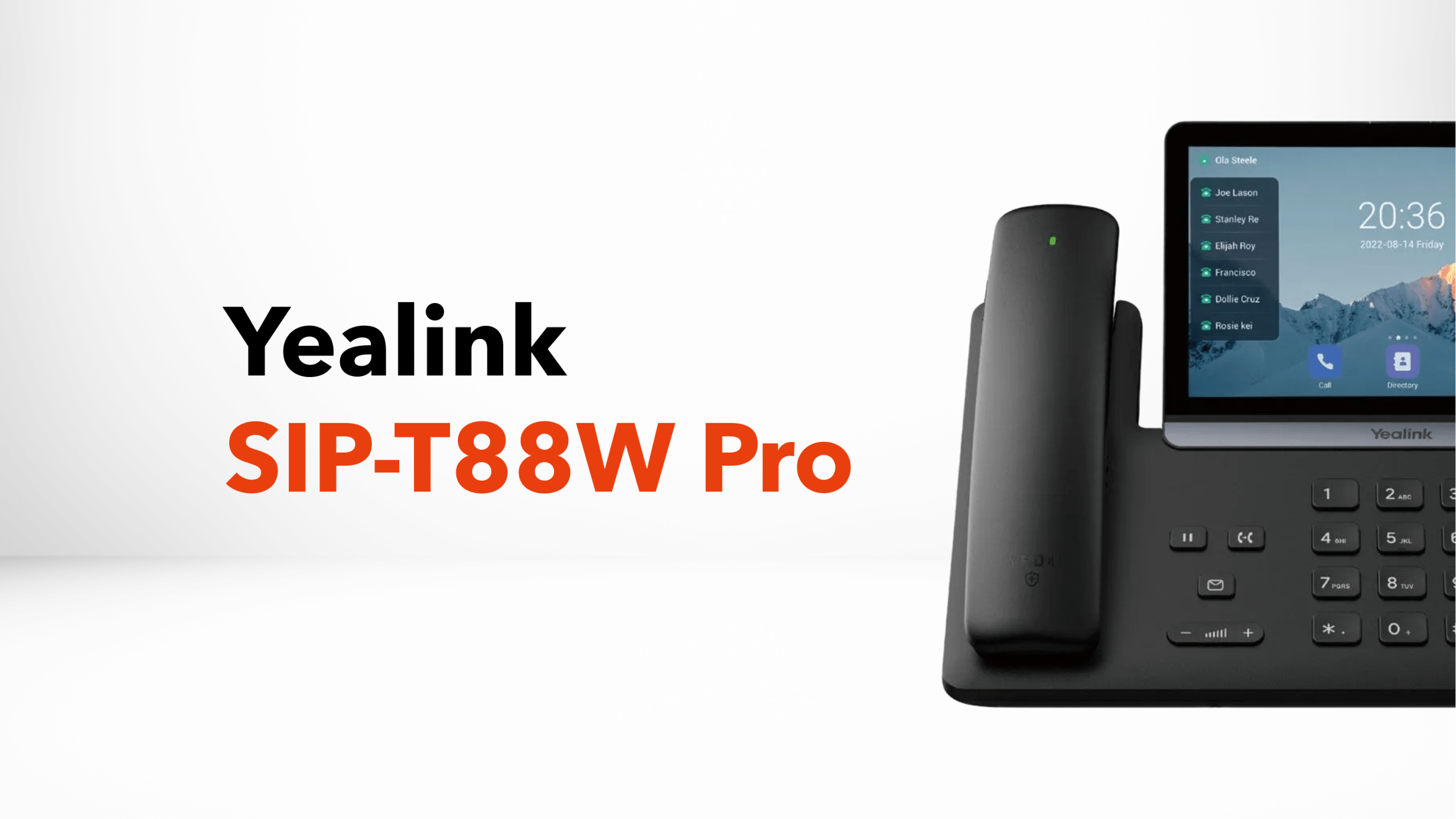
The Yealink SIP-T88W Pro is designed for this upper end of the business phone market. It is a premium smart IP phone with a large 7-inch touchscreen, Android 13, built-in Wi-Fi 6 and Bluetooth 5.0, advanced audio processing and support for up to three Yealink EXP55 expansion modules. The Pro model also includes the BTH88 Bluetooth handset as standard.
However, a premium handset should not automatically be regarded as a better choice for every employee. The right question is whether the additional functionality will improve the way a particular employee communicates. This guide explains what the SIP-T88W Pro does, who it is designed for, what infrastructure it needs and when it makes sense to choose it over a simpler business phone.
Key Takeaways
- The Yealink SIP-T88W Pro is a premium smart IP phone aimed at demanding business users.
- It features a 7-inch 1024 × 600 adjustable capacitive touchscreen.
- The phone runs Android 13 and supports up to 16 SIP accounts.
- Built-in Bluetooth 5.0 and Wi-Fi 6 provide additional connectivity options.
- The Pro version includes the Yealink BTH88 Bluetooth handset as standard.
- Yealink highlights AI Noise Cancellation, Acoustic Shield and a 3W speaker for improved audio performance.
- The phone supports up to three EXP55 expansion modules.
- Dual Gigabit Ethernet and PoE simplify integration with business networks.
- It is best suited to users who actively benefit from advanced call handling, premium usability or high-volume communication.
- The handset is an endpoint, not a complete business telephone system. It still depends on suitable hosted VoIP, networking and business connectivity.
At a Glance
| Requirement | Yealink SIP-T88W Pro |
| Product type | Premium business IP phone |
| Best suited to | Directors, senior managers, receptionists and high-volume users |
| Display | 7-inch 1024 × 600 capacitive touchscreen |
| Operating system | Android 13 |
| SIP accounts | Up to 16 |
| Wi-Fi | Wi-Fi 6 |
| Bluetooth | Bluetooth 5.0 |
| Wireless handset | BTH88 included with Pro model |
| Expansion | Up to 3 EXP55 modules |
| Ethernet | Dual Gigabit Ethernet |
| Power | PoE or power adapter |
| Conferencing | Up to 10-party audio conferencing |
| Audio | HD audio, Acoustic Shield, AI Noise Cancellation and 3W speaker |
| Best deployment | Hosted VoIP / SIP business telephone systems |
Note: Specifications are based primarily on Yealink’s current T88 Series product information and should be checked against the current model documentation when ordering.
Who This Guide Is For
This guide is for UK businesses considering the Yealink SIP-T88W Pro as part of a professional business telephone system. It is particularly relevant to telephone-dependent organisations such as care homes, manufacturing businesses, automotive companies, dental practices, estate agents and engineering firms. It is also useful for SMEs and growing organisations that want to understand whether a premium desktop IP phone is appropriate for their users and working environment.
Why Trust This Guide
This guide is designed to look beyond a simple product specification list and explain what the SIP-T88W Pro means in a real business environment. It considers the handset alongside hosted telephony, business broadband or leased-line connectivity, networking and the wider communications infrastructure. The aim is to help businesses assess suitability, deployment requirements, benefits and potential limitations before making a purchasing decision.
Why You Can Trust Our Recommendations
Our recommendations focus on the practical requirements of business communication rather than simply choosing the most feature-rich handset. We consider factors such as how employees work, the role of the telephone in generating revenue, network requirements, future scalability and the wider hosted phone system. This consultative approach helps businesses choose equipment that fits their operational needs rather than paying for functionality they may not use.
What Is the Yealink SIP-T88W Pro?
The Yealink SIP-T88W Pro is a premium business IP phone designed for users who need more than a conventional desk handset. At its centre is a large 7-inch adjustable touchscreen with a 1024 × 600 resolution. The phone runs Android 13 and combines touchscreen interaction with physical telephone controls, creating a more flexible interface for managing business calls. The phone also incorporates wireless connectivity. Built-in Bluetooth 5.0 allows compatible wireless accessories to be connected, while Wi-Fi 6 gives businesses an alternative to a conventional wired network connection where the network has been designed appropriately for voice traffic.
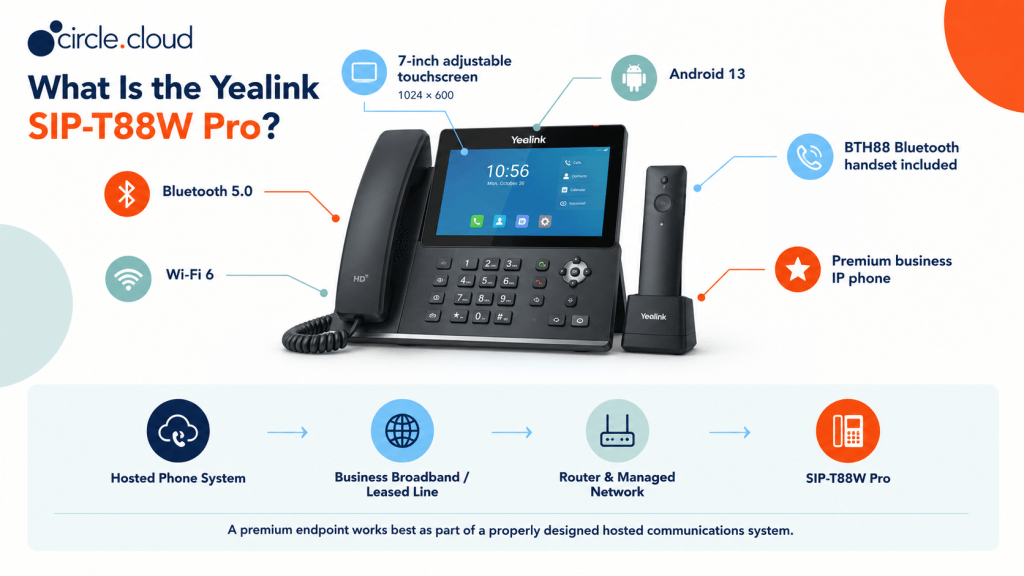
The Pro designation is important because the T88W Pro includes the Yealink BTH88 Bluetooth handset as standard. This adds another way for users to communicate away from the phone itself without turning the device into a conventional cordless DECT telephone.
For circle.cloud customers, the important distinction is that the SIP-T88W Pro should be considered part of a complete hosted communications environment. The phone sits at the endpoint of the system. Behind it are the hosted telephone platform, business broadband or leased line, router, managed network and ongoing technical support. That distinction matters because even an advanced phone cannot compensate for poor connectivity or an incorrectly configured VoIP environment.
Who Is the Yealink SIP-T88W Pro For?
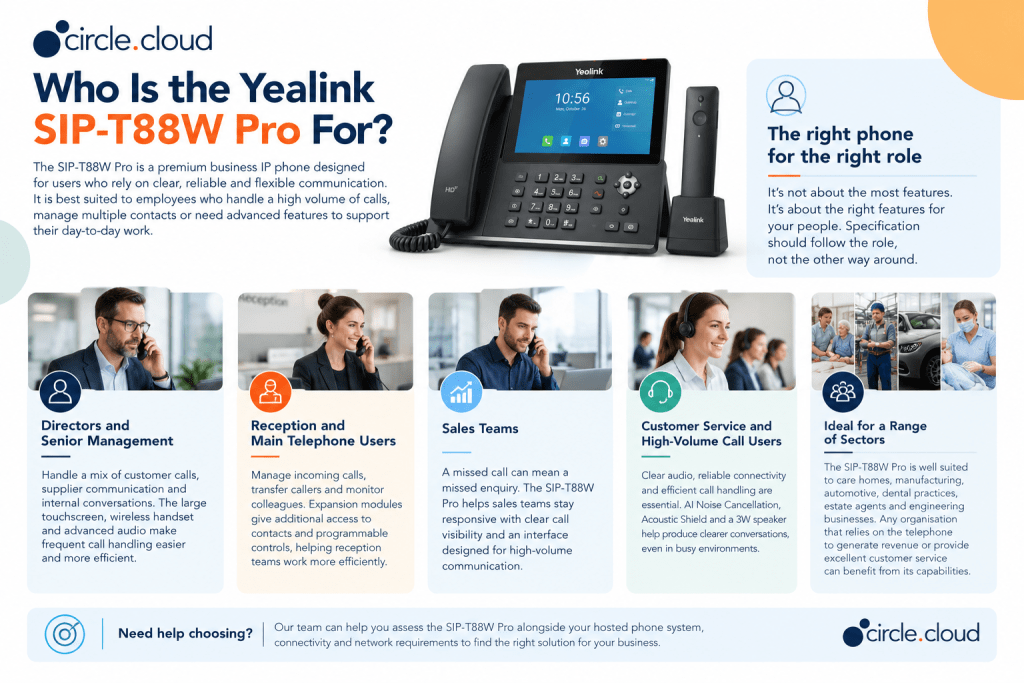
The SIP-T88W Pro makes most sense for employees whose telephone is an important part of their working day and who can genuinely benefit from a premium interface. A director who handles frequent external calls may appreciate the large touchscreen, wireless handset and advanced audio capabilities. A receptionist may benefit from a larger interface and expansion modules when managing multiple contacts. A sales manager may value the ability to manage numerous SIP accounts and calls from one endpoint. It is less compelling for someone who makes only occasional calls and spends most of the day using email or other applications.
For customers, this is one of the most important principles when buying business phones: specification should follow the role, not the other way around.
Directors and Senior Management
Senior managers and directors often handle a mixture of customer calls, supplier communication, internal conversations and conference calls. The SIP-T88W Pro provides a premium interface that can make frequent call handling easier. The large touchscreen gives users more room for information and controls, while Bluetooth connectivity provides flexibility for hands-free working.
For an executive who spends a significant proportion of the working day communicating by telephone, the additional functionality can be justified. For a director who rarely uses the phone, however, a less expensive handset may provide better value.
Reception and Main Telephone Users
Reception teams often have one of the most demanding telephone roles in a business. They may answer incoming calls, transfer callers, monitor colleague availability and deal with multiple conversations throughout the day. This is where the SIP-T88W Pro can become particularly useful. Expansion support allows the phone to be extended with up to three EXP55 modules, giving suitable users additional physical access to contacts and programmable controls.
The exact configuration should be based on the hosted phone system and the way the organisation handles calls.
Sales Teams
Sales staff are often highly telephone-dependent. A missed call can mean a missed enquiry, delayed response or lost opportunity. A premium desk phone can therefore be justified where it improves call visibility and makes frequent communication easier. The SIP-T88W Pro is particularly suited to sales managers and high-volume users rather than every member of a large sales team.
Customer Service and High-Volume Call Users
Customer service teams need clear audio, reliable connectivity and efficient call handling. The SIP-T88W Pro’s audio processing includes AI Noise Cancellation and Acoustic Shield technology, while Yealink specifies a 3W speaker. These features are designed to help produce clearer conversations in working environments where background noise can affect calls. The wider network remains critical, however. Audio quality is ultimately influenced by the complete communications path rather than the handset alone.
Key Features of the Yealink SIP-T88W Pro
The most useful way to assess the SIP-T88W Pro is to consider what each feature means for the employee and the organisation.
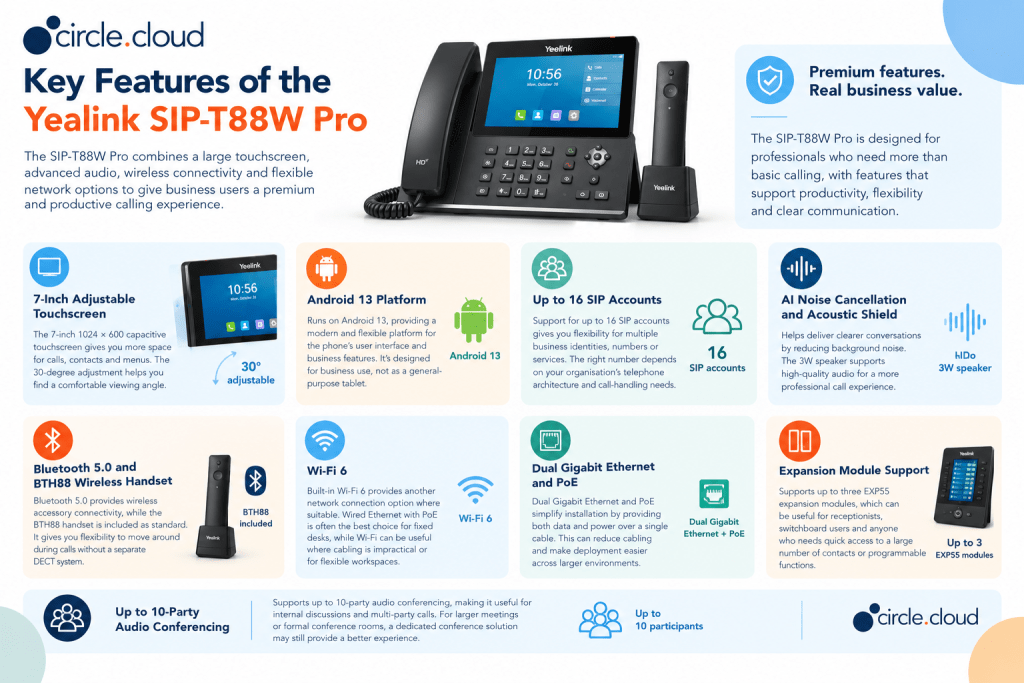
7-Inch Adjustable Touchscreen
The 7-inch 1024 × 600 capacitive touchscreen is one of the phone’s defining characteristics. A larger display gives users more space for call information, menus, contacts and other functions. Yealink also specifies a 30-degree vertical adjustment, allowing the screen to be positioned according to the user’s desk setup. This is particularly useful for people who spend substantial time interacting with their phone. The trade-off is simple: if an employee only needs basic calling, the larger touchscreen may represent unnecessary expenditure.
Android 13 Platform
The SIP-T88W Pro runs Android 13. This provides a modern software platform for the phone’s user interface and device capabilities. For businesses, the value is less about having a smartphone-like operating system for its own sake and more about the flexibility it provides for a modern smart business terminal. The phone should still be deployed according to the hosted telephony provider’s supported configuration rather than treated as a general-purpose Android tablet.
Up to 16 SIP Accounts
The SIP-T88W Pro supports up to 16 SIP accounts. SIP accounts provide the connection between the handset and a compatible VoIP service. Supporting multiple accounts gives the phone flexibility for users managing several business identities, numbers or services. However, businesses should not assume that having 16 available accounts means every user needs 16 accounts. The actual requirement depends on the organisation’s telephone architecture and call-handling design.
AI Noise Cancellation and Acoustic Shield
Yealink highlights AI Noise Cancellation and Acoustic Shield as part of the T88 Series audio capabilities. The phone also includes a 3W speaker. These features can be valuable in offices where conversations take place alongside colleagues, customer activity or other background noise. For customer-facing employees, clearer audio can contribute to a more professional call experience. It is important, however, to avoid treating noise cancellation as a substitute for good working conditions. A well-designed network, suitable headset and sensible office acoustics still matter.
Bluetooth 5.0 and BTH88 Wireless Handset
Bluetooth 5.0 provides wireless accessory connectivity, while the T88W Pro includes the BTH88 Bluetooth handset as standard. This is a notable distinction between the Pro model and a conventional desk phone. The BTH88 gives users the option of moving away from the phone during conversations without requiring a separate DECT system. This can be useful when an executive needs to stand up during a call, move around a nearby office or work more flexibly. The wireless range and performance will depend on the working environment, so businesses should avoid treating quoted maximum ranges as guaranteed operational coverage.
Wi-Fi 6
The SIP-T88W Pro includes built-in Wi-Fi 6. This gives businesses another network connection option where suitable wireless infrastructure is available. That does not mean Wi-Fi should automatically replace Ethernet. For fixed business phones, wired Ethernet with Power over Ethernet can often provide a straightforward and predictable deployment. Wi-Fi can be useful where cabling is impractical or where the business has deliberately designed its wireless network to support voice traffic. A network assessment should therefore come before choosing the connection method.
Dual Gigabit Ethernet and PoE
The phone supports dual Gigabit Ethernet and Power over Ethernet. PoE can simplify installation because compatible network infrastructure can provide both data connectivity and power over a single Ethernet connection. This can reduce the number of cables required at the workstation and make deployment easier across larger office environments. The network switch and cabling infrastructure still need to support the required PoE and Ethernet standards.
Expansion Module Support
The SIP-T88W Pro supports up to three EXP55 expansion modules. This can be particularly useful for receptionists, switchboard users and other employees who need access to a large number of contacts or programmable functions. Expansion should be considered based on actual workflow rather than simply because the phone supports it.
Up to 10-Party Audio Conferencing
Yealink documentation and UK product listings identify support for up to 10-party audio conferencing. This can be useful for internal discussions and multi-party calls where a dedicated conference phone is not required. For formal meeting rooms or larger conference spaces, a dedicated conference solution may still provide a better user experience.
Security and Device Management
Security becomes increasingly important as business telephony moves into cloud-based environments. The current T88 Series incorporates several security layers. Yealink describes a Trusted Execution Environment, secure boot integrity verification, firmware encryption and certificate mechanisms at the device level. It also highlights 802.1X and WPA3 for network protection, alongside TLS 1.3 and SRTP for communication security.
The SIP-T88W Pro can also be managed using Yealink’s device management capabilities. For organisations with multiple sites or a larger number of handsets, centralised provisioning and management can reduce the administrative work involved in deploying and maintaining devices. Security should nevertheless be considered across the entire telephone environment.
The phone is only one component. Administrator credentials, network segmentation, router configuration, hosted VoIP security and firmware management all contribute to the overall security position.
Is the SIP-T88W Pro Suitable for UK Businesses?
Yes, but it should be positioned as a premium endpoint rather than a universal business phone. circle.cloud’s existing Yealink buyer guidance already places the SIP-T88W Pro at the premium end of the range, alongside more role-specific devices such as the W76P, W59R and W56H. That positioning is sensible.
For a business with ten employees, buying ten flagship phones may not represent the best use of budget. A better approach may be to deploy premium phones to directors, receptionists and high-volume users while providing simpler phones to employees with more straightforward requirements. This role-based approach also makes a hosted phone system more commercially sensible because the business can design the hardware around how people actually work.
Which Business Sectors Should Consider the SIP-T88W Pro?
The SIP-T88W Pro is best suited to businesses where professional desktop communication, call visibility and advanced functionality are important to day-to-day operations. It can be particularly relevant to telephone-dependent organisations and roles where employees regularly manage customer, supplier or internal calls.
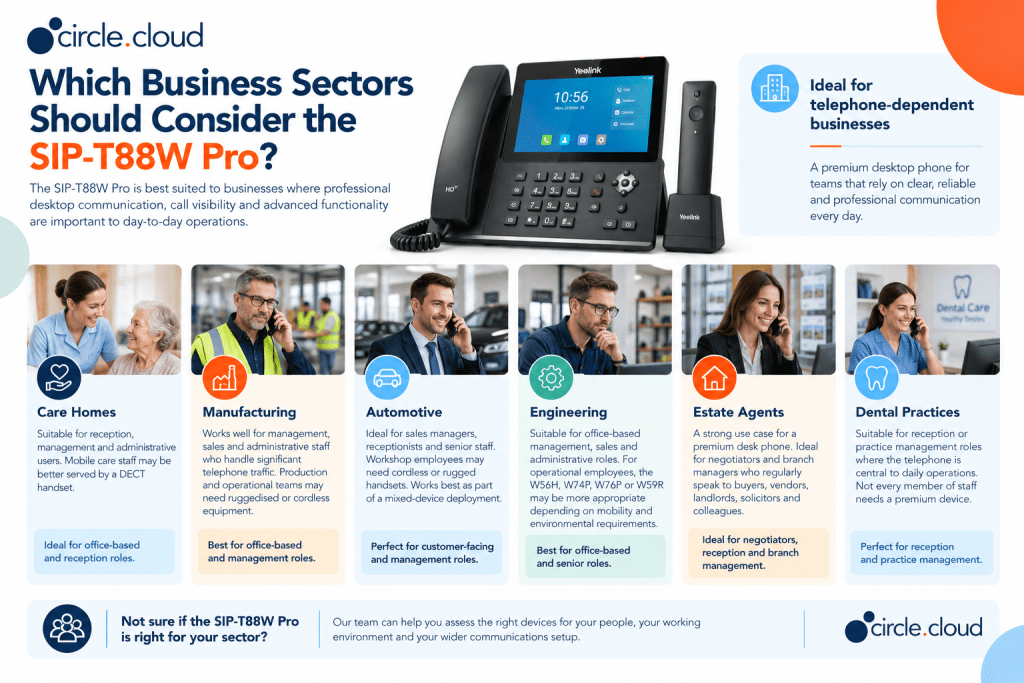
Care Homes
Care homes typically have a mixture of fixed reception roles and mobile operational staff. The SIP-T88W Pro is more likely to suit reception, management and administrative users than employees who spend their day moving between rooms. Those mobile users may be better served by a suitable DECT handset. This is a good example of why one handset model should not necessarily be deployed across an entire organisation.
Manufacturing
Manufacturing businesses often have office-based managers alongside production and operational teams. The SIP-T88W Pro can work well for management, sales and administrative staff who handle significant telephone traffic. Employees working across production areas may need ruggedised or cordless equipment instead.
Automotive
Automotive dealerships and service centres are highly communication-dependent. Sales managers, receptionists and senior staff can benefit from a premium desktop phone, while workshop employees may need cordless or rugged handsets. The SIP-T88W Pro therefore works best as part of a mixed-device deployment.
Engineering
Engineering businesses frequently combine office teams with employees working across workshops, plant areas and customer sites. The SIP-T88W Pro can suit office-based management, sales and administrative roles. For operational employees, the W56H, W74P, W76P or W59R may be more appropriate depending on mobility and environmental requirements.
Estate Agents
Estate agents are one of the clearest use cases for a premium business desk phone. Negotiators and branch managers can spend a large part of their day speaking to buyers, vendors, landlords, solicitors and colleagues. The SIP-T88W Pro’s large interface, audio features, wireless handset and expansion capabilities can therefore be valuable for senior negotiators and branch management.
Dental Practices
Dental practices rely heavily on telephone communication for appointments, enquiries and patient administration. The SIP-T88W Pro can suit reception or practice management roles where the telephone is central to daily operations. However, not every member of staff necessarily needs a premium device.
SIP-T88W Pro vs Other Yealink Phones
Choosing the right Yealink phone is less about identifying the most advanced model and more about matching the device to the employee.
| Model | Best Suited To | Main Reason to Choose It |
| Yealink SIP-T88W Pro | Directors, reception and high-volume users | Premium touchscreen, wireless handset and advanced functionality |
| Yealink T58W Pro | Executives and collaboration users | Premium smart desk phone with touchscreen and advanced communication features |
| Yealink T54W | Managers and professionals | Strong balance of features and cost |
| Yealink W76P | Mobile business teams | Cordless DECT mobility |
| Yealink W59R | Demanding environments | Ruggedised cordless communication |
| Yealink W56H | Additional cordless users | Handset option for compatible DECT platforms |
| Yealink CP925 | Meeting rooms | Dedicated conference phone |
circle.cloud’s wider Yealink guidance similarly positions the SIP-T88W Pro as the premium desk-phone option, while the W76P, W59R and W56H address different mobility and environmental requirements.
When Should You Choose the T88W Pro?
Choose the SIP-T88W Pro when the user:
- Handles a high volume of business calls.
- Benefits from a large touchscreen.
- Needs several business identities or SIP accounts.
- Would benefit from wireless handset flexibility.
- Requires additional programmable keys.
- Needs premium audio and connectivity options.
- Has a role where communication directly affects customer service or revenue.
The key is not simply whether the phone has more features. It is whether those features will actually be used.
Building the SIP-T88W Pro into a Complete Business Phone System
A premium phone should never be assessed in isolation. A typical circle.cloud deployment can be viewed as a complete business phone system, which typically includes:
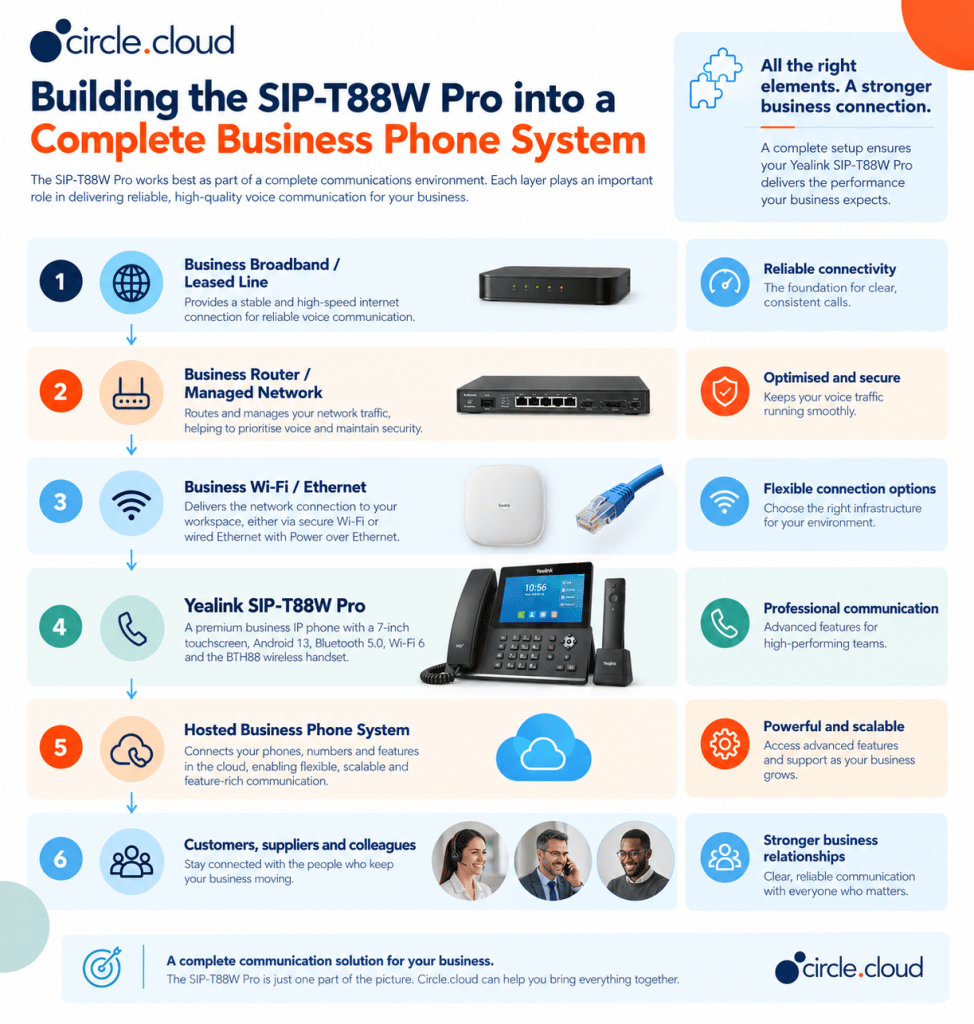
This architecture illustrates an important point. The SIP-T88W Pro is the endpoint through which the employee interacts with the telephone service, but the hosted platform and connectivity provide the underlying service.
For a business telephone-dependent organisation, reliable connectivity therefore matters just as much as handset selection. A leased line may be appropriate for organisations with particularly demanding connectivity requirements, while business broadband can be suitable for many SMEs when correctly specified and supported.
Businesses should also consider backup connectivity. A 4G or 5G failover connection can help maintain access to cloud services if the primary connection fails. It does not make an outage invisible, and active calls may still be interrupted, but it can reduce the duration and impact of a connectivity failure.
Network Requirements for the SIP-T88W Pro
A premium IP phone needs a network capable of delivering reliable real-time communications. Businesses should consider:
- Ethernet connectivity: For fixed desk deployment, wired Ethernet is often the simplest approach.
- PoE: Power over Ethernet can reduce cabling and simplify installation.
- Wi-Fi: If Wi-Fi is used, coverage, capacity and network configuration should be assessed specifically for voice traffic.
- Network segmentation: Voice traffic may need to be separated logically from other business traffic depending on the network design.
- Internet resilience: Hosted telephony depends on internet connectivity, making backup connectivity worth considering for telephone-dependent organisations.
- Quality of service: Voice traffic may need appropriate prioritisation where networks are carrying significant volumes of data.
These are not unique SIP-T88W Pro requirements. They are part of deploying any cloud-based business telephone system properly.
SIP-T88W Pro and the UK PSTN Switch-Off
The UK is moving away from legacy PSTN-based telephone infrastructure towards all-IP communications. For businesses, this means the conversation should not simply be about replacing an old telephone with a new handset. The more important decision is what the underlying business telephone system will look like after legacy services disappear.
A hosted VoIP platform provides the service layer, while an IP phone such as the SIP-T88W Pro provides the physical endpoint. This makes the phone a sensible option for businesses modernising their communications, provided the complete deployment is designed correctly. circle.cloud’s brand positioning focuses on helping UK organisations move from legacy communications towards cloud-first infrastructure, with simplicity, reliability, scalability and human technical support central to that approach.
Pros and Considerations
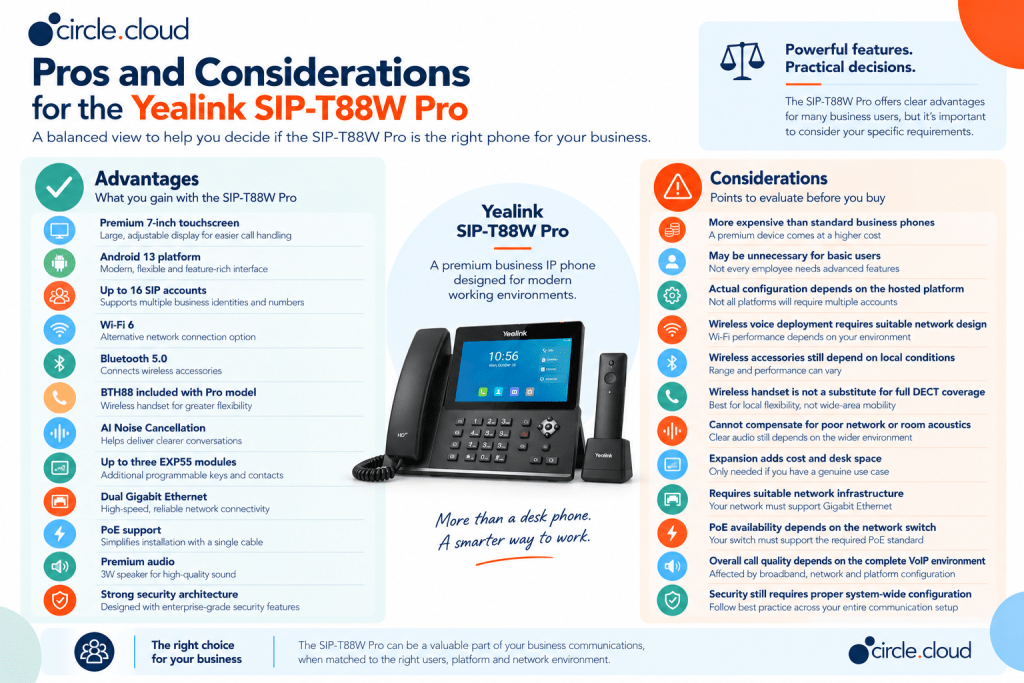
The SIP-T88W Pro is therefore best viewed as a specialist premium business phone, rather than the default choice for every employee.
Is the Yealink SIP-T88W Pro Worth It?
The answer depends on the role. For a receptionist managing a large number of calls, a branch manager handling customers all day, or a director who relies heavily on telephone communication, the additional features can provide genuine value. For a user who makes ten calls a week, the same expenditure may be difficult to justify.
This is why our experts at circle.cloud recommend approaching handset selection as part of the wider communications design rather than buying identical hardware for everyone. The business case becomes stronger when the phone contributes directly to productivity, customer response times or revenue generation. In other words, buy the functionality that people will use, not the specification sheet that looks most impressive.
Total Cost of Ownership
The purchase price of the phone is only one part of the cost. A business should consider:
- Handset cost.
- Hosted VoIP service.
- Business broadband or leased line.
- Router and network infrastructure.
- PoE switching where required.
- Expansion modules.
- Headsets and accessories.
- Installation and configuration.
- Ongoing support.
- Backup connectivity.
- Future replacement and expansion.
UK retail pricing can vary significantly by supplier and package. Current listings show the SIP-T88W Pro in a broad premium-price range, so businesses should compare the complete deployment rather than selecting purely on headline handset price.
A lower-cost phone may initially look attractive but provide fewer features for high-volume users. Conversely, deploying a flagship phone everywhere can create unnecessary capital expenditure. A role-based hardware strategy usually provides a more sensible balance.
Why Buy the Yealink SIP-T88W Pro from circle.cloud?
Choosing a business phone is only one part of building a reliable communications system. circle.cloud can help businesses assess the SIP-T88W Pro alongside the hosted phone system, connectivity and network infrastructure it depends on.
- Complete communications approach: Combine the SIP-T88W Pro with hosted telephony, business broadband or leased-line connectivity and network solutions.
- Business-focused guidance: Recommendations are based on how your employees actually use the telephone, rather than simply selecting the phone with the most features.
- UK business support: Get practical assistance with deployment, configuration, troubleshooting and ongoing technical requirements.
- Future-ready telephony: Build around hosted communications to support the transition away from traditional PSTN-based services.
- Suitable for telephone-dependent sectors: circle.cloud can help organisations across care, manufacturing, automotive, dental, estate agency and engineering assess the right phone and communications setup.
Not sure whether the SIP-T88W Pro is the right choice? Speak to the circle.cloud team to discuss your handset, hosted phone system and connectivity requirements together.
Common Buying Mistakes
Understanding how the SIP-T88W Pro will be used is just as important as reviewing its specifications. Avoiding a few common purchasing mistakes can help ensure the phone delivers genuine value within your wider business communications setup.
- Buying the Most Expensive Phone for Everyone: A flagship phone is not automatically the best phone. Match the device to the employee’s working pattern.
- Ignoring the Network: A premium IP phone connected to an unreliable network will not deliver a premium communications experience. Connectivity and network design should be assessed before deployment.
- Treating Wi-Fi as Automatically Better: Wi-Fi provides flexibility, but fixed desk phones can often benefit from wired Ethernet. The correct option depends on the network and workplace.
- Forgetting Business Continuity: If your telephone generates revenue, consider what happens when your primary internet connection fails. Backup connectivity can be an important part of the overall design.
- Buying Expansion Modules Without a Use Case: Expansion modules are useful for some users but unnecessary for others. Start with the employee’s workflow rather than the maximum supported configuration.
- Treating the Handset as the Whole Phone System: The T88W Pro is an endpoint. The hosted platform, connectivity, network and support arrangements determine the wider communications environment.
Final Buying Checklist
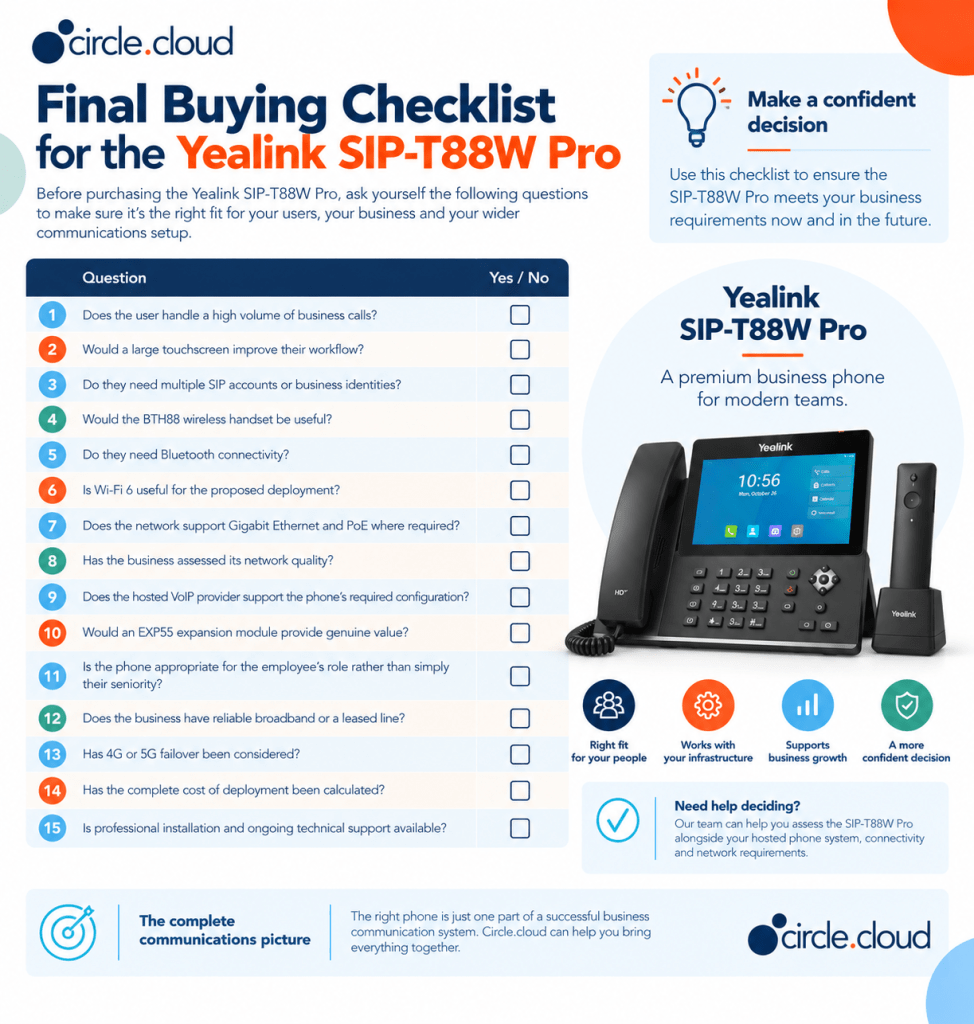
If most answers are yes, the SIP-T88W Pro is likely to be a strong candidate for that user’s role.
circle.cloud Verdict
The Yealink SIP-T88W Pro is a premium business IP phone for organisations that want more than basic desk-based calling. Its strongest advantages are the large touchscreen, modern Android platform, wireless connectivity, premium audio capabilities, expansion support and included BTH88 Bluetooth handset. Yealink’s current T88 Series documentation also places significant emphasis on security, AI-powered audio and flexible connectivity.
It is particularly well suited to directors, senior managers, receptionists, sales leaders and other users whose telephone plays an important role in customer communication or revenue generation. It is not, however, the right phone for everyone. A strong business telephone deployment should combine different devices according to user requirements. A premium desk phone may sit alongside cordless DECT handsets, rugged devices and conference phones, all connected to the same hosted business telephone system. That approach is usually more commercially sensible than buying the same handset for every employee.
For UK businesses preparing for the move away from legacy telephone infrastructure, the bigger decision is therefore not simply which handset to buy. It is how the handset, hosted telephony, connectivity, networking, resilience and support fit together. That is where professional advice can add real value.
If you are unsure whether the SIP-T88W Pro is right for your business, speak to the circle.cloud team about your users, connectivity and wider telephone requirements.
FAQs
1. What is the Yealink SIP-T88W Pro?
The Yealink SIP-T88W Pro is a premium desktop IP phone designed for professional business communication and advanced VoIP environments.
2. Who is the SIP-T88W Pro best suited to?
It is particularly suited to executives, receptionists, managers and customer-facing employees who regularly handle a high volume of business calls.
3. Is the SIP-T88W Pro suitable for small businesses?
Yes. SMEs can benefit from its advanced functionality where employees need more than a basic business desk phone.
4. Does the SIP-T88W Pro support VoIP?
Yes. It is designed for IP telephony and can be deployed with a compatible hosted business phone system.
5. Can the SIP-T88W Pro be used with hosted telephony?
Yes. It can form part of a hosted business phone system, provided the phone and platform are configured for compatibility.
6. Is the SIP-T88W Pro a cordless phone?
No. It is a desktop IP phone designed for use at a fixed workstation rather than cordless mobility.
7. Should every employee have a SIP-T88W Pro?
Not necessarily. Its premium features are most valuable for users who need advanced call handling, visibility and desktop functionality.
8. Is the SIP-T88W Pro suitable for receptionists?
Yes. Its professional desktop design and advanced calling capabilities can make it suitable for reception and other high-call-volume roles.
9. Can the SIP-T88W Pro be used in estate agencies?
Yes. Estate agents are highly telephone-dependent, making a professional desktop IP phone useful for negotiators, receptionists and office-based teams.
10. Is the SIP-T88W Pro suitable for care homes?
It can be suitable for reception, administration and management roles, although mobile staff may be better served by a Yealink DECT handset.
11. Does the SIP-T88W Pro require business broadband?
It requires suitable network connectivity to access hosted or IP telephony services. Business broadband or a leased line can provide the connectivity needed for a reliable deployment.
12. Can the SIP-T88W Pro work with a business network?
Yes. It should be deployed as part of a properly configured business network with appropriate switching, routing and connectivity.
13. Is the SIP-T88W Pro suitable for remote or hybrid workers?
It can be, depending on the hosted phone system, network configuration and business requirements. A softphone or mobile solution may be more practical for some remote users.
14. Should I choose the SIP-T88W Pro or a cordless Yealink phone?
Choose the SIP-T88W Pro where advanced desktop functionality is important. Choose a cordless model such as the W74P or W76P where employee mobility is the priority.
15. Can circle.cloud help choose and configure the SIP-T88W Pro?
Yes. Our expert teams at circle.cloud can help you assess phone, hosted telephony, connectivity and wider network requirements to determine whether the SIP-T88W Pro is appropriate for your organisation.