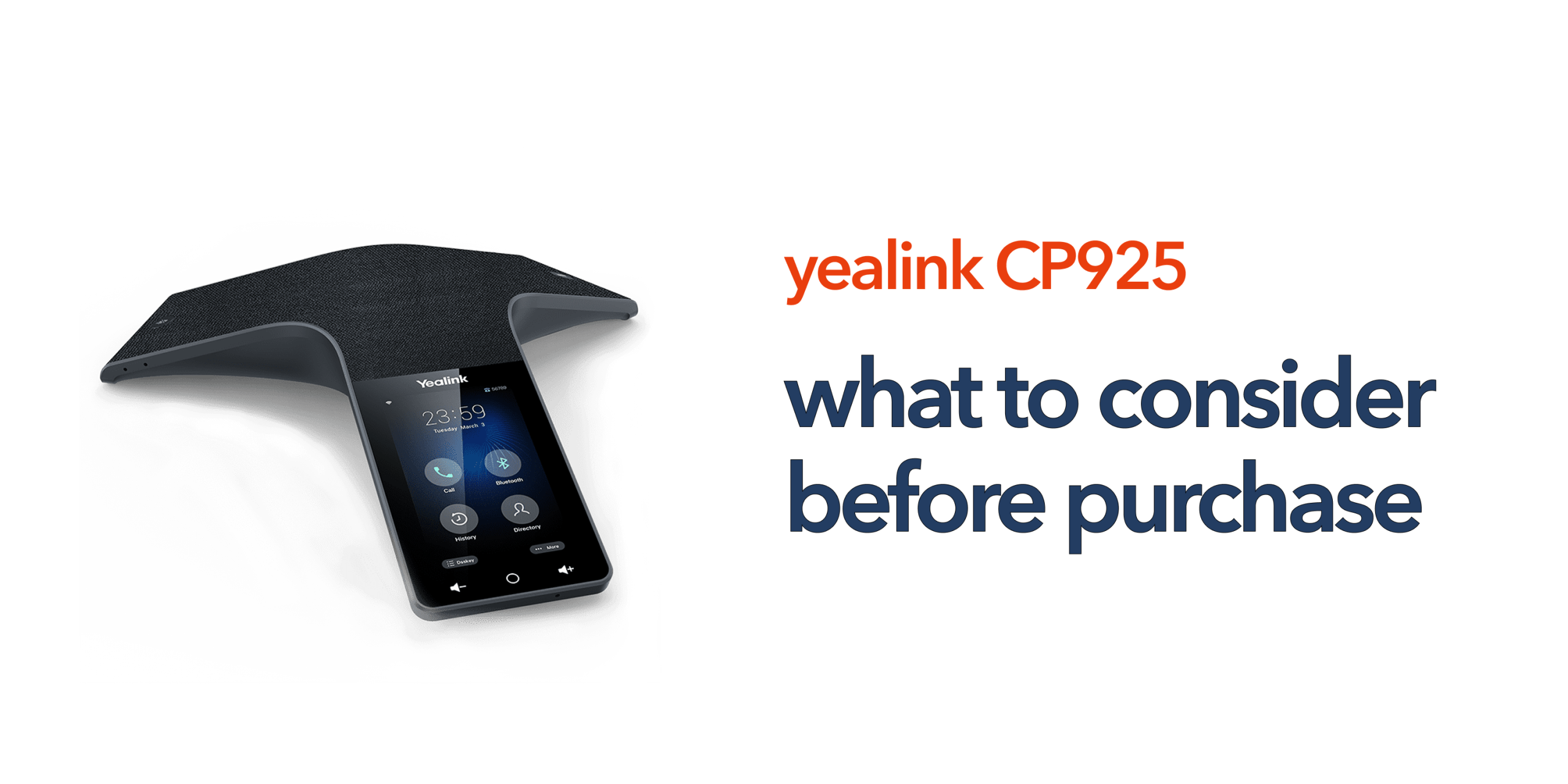
Many businesses invest in conference room technology without fully assessing how their teams actually communicate. The result is often poor audio quality, complicated setup, or equipment that quickly becomes outdated. The Yealink CP925 is designed to solve many of these problems. It provides professional-grade audio conferencing for modern hybrid working environments while remaining simple to deploy and manage. However, before purchasing the device, there are several important factors UK businesses should consider.
What Is the Yealink CP925?
The Yealink CP925 is a premium SIP-based conference phone designed for small to medium meeting rooms. It combines:
- HD voice quality
- Noise cancellation
- 360-degree microphone pickup
- Touchscreen controls
- Wireless connectivity
- Cloud telephony integration
The device is built for businesses using hosted VoIP, SIP telephony, unified communications platforms, and hybrid working environments. Unlike traditional analogue conference phones, the CP925 is designed specifically for cloud-first communications.
Consider Your Meeting Room Size
One of the most common mistakes businesses make when buying conferencing equipment is choosing a device that does not properly match the meeting room size. The Yealink CP925 performs particularly well in small meeting rooms, huddle spaces, medium-sized boardrooms, and hybrid collaboration environments where participants remain within the recommended microphone pickup range.
However, larger conference rooms may require additional audio equipment to maintain consistent call quality. Businesses regularly hosting more than 8 to 10 participants may need expansion microphones, larger conferencing systems, or dedicated AV integration. Understanding room acoustics, table layouts, and participant numbers before purchase helps ensure the conferencing solution performs effectively in daily use.
Evaluate Your Existing Phone System
The Yealink CP925 is designed for professional business communications rather than consumer-level conferencing. It operates within SIP and VoIP environments and should be compatible with the organisation’s wider telecom infrastructure before deployment. Businesses should confirm integration with hosted VoIP systems, SIP providers, Microsoft Teams environments, and unified communications platforms.
Older PBX environments may require additional configuration, SIP trunking, network upgrades, or wider migration planning. Organisations still relying on PSTN or ISDN infrastructure should also consider long-term migration requirements as UK businesses continue moving towards cloud-based communications.
Check Network Readiness
Conference call quality depends heavily on network performance. Even premium conferencing hardware cannot compensate for unstable broadband or poorly configured internal networks. Before deploying the Yealink CP925, businesses should assess:
- Broadband stability
- LAN performance
- Wi-Fi coverage
- Power over Ethernet capability
- Potential network congestion
Poor connectivity can lead to audio dropouts, delayed speech, packet loss, and inconsistent call quality during meetings. Reliable business broadband and properly configured networking remain essential for achieving professional VoIP conferencing performance.
Understand Hybrid Meeting Requirements
Modern meeting rooms are no longer designed purely for in-person discussions. Many organisations now operate with remote staff, hybrid teams, multi-site collaboration, and regular client video calls. The Yealink CP925 is well-suited to these modern working models because it supports flexible cloud-based conferencing environments.
Before purchasing, businesses should consider how often remote participants join meetings, whether video conferencing is required, platform compatibility, and ongoing device management requirements. For audio-focused collaboration, the CP925 is often sufficient on its own. However, businesses running video-heavy meetings may also require conferencing cameras, meeting room displays, or dedicated collaboration systems.
Audio Quality Matters More Than Most Businesses Realise
Many conference call frustrations are caused by poor audio rather than internet speed or conferencing software. Missed words, echo, and background noise can quickly affect productivity, customer experience, collaboration, and meeting efficiency. The Yealink CP925 includes features such as full-duplex audio, echo cancellation, noise suppression, and multi-microphone voice pickup to help improve overall call clarity.
These capabilities help meetings sound clearer and more professional, particularly during client calls and hybrid collaboration sessions. For businesses that rely heavily on communication, audio quality has a direct impact on overall meeting effectiveness.
Think Beyond the Hardware Cost
The upfront hardware price is only one part of the total investment. Businesses should also factor in costs associated with VoIP licensing, installation, configuration, ongoing support, firmware management, and future scalability. While cheaper conference phones may initially appear cost-effective, they often create higher long-term operational costs through poor reliability, limited support, lower audio quality, and shorter product lifespans. The right conferencing system should provide long-term reliability and scalability rather than simply addressing an immediate short-term requirement.
Ease of Management Is Important
Business telecom systems should be easy to manage and should not require constant troubleshooting or complex maintenance. The Yealink CP925 is designed to simplify deployment and administration, particularly within cloud-based telecom environments. Features such as remote provisioning, centralised configuration, firmware management, SIP integration, and cloud compatibility help reduce operational complexity.
This is especially valuable for SMEs without dedicated IT teams, multi-site organisations, and growing businesses that need scalable communications infrastructure without increasing management overhead.
Security Should Not Be Overlooked
VoIP and conferencing devices form part of the wider business network and should be managed securely. Businesses should ensure firmware remains regularly updated, devices are securely provisioned, SIP credentials are properly protected, and network segmentation is considered where appropriate. Working with a telecom provider that understands secure deployment and ongoing device management helps reduce unnecessary security risks while improving long-term reliability and compliance.
Choosing the Right Supplier Matters
Not all suppliers provide the same level of support. Some retailers focus purely on hardware sales with little assistance after purchase. Businesses should look for providers that offer:
- UK-based support
- Deployment guidance
- VoIP expertise
- Ongoing maintenance
- Telecom consultancy
Reliable support becomes especially important when conferencing systems are business-critical. At Circle.cloud, we help businesses deploy modern communications systems that are simple, scalable, and reliable without unnecessary complexity.
Who Is the Yealink CP925 Best Suited For?
The Yealink CP925 is particularly well-suited to:
- SMEs and professional services firms
- Hybrid and multi-site teams
- Customer-facing organisations
- Companies upgrading outdated conference room systems
Its combination of professional audio quality, simple deployment, and cloud compatibility makes it a strong option for organisations that rely heavily on clear and reliable communication. The device is especially effective for businesses already moving towards cloud-first telecom infrastructure and modern unified communications environments.
Final Thoughts
The Yealink CP925 is a strong option for businesses looking to improve meeting room communications without introducing unnecessary complexity. However, choosing the right conferencing solution requires more than comparing specifications or pricing. Businesses should evaluate room size, network readiness, VoIP compatibility, hybrid working needs, long-term scalability, and ongoing support.
The right conference phone should improve communication reliability, simplify collaboration, and support the way modern businesses operate. Speak to Circle.cloud to find the right conferencing and VoIP solution for your business.
FAQs
Is the Yealink CP925 suitable for Microsoft Teams? The Yealink CP925 can integrate with compatible unified communications environments depending on the deployment configuration.
Does the Yealink CP925 support wireless connectivity? Yes. The device supports both Bluetooth and Wi-Fi connectivity.
Can the Yealink CP925 be used in large conference rooms? The CP925 is primarily designed for small to medium meeting rooms. Larger spaces may require additional conferencing hardware.
Does the Yealink CP925 require hosted VoIP? The device is designed for SIP and cloud telephony environments, making hosted VoIP the most common deployment option.
How long does the Yealink CP925 typically last? With proper maintenance and firmware management, conference phones like the CP925 commonly remain in service for 5 to 7 years.
Buying a Yealink CP925: What to Consider Before Purchase
Many businesses invest in conference room technology without fully assessing how their teams actually communicate. The result is often poor audio quality, complicated setup, or equipment that quickly becomes outdated. The Yealink CP925 is designed to solve many of these problems. It provides professional-grade audio conferencing for modern hybrid working environments while remaining simple to deploy and manage. However, before purchasing the device, there are several important factors UK businesses should consider.
What Is the Yealink CP925?
The Yealink CP925 is a premium SIP-based conference phone designed for small to medium meeting rooms. It combines:
- HD voice quality
- Noise cancellation
- 360-degree microphone pickup
- Touchscreen controls
- Wireless connectivity
- Cloud telephony integration
The device is built for businesses using hosted VoIP, SIP telephony, unified communications platforms, and hybrid working environments. Unlike traditional analogue conference phones, the CP925 is designed specifically for cloud-first communications.
Consider Your Meeting Room Size
One of the most common mistakes businesses make when buying conferencing equipment is choosing a device that does not properly match the meeting room size. The Yealink CP925 performs particularly well in small meeting rooms, huddle spaces, medium-sized boardrooms, and hybrid collaboration environments where participants remain within the recommended microphone pickup range.
However, larger conference rooms may require additional audio equipment to maintain consistent call quality. Businesses regularly hosting more than 8 to 10 participants may need expansion microphones, larger conferencing systems, or dedicated AV integration. Understanding room acoustics, table layouts, and participant numbers before purchase helps ensure the conferencing solution performs effectively in daily use.
Evaluate Your Existing Phone System
The Yealink CP925 is designed for professional business communications rather than consumer-level conferencing. It operates within SIP and VoIP environments and should be compatible with the organisation’s wider telecom infrastructure before deployment. Businesses should confirm integration with hosted VoIP systems, SIP providers, Microsoft Teams environments, and unified communications platforms.
Older PBX environments may require additional configuration, SIP trunking, network upgrades, or wider migration planning. Organisations still relying on PSTN or ISDN infrastructure should also consider long-term migration requirements as UK businesses continue moving towards cloud-based communications.
Check Network Readiness
Conference call quality depends heavily on network performance. Even premium conferencing hardware cannot compensate for unstable broadband or poorly configured internal networks. Before deploying the Yealink CP925, businesses should assess:
- Broadband stability
- LAN performance
- Wi-Fi coverage
- Power over Ethernet capability
- Potential network congestion
Poor connectivity can lead to audio dropouts, delayed speech, packet loss, and inconsistent call quality during meetings. Reliable business broadband and properly configured networking remain essential for achieving professional VoIP conferencing performance.
Understand Hybrid Meeting Requirements
Modern meeting rooms are no longer designed purely for in-person discussions. Many organisations now operate with remote staff, hybrid teams, multi-site collaboration, and regular client video calls. The Yealink CP925 is well-suited to these modern working models because it supports flexible cloud-based conferencing environments.
Before purchasing, businesses should consider how often remote participants join meetings, whether video conferencing is required, platform compatibility, and ongoing device management requirements. For audio-focused collaboration, the CP925 is often sufficient on its own. However, businesses running video-heavy meetings may also require conferencing cameras, meeting room displays, or dedicated collaboration systems.
Audio Quality Matters More Than Most Businesses Realise
Many conference call frustrations are caused by poor audio rather than internet speed or conferencing software. Missed words, echo, and background noise can quickly affect productivity, customer experience, collaboration, and meeting efficiency. The Yealink CP925 includes features such as full-duplex audio, echo cancellation, noise suppression, and multi-microphone voice pickup to help improve overall call clarity.
These capabilities help meetings sound clearer and more professional, particularly during client calls and hybrid collaboration sessions. For businesses that rely heavily on communication, audio quality has a direct impact on overall meeting effectiveness.
Think Beyond the Hardware Cost
The upfront hardware price is only one part of the total investment. Businesses should also factor in costs associated with VoIP licensing, installation, configuration, ongoing support, firmware management, and future scalability. While cheaper conference phones may initially appear cost-effective, they often create higher long-term operational costs through poor reliability, limited support, lower audio quality, and shorter product lifespans. The right conferencing system should provide long-term reliability and scalability rather than simply addressing an immediate short-term requirement.
Ease of Management Is Important
Business telecom systems should be easy to manage and should not require constant troubleshooting or complex maintenance. The Yealink CP925 is designed to simplify deployment and administration, particularly within cloud-based telecom environments. Features such as remote provisioning, centralised configuration, firmware management, SIP integration, and cloud compatibility help reduce operational complexity.
This is especially valuable for SMEs without dedicated IT teams, multi-site organisations, and growing businesses that need scalable communications infrastructure without increasing management overhead.
Security Should Not Be Overlooked
VoIP and conferencing devices form part of the wider business network and should be managed securely. Businesses should ensure firmware remains regularly updated, devices are securely provisioned, SIP credentials are properly protected, and network segmentation is considered where appropriate. Working with a telecom provider that understands secure deployment and ongoing device management helps reduce unnecessary security risks while improving long-term reliability and compliance.
Choosing the Right Supplier Matters
Not all suppliers provide the same level of support. Some retailers focus purely on hardware sales with little assistance after purchase. Businesses should look for providers that offer:
- UK-based support
- Deployment guidance
- VoIP expertise
- Ongoing maintenance
- Telecom consultancy
Reliable support becomes especially important when conferencing systems are business-critical. At Circle.cloud, we help businesses deploy modern communications systems that are simple, scalable, and reliable without unnecessary complexity.
Who Is the Yealink CP925 Best Suited For?
The Yealink CP925 is particularly well-suited to:
- SMEs and professional services firms
- Hybrid and multi-site teams
- Customer-facing organisations
- Companies upgrading outdated conference room systems
Its combination of professional audio quality, simple deployment, and cloud compatibility makes it a strong option for organisations that rely heavily on clear and reliable communication. The device is especially effective for businesses already moving towards cloud-first telecom infrastructure and modern unified communications environments.
Final Thoughts
The Yealink CP925 is a strong option for businesses looking to improve meeting room communications without introducing unnecessary complexity. However, choosing the right conferencing solution requires more than comparing specifications or pricing. Businesses should evaluate room size, network readiness, VoIP compatibility, hybrid working needs, long-term scalability, and ongoing support.
The right conference phone should improve communication reliability, simplify collaboration, and support the way modern businesses operate. Speak to Circle.cloud to find the right conferencing and VoIP solution for your business.
FAQs
Is the Yealink CP925 suitable for Microsoft Teams? The Yealink CP925 can integrate with compatible unified communications environments depending on the deployment configuration.
Does the Yealink CP925 support wireless connectivity? Yes. The device supports both Bluetooth and Wi-Fi connectivity.
Can the Yealink CP925 be used in large conference rooms? The CP925 is primarily designed for small to medium meeting rooms. Larger spaces may require additional conferencing hardware.
Does the Yealink CP925 require hosted VoIP? The device is designed for SIP and cloud telephony environments, making hosted VoIP the most common deployment option.
How long does the Yealink CP925 typically last? With proper maintenance and firmware management, conference phones like the CP925 commonly remain in service for 5 to 7 years.
Many businesses invest in conference room technology without fully assessing how their teams actually communicate. The result is often poor audio quality, complicated setup, or equipment that quickly becomes outdated. The Yealink CP925 is designed to solve many of these problems. It provides professional-grade audio conferencing for modern hybrid working environments while remaining simple to deploy and manage. However, before purchasing the device, there are several important factors UK businesses should consider.
What Is the Yealink CP925?
The Yealink CP925 is a premium SIP-based conference phone designed for small to medium meeting rooms. It combines:
- HD voice quality
- Noise cancellation
- 360-degree microphone pickup
- Touchscreen controls
- Wireless connectivity
- Cloud telephony integration
The device is built for businesses using hosted VoIP, SIP telephony, unified communications platforms, and hybrid working environments. Unlike traditional analogue conference phones, the CP925 is designed specifically for cloud-first communications.
Consider Your Meeting Room Size
One of the most common mistakes businesses make when buying conferencing equipment is choosing a device that does not properly match the meeting room size. The Yealink CP925 performs particularly well in small meeting rooms, huddle spaces, medium-sized boardrooms, and hybrid collaboration environments where participants remain within the recommended microphone pickup range.
However, larger conference rooms may require additional audio equipment to maintain consistent call quality. Businesses regularly hosting more than 8 to 10 participants may need expansion microphones, larger conferencing systems, or dedicated AV integration. Understanding room acoustics, table layouts, and participant numbers before purchase helps ensure the conferencing solution performs effectively in daily use.
Evaluate Your Existing Phone System
The Yealink CP925 is designed for professional business communications rather than consumer-level conferencing. It operates within SIP and VoIP environments and should be compatible with the organisation’s wider telecom infrastructure before deployment. Businesses should confirm integration with hosted VoIP systems, SIP providers, Microsoft Teams environments, and unified communications platforms.
Older PBX environments may require additional configuration, SIP trunking, network upgrades, or wider migration planning. Organisations still relying on PSTN or ISDN infrastructure should also consider long-term migration requirements as UK businesses continue moving towards cloud-based communications.
Check Network Readiness
Conference call quality depends heavily on network performance. Even premium conferencing hardware cannot compensate for unstable broadband or poorly configured internal networks. Before deploying the Yealink CP925, businesses should assess:
- Broadband stability
- LAN performance
- Wi-Fi coverage
- Power over Ethernet capability
- Potential network congestion
Poor connectivity can lead to audio dropouts, delayed speech, packet loss, and inconsistent call quality during meetings. Reliable business broadband and properly configured networking remain essential for achieving professional VoIP conferencing performance.
Understand Hybrid Meeting Requirements
Modern meeting rooms are no longer designed purely for in-person discussions. Many organisations now operate with remote staff, hybrid teams, multi-site collaboration, and regular client video calls. The Yealink CP925 is well-suited to these modern working models because it supports flexible cloud-based conferencing environments.
Before purchasing, businesses should consider how often remote participants join meetings, whether video conferencing is required, platform compatibility, and ongoing device management requirements. For audio-focused collaboration, the CP925 is often sufficient on its own. However, businesses running video-heavy meetings may also require conferencing cameras, meeting room displays, or dedicated collaboration systems.
Audio Quality Matters More Than Most Businesses Realise
Many conference call frustrations are caused by poor audio rather than internet speed or conferencing software. Missed words, echo, and background noise can quickly affect productivity, customer experience, collaboration, and meeting efficiency. The Yealink CP925 includes features such as full-duplex audio, echo cancellation, noise suppression, and multi-microphone voice pickup to help improve overall call clarity.
These capabilities help meetings sound clearer and more professional, particularly during client calls and hybrid collaboration sessions. For businesses that rely heavily on communication, audio quality has a direct impact on overall meeting effectiveness.
Think Beyond the Hardware Cost
The upfront hardware price is only one part of the total investment. Businesses should also factor in costs associated with VoIP licensing, installation, configuration, ongoing support, firmware management, and future scalability. While cheaper conference phones may initially appear cost-effective, they often create higher long-term operational costs through poor reliability, limited support, lower audio quality, and shorter product lifespans. The right conferencing system should provide long-term reliability and scalability rather than simply addressing an immediate short-term requirement.
Ease of Management Is Important
Business telecom systems should be easy to manage and should not require constant troubleshooting or complex maintenance. The Yealink CP925 is designed to simplify deployment and administration, particularly within cloud-based telecom environments. Features such as remote provisioning, centralised configuration, firmware management, SIP integration, and cloud compatibility help reduce operational complexity.
This is especially valuable for SMEs without dedicated IT teams, multi-site organisations, and growing businesses that need scalable communications infrastructure without increasing management overhead.
Security Should Not Be Overlooked
VoIP and conferencing devices form part of the wider business network and should be managed securely. Businesses should ensure firmware remains regularly updated, devices are securely provisioned, SIP credentials are properly protected, and network segmentation is considered where appropriate. Working with a telecom provider that understands secure deployment and ongoing device management helps reduce unnecessary security risks while improving long-term reliability and compliance.
Choosing the Right Supplier Matters
Not all suppliers provide the same level of support. Some retailers focus purely on hardware sales with little assistance after purchase. Businesses should look for providers that offer:
- UK-based support
- Deployment guidance
- VoIP expertise
- Ongoing maintenance
- Telecom consultancy
Reliable support becomes especially important when conferencing systems are business-critical. At circle.cloud, we help businesses deploy modern communications systems that are simple, scalable, and reliable without unnecessary complexity.
Who Is the Yealink CP925 Best Suited For?
The Yealink CP925 is particularly well-suited to:
- SMEs and professional services firms
- Hybrid and multi-site teams
- Customer-facing organisations
- Companies upgrading outdated conference room systems
Its combination of professional audio quality, simple deployment, and cloud compatibility makes it a strong option for organisations that rely heavily on clear and reliable communication. The device is especially effective for businesses already moving towards cloud-first telecom infrastructure and modern unified communications environments.
Final Thoughts
The Yealink CP925 is a strong option for businesses looking to improve meeting room communications without introducing unnecessary complexity. However, choosing the right conferencing solution requires more than comparing specifications or pricing. Businesses should evaluate room size, network readiness, VoIP compatibility, hybrid working needs, long-term scalability, and ongoing support.
The right conference phone should improve communication reliability, simplify collaboration, and support the way modern businesses operate. Speak to Circle.cloud to find the right conferencing and VoIP solution for your business.
FAQs
Is the Yealink CP925 suitable for Microsoft Teams? The Yealink CP925 can integrate with compatible unified communications environments depending on the deployment configuration.
Does the Yealink CP925 support wireless connectivity? Yes. The device supports both Bluetooth and Wi-Fi connectivity.
Can the Yealink CP925 be used in large conference rooms? The CP925 is primarily designed for small to medium meeting rooms. Larger spaces may require additional conferencing hardware.
Does the Yealink CP925 require hosted VoIP? The device is designed for SIP and cloud telephony environments, making hosted VoIP the most common deployment option.
How long does the Yealink CP925 typically last? With proper maintenance and firmware management, conference phones like the CP925 commonly remain in service for 5 to 7 years.