Published: 29th October 2026. | Last updated: 29th October 2026
Reviewed by: circle.cloud Team | Last Reviewed: 29th October 2026
Reading time: Approximately 16 minutes | Revision: Version 1.0
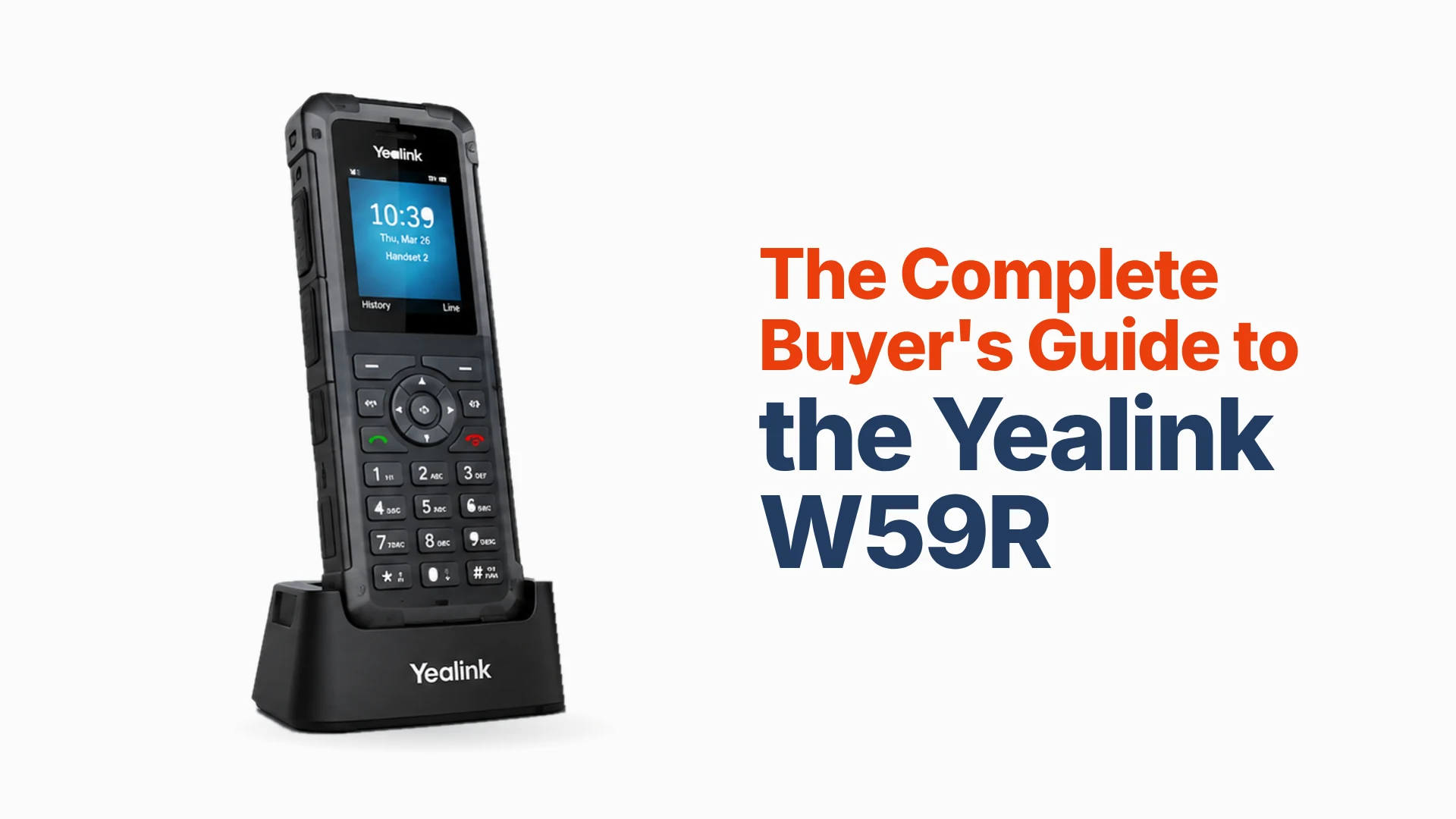
For many UK businesses, the phone is still tied to revenue, customer service and the day-to-day running of things. That’s especially true when your people work away from a desk, on a factory floor, in a warehouse, in a workshop or on an engineering site. The Yealink W59R is built for exactly those places. It’s a professional rugged DECT IP handset with an IP67 rating, Bluetooth, a vibration alarm and occupational safety alarms, designed for factories, warehouses and construction sites where an ordinary cordless handset wouldn’t last.
The W59R isn’t a complete phone system on its own. It works as part of a Yealink DECT system, such as the W70B base station, alongside your hosted phone system and your business broadband or leased line. So, the real question isn’t just whether the handset is rugged. It’s whether the W59R gives your team the right mix of durability, mobility, call reliability and room to grow for the way they actually work.
Key Takeaways
- The Yealink W59R is a professional rugged DECT IP handset built for demanding workplaces.
- It’s IP67 rated, so it’s sealed against dust and can survive being submerged in up to 1 metre of water for 30 minutes.
- Yealink says it can survive a drop of up to 2.5 metres.
- It’s designed for factories, warehouses, construction sites and other tough environments.
- Built-in Bluetooth lets your team use wireless headsets.
- A vibration alarm and occupational safety alarms (push-button, no-movement, man-down and running) help in noisy or risky environments.
- Yealink quotes up to 28 hours’ talk time and 360 hours’ standby in ideal conditions.
- HD voice, Flexible Noise Reduction and full-duplex audio help keep conversations clear.
- It works with the Yealink W70B base station and with Yealink’s W75, W80 and W90 multi-cell systems.
- The W70B supports up to 10 handsets, 10 SIP accounts and 20 simultaneous calls.
- Think of the W59R as part of a complete hosted phone system, not a standalone phone.
Yealink W59R at a Glance
| Specification | Yealink W59R |
| Device type | Rugged DECT IP handset |
| Protection | IP67 (dust-tight; submersion up to 1 m for 30 minutes) |
| Drop resistance | Up to 2.5 m |
| Display | 1.8-inch colour TFT |
| Talk time | Up to 28 hours (up to 18 hours with a Bluetooth headset) |
| Standby time | Up to 360 hours (up to 200 hours with a Bluetooth headset) |
| DECT indoor range | Up to 50 m in ideal conditions |
| DECT outdoor range | Up to 300 m in ideal conditions |
| Bluetooth | Yes, for wireless headsets |
| Audio | HD voice, Flexible Noise Reduction, full duplex |
| Vibration alarm | Yes |
| Safety alarms | Push-button, no-movement, man-down and running alarms |
| Belt clip | Yes |
| Base compatibility | Yealink W70B (single cell); W75, W80 and W90 multi-cell systems |
| Best for | Demanding business environments |
Specifications can change with firmware and hardware revisions, so check Yealink’s latest documentation before you deploy.
Who This Guide Is For
This guide is for UK businesses looking at a rugged cordless phone for people who work where desk phones or ordinary cordless handsets aren’t practical. It’s especially relevant if you’re in manufacturing, engineering, automotive, care or warehousing, or any business where calls need to keep flowing while people move around a site.
Why Trust This Guide
We’ve looked at the W59R from both sides: the technical spec and how it works day to day. That covers ruggedness, DECT range, audio, battery life, safety features and how the handset fits into your wider phone system and connectivity. We’d rather recommend the right handset for the job than the one with the longest spec list.
What Is the Yealink W59R?
The Yealink W59R is a rugged DECT IP handset for workplaces where ordinary cordless phones get exposed to dust, water, drops, noise and knocks. Its IP67 rating is one of its defining features. Yealink describes it as shock, dust and water resistant, with a tough rubberised surface that protects against slipping, scratching and disinfectant.
The W59R pairs that protection with everything you’d expect from a professional IP phone: HD voice, Flexible Noise Reduction, Bluetooth, a vibration alarm and configurable safety alarms. With the W70B base station, the system supports up to 10 handsets and 20 simultaneous calls. For larger sites where people need to roam between zones, the W59R also works with Yealink’s multi-cell DECT systems.
That makes it a very different proposition to an ordinary office cordless phone. It’s built for situations where mobility and toughness both matter.
![Yealink W59R rugged IP67 DECT handset in its charger beside a Yealink W70B base station]](https://circle.cloud/wp-content/uploads/2026/10/what-is-the-yealink-w59r-1-1024x683.webp)
Why Is the Yealink W59R Different From a Standard Cordless Phone?
The W59R’s main selling point isn’t that it’s cordless. It’s that it’s built for places where a standard handset wouldn’t survive or wouldn’t perform reliably. An ordinary office handset is perfectly fine for a receptionist. It’s a different story when your people work around machinery, vehicles, warehouses or production lines.
The W59R combines DECT mobility with physical protection and safety features, so your team can carry the business phone around the site without treating it like fragile office kit. That matters most where the phone is directly linked to customer service, keeping operations running, or revenue.
Key Features of the Yealink W59R
Here’s what each feature actually does for your team.
![Key features of the Yealink W59R: IP67 protection, DECT range, battery life, Bluetooth, vibration and safety alarms]](https://circle.cloud/wp-content/uploads/2026/10/yealink-w59r-key-features-1024x683.webp)
IP67 Rugged Protection
The W59R is certified to IP67, which means it’s sealed against dust and can survive being submerged in up to 1 metre of water for 30 minutes. Yealink also says it can survive a drop of up to 2.5 metres. It’s designed for construction sites, factories and warehouses, and its rubberised exterior improves grip and resists scratches and disinfectant. That’s useful anywhere kit gets exposed to dust, moisture, cleaning products or the odd knock.
Rugged isn’t the same as indestructible, though. It still needs to be used and looked after the way Yealink recommends.
Rugged DECT Mobility
DECT gives the handset its own dedicated wireless link to the base station. Yealink quotes up to 50 metres indoors and 300 metres outdoors in ideal conditions. Real-world coverage depends on walls, floors, building materials, interference and the layout of your site.
This is especially important in warehouses, factories and large commercial premises. Don’t treat the quoted range as a coverage map. If your people need to move between separate areas or buildings, you may need extra DECT equipment or a multi-cell system, not just more handsets.
Long Battery Life
Yealink quotes up to 28 hours’ talk time and 360 hours’ standby for the W59R in ideal conditions. Using a Bluetooth headset brings this down to up to 18 hours’ talk time and 200 hours’ standby. For people working long shifts, that means fewer trips back to the charger during the day.
Bluetooth Headset Support
The W59R has built-in Bluetooth, so your team can use wireless headsets and keep both hands free. That’s handy for an engineer inspecting equipment, or someone in a warehouse coordinating deliveries without holding a phone to their ear.
Vibration Alarm
The vibration alarm makes sure people notice incoming calls even when they can’t hear the ringtone. It’s a simple feature, but in a noisy factory, workshop or warehouse, it can be the difference between answering a call and missing it.
Occupational Safety Alarms
One of the W59R’s most specialised features is its range of safety alarms. Yealink highlights push-button, no-movement, man-down and running alarms. When one is triggered, the handset can automatically place an emergency call. This can be valuable if your people work alone or in places where a fast response to an incident matters. It’s not a substitute for a dedicated safety system or a proper workplace risk assessment, but it’s a useful extra layer.
HD Audio and Noise Reduction
HD voice, Flexible Noise Reduction and full-duplex audio help keep calls clear even with background noise. That’s especially valuable when your team are speaking to customers or colleagues from a workshop, production area or warehouse. As with any VoIP handset, call quality also depends on your hosted phone system, network and internet connection.
Professional Business Design
The W59R comes with a belt clip and has a backlit keypad and colour display. It’s designed to be carried all shift, not left on a desk.
Who Is the Yealink W59R For?
The W59R makes the most sense when your people are on the move and the environment is tough on kit.
Manufacturing
Factories can be hard on equipment, with dust, movement, machinery and the occasional knock. The W59R keeps supervisors, engineers and operational staff reachable without relying on personal mobiles. Where conditions are especially harsh, it’s a better fit than a standard office DECT handset.
Engineering
Engineering teams often work across workshops, production areas, plant rooms and customer sites. The W59R gives them mobile access to the business phone system on a handset that’s built for tough environments, so there’s less need to head back to a desk phone.
Automotive
Automotive businesses usually combine reception, service bays, workshops, parts teams and offices. A rugged cordless handset helps staff stay reachable across all of them. The W59R is especially well suited to the workshop, where an ordinary office handset wouldn’t last long.
Warehouses and Distribution
Warehouse teams rarely sit at desks. The W59R keeps warehouse staff, supervisors, reception and office teams in touch, even when it’s noisy and physically demanding. For larger warehouses, check DECT coverage before you deploy.
Care Homes
Care staff are constantly moving between rooms, so cordless phones make sense. But don’t choose the W59R just because it’s rugged. In most care homes, the W74P or W76P will give a better balance of comfort, mobility and cost, unless you specifically need the W59R’s toughness or safety alarms. It’s a good example of why the most rugged phone isn’t always the best phone.
Estate Agents
Estate agents rely on the phone, but most offices don’t need a rugged handset. The W59R might suit someone who regularly works in more demanding properties or sites, but for a typical estate agency office, a standard DECT or desk IP phone is likely to be the better choice.
Dental Practices
Dental practices depend on reliable communication, but they’re usually better served by standard professional cordless or desk phones. The W59R might help in specific situations, but there’s no point paying for ruggedness you won’t use.
![Which businesses suit the Yealink W59R: manufacturing, engineering, automotive, warehouses, care homes, estate agents and dental practices]](https://circle.cloud/wp-content/uploads/2026/10/who-is-the-yealink-w59r-for-1024x683.webp)
W59R vs Standard Yealink Cordless Phones
Don’t choose the W59R just because it’s the rugged option. The key question is whether your working environment justifies the extra protection and specialist features.
| Requirement | Recommended approach |
| Standard office mobility | W74P (W70B + W74H) or W76P (W70B + W56H), chosen by handset preference and price |
| Harsh industrial environment | W59R |
| Dust, water and impact exposure | W59R |
| Safety alarm requirements | W59R |
| Large multi-zone site | W59R with suitable multi-cell infrastructure |
The W59R is best seen as a specialist business handset, not simply a better version of every other Yealink cordless phone.
W59R vs W74P vs W76P
This comparison is most useful when you’re deciding whether you really need a rugged handset.
- The W74P and W76P are professional cordless systems for ordinary office and operational environments. Both use the same W70B base station; the W74P comes with the W74H handset and the W76P with the W56H, so the difference between them is the handset, not the system.
- The W59R puts ruggedness, durability and safety features first. It’s the natural choice when the physical environment is a big factor.
Start with where and how your people work, not with the most expensive handset.
W59R and the W70B Base Station
The W59R is a handset, not a complete phone system. The Yealink W70B base station provides the DECT IP infrastructure and supports up to 10 handsets, 10 SIP accounts and 20 simultaneous calls. Yealink lists the W59R as a compatible handset. The W70B also supports PoE, auto-provisioning, VLANs and security features including TLS and SRTP.
That means the W59R slots into a properly structured business VoIP set-up, rather than working as an isolated cordless phone.
When Do You Need a Multi-Cell DECT System?
A single W70B base station may be enough for smaller premises. On larger sites, though, your people may need to move across several areas and stay reachable. That’s where a multi-cell DECT system comes in, giving wider coverage and seamless roaming.
Yealink states that the W59R is fully compatible with its W80 multi-cell system, which supports seamless roaming and handover between zones. The W90 platform is designed for much larger deployments, supporting up to 2,500 handsets and 2,500 parallel calls across up to 600 base stations, with Yealink’s VIM licence. The right set-up depends on the size and layout of your premises, how many users you have and how far people need to move while on a call.
Building the W59R into a Complete Business Phone System
A rugged handset on its own doesn’t make a reliable phone system. A typical set-up looks like this:
- Business broadband or leased line
- Business router and managed network
- W70B DECT base station (or a multi-cell system for larger sites)
- Yealink W59R rugged handsets
- Hosted business phone system
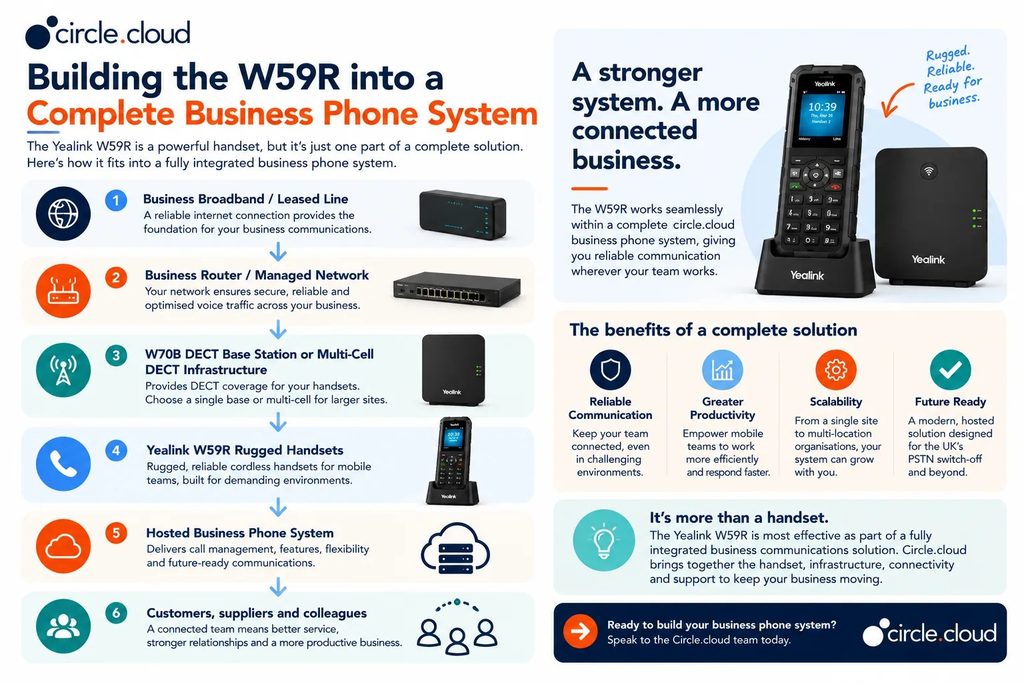
The bigger picture matters because the W59R depends on the network and hosted phone system behind it. You can buy the toughest handset on the market and still have poor calls if your broadband is unreliable, your network isn’t set up properly or your hosted phone system isn’t configured correctly.
That’s why we look at the whole set-up, the phone system, business internet, connectivity and support, not just the handset.
Hosted VoIP and the UK PSTN Switch-Off
The W59R is built for IP-based business telephony, so it’s a natural fit if you’re moving away from traditional analogue phone lines. With Openreach retiring the PSTN on 31 January 2027, it’s more important than ever to look at your whole communications set-up rather than just swapping an old phone for a new one. A modern set-up should include:
- A hosted business phone system
- Business broadband or a leased line
- A properly configured network
- IP-compatible handsets
- Backup connectivity
- Ongoing technical support
The W59R can be a great handset within that set-up, but it doesn’t replace the hosted phone system or internet connection. If you haven’t reviewed your phone system yet, the switch-off is the moment to do it.
How Reliable Does the Network Need to Be?
A rugged handset can’t make up for unreliable connectivity. The W59R works through the DECT system and your IP network, so the infrastructure behind it needs to be properly designed. If your business depends on the phone, consider:
- Business broadband or leased line: the connection your hosted phone system runs on.
- Managed network: makes sure voice traffic is set up and prioritised properly.
- DECT coverage: decides where your team can reliably use their handsets.
- Backup connectivity: 4G or 5G failover keeps calls going if your main broadband drops.
- Technical support: helps pin down whether a problem sits with the handset, DECT system, network, connectivity or phone system.
We supply business internet with 4G backup, looked after by the same team that supports your phones.
Common Yealink W59R Buying Mistakes
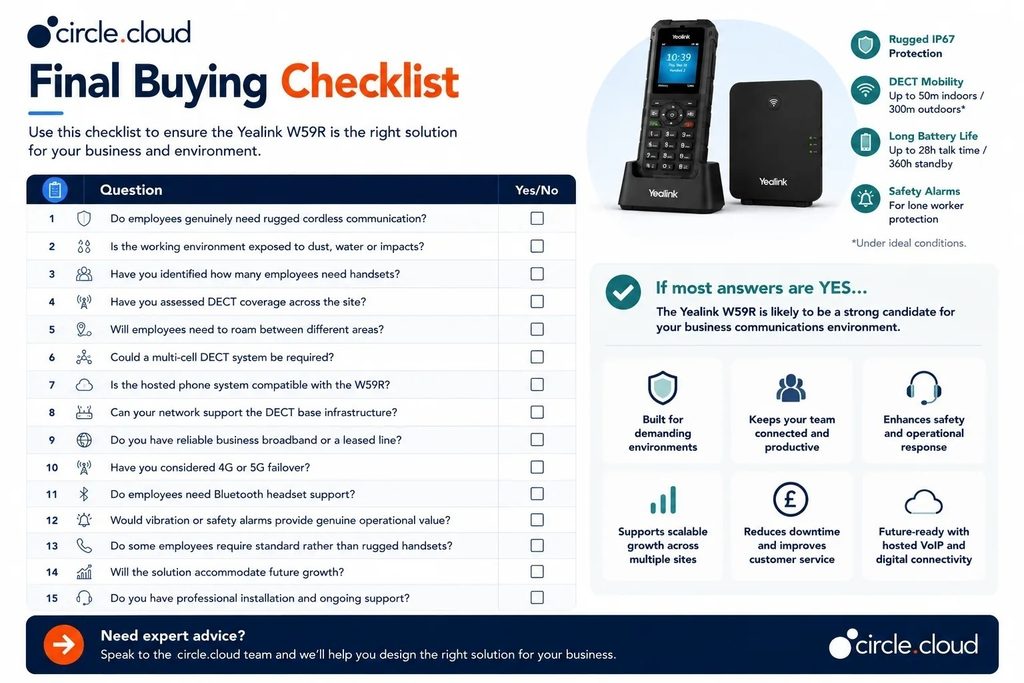
The W59R is a specialist handset, so get to know your environment before you buy. Here are the mistakes we see most often:
- Buying it just because it’s rugged: ruggedness only pays off where the workplace needs it.
- Ignoring DECT coverage: IP67 protection doesn’t improve wireless range.
- Assuming one base station will cover a large site: complex buildings may need extra infrastructure or multi-cell DECT.
- Ignoring the wider network: poor broadband or network set-up still affects call quality.
- Giving rugged handsets to everyone: desk-based staff are usually better off with standard IP phones.
- Treating safety alarms as a complete safety system: they should support your workplace safety procedures, not replace them.
- Forgetting future growth: think about whether you’ll need more users or wider coverage.
- Choosing hardware before the phone system: the handset, base station and phone system all need to work together.
Which Yealink W59R Configuration Should You Buy?
The right set-up mainly depends on your environment, number of users and the coverage you need.
- Small industrial site: a W70B with W59R handsets may be all you need if people work within a compact area.
- Growing manufacturing business: a W70B with several handsets covers operational teams. As the site grows, review coverage and handset numbers rather than just adding equipment.
- Large warehouse: start with a DECT coverage survey. If people move across a large footprint, a multi-cell system is likely to work better than a single base station.
- Engineering environment: use W59R handsets for people who are on the move in tough conditions, and standard desk IP phones for those mostly in the office.
- Automotive workshop: the W59R comes into its own in workshops and service areas, where dust, movement, noise and knocks would finish off a standard handset.
- Care environment: ask whether you really need ruggedness. If it’s mainly about cordless mobility, a W74P or W76P is likely to be a better fit.
If you’re still not sure which set-up is right for you, the circle.cloud team can look at the handsets, DECT coverage, hosted phone system and connectivity together.
What Should You Budget For?
Don’t just look at the handset price. A complete deployment can include:
- Hardware: W59R handsets, W70B base stations, chargers and extra DECT equipment where needed.
- Telephony: a hosted business phone system, extensions, numbers and call-management features.
- Connectivity: business broadband or a leased line.
- Network: router, switches, cabling and set-up.
- DECT coverage: extra base stations, repeaters or multi-cell infrastructure where needed.
- Resilience: 4G or 5G failover if phone downtime would hurt your business.
- Support: installation, provisioning, troubleshooting and ongoing technical help.
Looking at the total cost of ownership tells you far more than comparing handset prices on their own.
circle.cloud Verdict
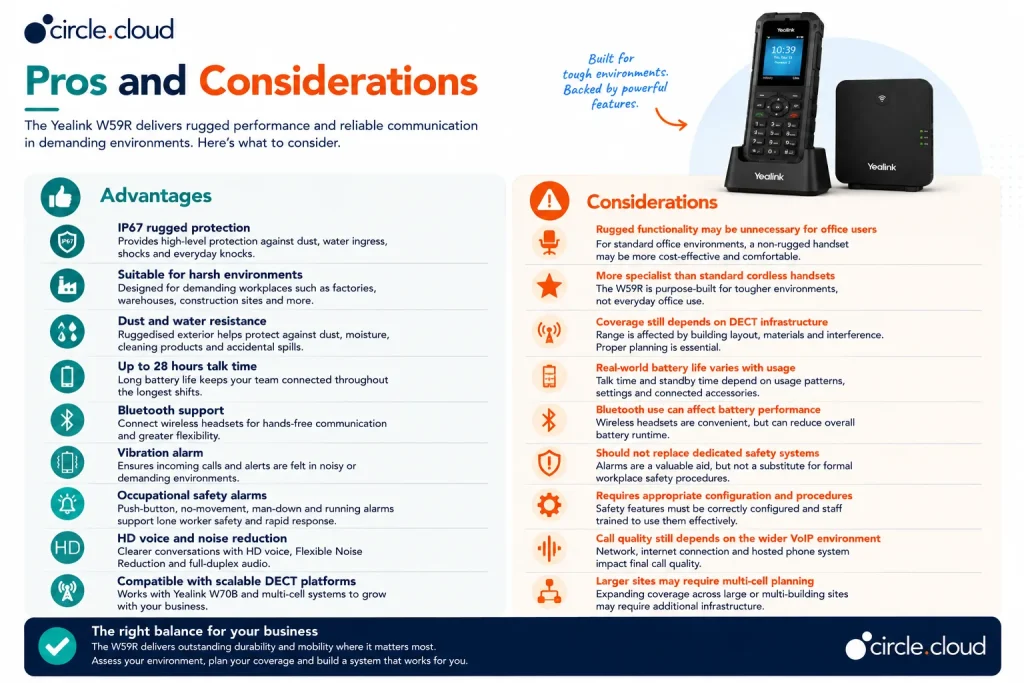
The Yealink W59R is a strong choice when your business genuinely needs rugged cordless phones. Its IP67 protection, mobility, battery life, Bluetooth, vibration alarm and safety features make it a great fit for manufacturing, engineering, automotive, warehousing and other demanding environments.
For a typical office, though, a standard Yealink handset will usually be better value. Choose the W59R because your working environment needs it, not just because rugged sounds better.
Why Buy the Yealink W59R from circle.cloud?
The right rugged handset is only one part of a reliable business phone system. We take a wider view of business communications. You get hosted VoIP, cordless DECT phones, business internet, 4G backup and tailored set-up, with one UK-based team owning it from day one and real people on the end of the phone when you need help. That matters, because a phone problem rarely sits entirely in the handset.
- Hardware: the right Yealink handset for each working environment.
- Hosted telephony: the cloud phone system behind the handset.
- Connectivity: the right business broadband or leased line.
- Resilience: 4G or 5G backup where downtime would cost you.
- Network: infrastructure that supports reliable voice calls.
- Support: specialists on hand to fix issues and manage changes.
Whether you’re in manufacturing, engineering, automotive, care, estate agency or dental, the goal is simple: keep your people reachable, keep customers connected and cut out avoidable phone downtime.
Not sure whether the Yealink W59R is right for your environment? Speak to the circle.cloud team about the handset, DECT coverage, hosted phone system and connectivity together.
Conclusion
The Yealink W59R is a specialist cordless handset for businesses where standard office phones just aren’t tough enough. Its IP67 protection, rugged build, Bluetooth, long battery life, vibration alarm, safety features and professional DECT capabilities make it a great fit for manufacturing, engineering, automotive, warehousing and other demanding workplaces.
The real buying decision isn’t whether the W59R is a good rugged phone. It’s whether your people actually need its toughness and specialist features. If they do, the W59R is a reliable handset within a properly designed hosted phone system. If they don’t, a standard Yealink cordless handset will probably be better value.
The best set-up is the one that matches the way your people actually work.
FAQs
What is the Yealink W59R?
It’s a professional rugged DECT IP handset for demanding business environments. It combines cordless mobility with IP67 protection, Bluetooth, a vibration alarm and occupational safety alarms.
Is the Yealink W59R waterproof?
It’s IP67 rated, which means it’s sealed against dust and can survive being submerged in up to 1 metre of water for 30 minutes. You should still follow Yealink’s guidance on use and care.
How long does the W59R battery last?
Yealink quotes up to 28 hours’ talk time and 360 hours’ standby in ideal conditions, or up to 18 hours’ talk time and 200 hours’ standby with a Bluetooth headset. Real-world battery life depends on how it’s used.
Is the W59R suitable for manufacturing and warehouses?
Yes. Yealink designed the W59R for factories, warehouses and construction sites, where dust, movement, noise and tough conditions would be too much for a standard handset. For larger sites, check DECT coverage before you deploy.
Does the W59R work with the W70B?
Yes. Yealink lists the W59R as compatible with the W70B DECT IP base station, which supports up to 10 handsets, 10 SIP accounts and 20 simultaneous calls.
Can the W59R be used across a large site?
Yes, but large sites may need extra DECT equipment or a multi-cell system. The W59R works with Yealink’s W75, W80 and W90 multi-cell systems, which provide roaming and handover across larger areas.
Is the W59R better than the W74P?
Not necessarily. The W59R is better where you need ruggedness and safety features. The W74P is usually the better fit for standard professional cordless calling.
Is the W59R suitable for care homes?
It can be, but you might not need the ruggedness. Ask yourself whether your team will really use the IP67 protection and safety alarms. If not, a standard Yealink DECT handset is likely to be the better buy.
Can the W59R be used with hosted VoIP?
Yes. It’s a DECT IP handset designed for SIP-based telephony, so it works as part of a hosted VoIP set-up.
Does the W59R replace a business phone system?
No. The W59R is a handset. You’ll also need a compatible DECT base station, a hosted phone system and reliable connectivity.
About the Reviewer & Editorial Methodology
Reviewed by: circle.cloud Technical & Solutions Team
Role: Business communications and hosted VoIP specialists
Experience: Supporting UK organisations with hosted phone systems, VoIP handsets, business broadband, leased lines, connectivity resilience and telecoms infrastructure.
Editorial Methodology
This buyer’s guide was put together using:
- Yealink product specifications and technical documentation.
- Practical business communications and hosted VoIP requirements.
- Rugged handset deployment, DECT coverage and scalability.
- Durability, usability, reliability and business value.
- UK business requirements, including the move to hosted VoIP and the PSTN switch-off.
We focus on what works in practice for UK businesses, rather than relying on manufacturer marketing claims alone.
Editorial Policy
circle.cloud aims to provide accurate, practical and honest buying guidance to help UK businesses make informed communications decisions. We assess products on working environment, usability, scalability, deployment requirements, reliability and how well they fit with your wider communications set-up.
Disclaimer
This guide is designed to help UK businesses decide whether the Yealink W59R suits their needs. Every deployment is different, depending on building layout, DECT coverage, user numbers, network infrastructure and hosted phone system set-up. We recommend a professional assessment before deploying business-critical communications equipment. Product specifications, compatibility and availability may change as manufacturers release new hardware or firmware.