
Published: 11th August 2026 Last updated: 11th August 2026
Reviewed by: circle.cloud Team Last Reviewed: 11th August 2026
Reading time: Approximately 15 minutes Revision: Version 1.0
Introduction
Modern business operations depend heavily on a fast, reliable, and secure network, from cloud phone systems and Microsoft Teams to CCTV, payment terminals, and critical applications. Yet, many organisations still rely on ageing networking equipment not built for today’s cloud-first demands. Slow Wi-Fi, poor coverage, and downtime directly impact productivity, customer service, and revenue. With the UK’s PSTN and ISDN switch-off approaching, network dependability is vital, as hosted business phone systems rely entirely on local network health.
TP-Link Omada is a leading Software-Defined Networking (SDN) platform that modernises infrastructure without enterprise complexity or cost. Featuring intelligent Wi-Fi access points, managed PoE switches, automatic 4G failover routers, and wireless bridges, Omada builds scalable, centrally managed networks. Whether you manage a care home needing seamless Wi-Fi, a factory linking offices and warehouses, a dental practice using cloud patient data, or an estate agency, the right equipment boosts operational efficiency.
This buyer’s guide explores the TP-Link Omada range available through circle.cloud to help you choose the ideal hardware for a complete business communications setup.
Key Takeaways
- TP-Link Omada provides a complete business networking ecosystem rather than standalone devices.
- Centralised cloud management simplifies network administration across single and multi-site organisations.
- Business-grade Wi-Fi, PoE switching and automatic 4G failover improve resilience and reduce downtime.
- Omada integrates perfectly with hosted business phone systems and cloud applications.
- circle.cloud recommends selecting networking equipment based on operational requirements rather than simply choosing the most powerful hardware.
At a Glance
| Category | circle.cloud Recommendation |
|---|---|
| Best Overall | TP-Link Omada EAP673 |
| Best Value | TP-Link Omada EAP653 |
| Best Business Router | TP-Link Omada DR3650V-4G |
| Best Managed Switch | TP-Link Omada ES210GMP |
| Best Edge Switch | TP-Link Omada LS108GP |
| Best Point-to-Point Connectivity | TP-Link Omada EAP215-Bridge Kit |
| Best for Growing Businesses | Complete TP-Link Omada SDN Ecosystem |
Who This Guide Is For
This guide has been written for organisations looking to build a reliable, future-ready business network that supports cloud communications and day-to-day operations. It is particularly relevant for business owners, IT managers and decision-makers who are planning to replace ageing networking equipment, expand into new premises or improve the performance of their existing infrastructure. The recommendations throughout this guide are especially suitable for:
- Growing SMEs seeking a scalable networking platform without enterprise-level complexity.
- Multi-site organisations requiring centralised management across several locations.
- Telephone-dependent businesses such as care homes, manufacturers, engineering firms, estate agents, dental practices and automotive businesses where reliable connectivity directly impacts customer service and revenue.
Why Trust This Guide
This guide bridges the gap between technical specs and practical business outcomes, focusing on how TP-Link Omada hardware supports real-world deployment across UK businesses. Our recommendations assess how devices work together as a unified ecosystem for hosted telephony, Wi-Fi, and cloud applications. Drawing on experience across sectors like healthcare, manufacturing, and professional services, we help you make informed purchasing decisions with confidence, balancing performance, scalability, and value.
Why You Can Trust Our Recommendations
We evaluate networking equipment based on real-world performance within complete business environments, not just manufacturer specs. When recommending TP-Link Omada solutions, we ensure seamless integration with hosted phones, broadband, cloud applications, and continuity planning. Because every organisation operates differently, we match hardware directly to your team’s specific working style. This tailored approach ensures you invest in practical, cost-effective infrastructure built for both current needs and future growth.
What is TP-Link Omada?
TP-Link Omada is a business networking platform that combines cloud-managed Wi-Fi access points, managed switches, business routers and wireless bridge technology into a single centrally managed ecosystem. It enables organisations to build secure, scalable and reliable networks that support cloud communications, hosted VoIP, hybrid working and future business growth. Whether your business operates from a single office or multiple locations across the UK, TP-Link Omada allows your network to grow alongside your organisation.
Product Range Overview
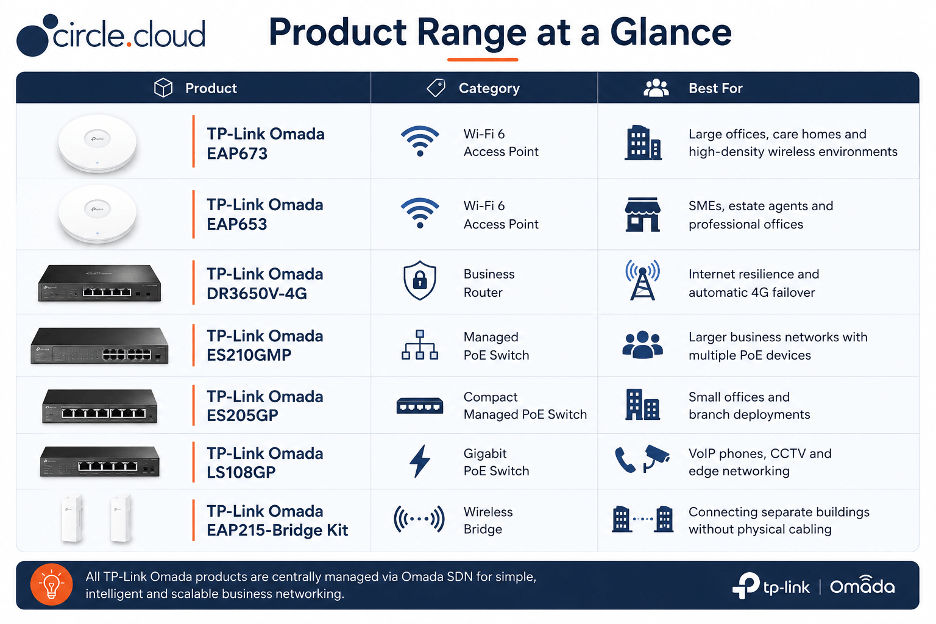
One of TP-Link Omada’s greatest strengths is that it isn’t built around a single product. Instead, it is a complete business networking ecosystem where routers, switches, wireless access points and bridge links work together through a single cloud-managed platform. This allows businesses to build a network that matches their current requirements while remaining flexible enough to expand as the organisation grows. Rather than replacing equipment every few years, additional Omada devices can simply be added to the existing infrastructure.
For businesses adopting hosted phone systems, upgrading business Wi-Fi or preparing for the UK’s PSTN and ISDN switch-off, this modular approach offers both scalability and long-term value. circle.cloud recommends viewing Omada as a complete networking solution rather than purchasing individual devices in isolation. The right combination of products creates a reliable, secure and resilient network that supports business communications, cloud applications and future expansion.
The devices covered in this guide fall into four key categories.
Wi-Fi Access Points
Reliable wireless connectivity has become essential for modern businesses. Employees, customers and connected devices all expect fast, uninterrupted Wi-Fi regardless of where they are within the building. TP-Link Omada access points are designed to deliver high-performance wireless coverage while being centrally managed through the Omada SDN platform. They support seamless roaming, intelligent traffic management and business-grade security, making them ideal for organisations that rely on cloud services and hosted communications. The products include:
| Model | Category | Best For |
|---|---|---|
| TP-Link Omada EAP673 | Wi-Fi 6 Access Point | High-density offices, care homes, schools and large commercial premises |
| TP-Link Omada EAP653 | Wi-Fi 6 Access Point | SMEs, estate agents, dental practices and growing businesses |
Business Routers
The router is the gateway between your business network and the internet. Choosing the right router is critical for maintaining secure, reliable connectivity, particularly when cloud telephony and business-critical applications depend on uninterrupted internet access. TP-Link Omada business routers provide advanced routing, VPN support, traffic management and automatic failover, helping organisations remain connected even during broadband outages. The products include:
| Model | Category | Best For |
|---|---|---|
| TP-Link Omada DR3650V-4G | Multi-WAN Business Router with 4G Backup | Businesses requiring automatic failover and resilient internet connectivity |
Managed PoE Switches
Network switches form the backbone of every wired business network, connecting access points, VoIP phones, computers, printers and other devices. Omada managed switches provide intelligent traffic management, Power over Ethernet (PoE), VLAN support and centralised monitoring. This simplifies network administration while ensuring reliable performance across the entire organisation. The LS108GP is included here as a wired PoE option for edge locations, although it is an unmanaged switch and sits outside Omada SDN central management. The products include:
| Model | Category | Best For |
|---|---|---|
| TP-Link Omada ES210GMP | 10-Port Gigabit Managed PoE Switch | Medium-sized businesses requiring PoE-powered devices |
| TP-Link Omada ES205GP | 5-Port Gigabit Managed PoE Switch | Smaller offices and branch locations |
| TP-Link Omada LS108GP | 8-Port Gigabit Unmanaged PoE Switch, not managed through Omada SDN | Edge networking, VoIP phones and CCTV deployments |
Wireless Bridge Solutions
Not every building can be connected using traditional network cabling. Warehouses, detached offices, temporary buildings and remote facilities often require an alternative method of extending the network. Wireless bridge technology creates a secure point-to-point connection between buildings, eliminating the need for expensive trenching or fibre installation. The products include:
| Model | Category | Best For |
|---|---|---|
| TP-Link Omada EAP215-Bridge Kit | Outdoor Wireless Bridge | Multi-building sites, warehouses, workshops and remote offices |
circle.cloud Recommendation:
Rather than purchasing networking devices individually, consider your network as a complete ecosystem. Combining Omada access points, managed switches, business routers and wireless bridges creates a more reliable infrastructure that supports hosted telephony, cloud applications, hybrid working and future business growth.
Understanding the TP-Link Omada Product Range
Every business has different networking requirements, which is why TP-Link Omada offers a broad portfolio of products rather than a single all-in-one solution. Some organisations require fast, reliable Wi-Fi throughout an office, while others need resilient internet connectivity, Power over Ethernet (PoE) for IP phones and CCTV, or wireless links between separate buildings. Understanding the purpose of each product category makes it much easier to build a network that meets your operational requirements today while remaining flexible enough to grow with your business.
In the following sections, we’ll examine each TP-Link Omada device in detail, explaining its strengths, ideal deployment scenarios and the type of organisation it best supports.
TP-Link Omada EAP673
The TP-Link Omada EAP673 is one of the flagship Wi-Fi 6 access points within the Omada portfolio. Designed for high-density business environments, it delivers fast wireless performance, excellent coverage and seamless integration with the Omada SDN platform. It is particularly well suited to organisations where numerous employees, visitors and connected devices require dependable wireless connectivity throughout the working day.
Whether supporting cloud telephony, Microsoft Teams meetings, CCTV systems or wireless business applications, the EAP673 provides the capacity modern businesses demand.
Key Features
- Wi-Fi 6 (802.11ax)
- Dual-band wireless
- Multi-gigabit Ethernet uplink
- Omada SDN cloud management
- Seamless roaming
- WPA3 security
- Power over Ethernet (PoE+) support
- High client capacity
Why Choose the EAP673?
As modern businesses transition away from traditional wired setups, the EAP673 delivers high-performance Wi-Fi 6 technology, wide coverage, and seamless roaming to keep moving staff and guest networks continuously connected. Built for high-density environments and easily managed through a central interface, it supports large numbers of simultaneous devices with business-grade security, making it ideal for scalable, future-ready growth.
- Best Suited For: Multi-floor offices, care homes, manufacturing facilities, warehouses, schools, hotels, engineering firms, and large dental practices.
- Key Advantages: Enterprise Wi-Fi 6 speeds, extensive range, high device capacity, robust security, and seamless roaming.
- Considerations: For smaller offices with fewer connected devices, the EAP653 may offer sufficient performance at a lower price point.
circle.cloud Recommendation: Best Overall Wi-Fi Access Point
For organisations planning a long-term networking investment, the TP-Link Omada EAP673 provides an excellent balance of performance, scalability, and future readiness. This enterprise Wi-Fi 6 access point is engineered specifically for large offices and high-density environments, and is typically deployed in multiples across networks supporting anywhere from 25 to several hundred users, with the number of access points determined by a wireless site survey rather than user numbers alone.
TP-Link Omada EAP653
The TP-Link Omada EAP653 brings many of the advantages of Wi-Fi 6 networking into a more compact and cost-effective package, making it an excellent choice for small and medium-sized businesses. It delivers reliable wireless coverage, supports cloud management and integrates seamlessly into the Omada ecosystem, allowing organisations to expand their network as they grow.
For businesses replacing ageing wireless infrastructure, the EAP653 provides a straightforward upgrade path without unnecessary complexity.
Key Features
- Wi-Fi 6 technology
- Dual-band wireless
- Omada SDN integration
- Power over Ethernet support
- Intelligent roaming
- Secure guest networking
- Cloud management
- Business-grade reliability
Why Choose the EAP653?
For SMEs that do not require the capacity of a flagship model, the EAP653 offers dependable Wi-Fi 6 performance, scalable deployment, and easy cloud management without unnecessary cost. Integrating seamlessly into the wider Omada ecosystem, it delivers fast, secure wireless networking and rapid installation to support daily operations, staff, and guest traffic.
- Best Suited For: Estate agents, dental practices, accountancy firms, retail stores, professional offices, and growing SMEs.
- Key Advantages: Exceptional value for money, reliable Wi-Fi 6 speeds, fast setup, and full Omada cloud integration.
- Considerations: Very large premises or environments with extremely high user density will achieve better coverage and capacity with the higher-spec EAP673.
circle.cloud Recommendation: Best Value Wi-Fi Access Point
The TP-Link Omada EAP653 delivers excellent performance and an easy route to future network expansion without unnecessary cost. This Wi-Fi 6 access point is the ideal choice for SMEs and professional offices, with the number of units required determined by the size and layout of your premises rather than user numbers alone.
TP-Link Omada DR3650V-4G
The TP-Link Omada DR3650V-4G is far more than a standard business router. It combines high-performance routing with integrated 4G LTE connectivity, providing automatic failover if the primary broadband or leased line connection becomes unavailable. For businesses that rely on hosted VoIP, cloud applications and continuous customer communication, internet downtime can quickly result in lost productivity and missed revenue. The DR3650V-4G helps reduce this risk by automatically switching to the 4G connection during an outage, allowing critical services to come back online without manual intervention. Failover is not instantaneous, so calls in progress will normally drop and reconnect on the backup service, and the 4G connection requires an active SIM and data allowance with enough capacity for your voice and cloud traffic.
It is an ideal solution for businesses preparing for the UK’s PSTN and ISDN switch-off, where internet connectivity becomes essential for business telephony.
Key Features
- Integrated 4G LTE modem
- Automatic WAN failover
- Multi-WAN support
- Business VPN capabilities
- Cloud-managed through Omada SDN
- Advanced firewall and security
- Traffic management and load balancing
- Centralised remote management
Why Choose the DR3650V-4G?
Because modern business operations depend heavily on cloud phones, Microsoft Teams, CRM systems, and payment terminals, the DR3650V-4G provides automatic internet failover to keep your organisation connected if your primary broadband drops. Offering secure VPN connectivity, seamless VoIP support, and simple cloud management, it minimises costly downtime and supports business continuity.
- Best Suited For: Care homes, estate agents, dental practices, manufacturing facilities, engineering firms, automotive dealerships, professional offices, and multi-site businesses.
- Key Advantages: Automatic 4G backup, minimal downtime, reliable VoIP performance, secure VPN capabilities, and centralised cloud control.
- Considerations: Organisations in remote or weak signal locations should test local 4G mobile coverage before deploying failover functionality. You will also need a SIM with a suitable data allowance, and mobile throughput will usually be lower than your primary circuit, so it is worth agreeing in advance which services take priority during an outage. Note that emergency calls placed over a backup connection still route using the address registered against your phone service.
circle.cloud Recommendation: Best Business Continuity Solution
The TP-Link Omada DR3650V-4G is a business router with 4G backup that protects cloud communications and minimises operational disruption. Ideal for hosted VoIP and business continuity, it serves as a top recommendation for organisations of any size.
TP-Link Omada ES210GMP
The TP-Link Omada ES210GMP is a managed Gigabit PoE switch designed for organisations requiring high-performance wired networking with centralised management. By combining Power over Ethernet with advanced switching capabilities, it enables businesses to power access points, VoIP phones and IP cameras directly through network cables, reducing installation complexity and improving flexibility.
Key Features
- Gigabit Ethernet ports
- Power over Ethernet (PoE+)
- Managed switching
- VLAN support
- Quality of Service (QoS)
- Omada SDN integration
- Cloud management
- Business-grade reliability
Why Choose the ES210GMP?
As networks grow, the ES210GMP replaces unmanaged switches with intelligent traffic management and simple Omada SDN administration. Delivering reliable Power over Ethernet (PoE) connectivity across your infrastructure, it ensures seamless power and data delivery for multiple wireless access points, IP desk phones, and security cameras.
- Best Suited For: Medium-sized offices, care homes, manufacturing facilities, schools, hotels, and engineering companies.
circle.cloud Recommendation: Best Managed PoE Switch
The TP-Link Omada ES210GMP is a Managed Gigabit PoE Switch designed to deliver reliable power and centralised traffic control for expanding business networks. Ideal for medium-sized organisations, where port count and PoE budget are scaled by adding further switches as device numbers grow, it is our top choice for managing high-density IP devices smoothly.
TP-Link Omada ES205GP
The TP-Link Omada ES205GP brings the benefits of managed PoE networking to smaller businesses and branch offices. It provides sufficient switching capacity for organisations deploying a handful of access points, VoIP phones or network devices while maintaining compatibility with the wider Omada ecosystem. The ES205GP is ideal for small offices, branch locations, retail premises, estate agencies, dental practices, and reception areas.
For growing SMEs, it represents an affordable entry point into professionally managed networking.
Key Features
- Compact managed switch
- Power over Ethernet
- Cloud management
- VLAN support
- Gigabit connectivity
- Energy-efficient operation
circle.cloud Recommendation: Best Compact Managed Switch
The TP-Link Omada ES205GP is a Compact Managed PoE Switch engineered to deliver enterprise-level control in a space-saving footprint. Built for small-to-medium businesses and branch offices, with additional switches added as port count and PoE requirements grow, it is our top pick for small office network management.
TP-Link Omada LS108GP
The TP-Link Omada LS108GP is an unmanaged Gigabit PoE switch designed for straightforward deployments where simplicity and reliability are the priority. Because it is unmanaged, it does not appear in the Omada SDN dashboard and cannot be configured or monitored centrally alongside your Omada access points, switches and routers, so it is best used at the edge of the network rather than as the backbone. It is commonly used to connect VoIP phones, CCTV cameras, wireless access points and desktop devices without requiring advanced switch configuration. Although simpler than the managed Omada switches, it still plays an important role in extending business networks efficiently. The device is recommended for small offices, reception areas, meeting rooms, CCTV deployments, and VoIP phone installations.
Key Features
- Gigabit Ethernet
- PoE support
- Plug-and-play deployment
- Reliable wired connectivity
- Compact design
circle.cloud Recommendation: Best Plug-and-Play PoE Switch
The TP-Link Omada LS108GP is an unmanaged Gigabit PoE Switch that simplifies network expansion with effortless zero-configuration setup. Ideal for edge networking in small to medium businesses, it provides a reliable, hassle-free way to connect and power essential IP devices. Where central visibility and control matter, choose one of the managed switches above instead.
TP-Link Omada EAP215-Bridge Kit
Not every business operates from a single building. Many organisations have warehouses, workshops, storage facilities, detached offices or temporary buildings that still require secure network connectivity. Traditionally, connecting these buildings meant installing underground fibre or leased cabling, which can be expensive, disruptive and time-consuming.
The TP-Link Omada EAP215-Bridge Kit provides an alternative by creating a secure point-to-point wireless connection between buildings. Instead of laying physical cables, it establishes a high-speed wireless bridge that extends your business network across separate locations.
For businesses with multiple buildings on the same site, this can significantly reduce installation costs while delivering reliable connectivity for internet access, cloud applications, CCTV systems and hosted VoIP services.
Key Features
- Long-range point-to-point wireless bridge
- Outdoor weather-resistant design
- High-speed wireless connectivity
- Secure encrypted communication
- Easy installation
- Omada ecosystem compatibility
- Suitable for permanent and temporary deployments
Why Choose the EAP215-Bridge Kit?
When expanding across multiple buildings, such as workshops, warehouses, or portable offices, trenching fibre cabling is often too expensive, slow, or restricted by lease agreements. The EAP215-Bridge Kit solves this by delivering fast, reliable, long-distance wireless connectivity between sites while integrating seamlessly into your central Omada SDN setup.
- Best Suited For: Multi-building offices, manufacturing sites, warehouses, schools, agricultural businesses, distribution centres, and automotive dealerships with separate workshops.
- Key Advantages: Eliminates costly underground cabling, deploys quickly, features weather-resistant outdoor hardware, and expands network range cost-effectively.
- Considerations: Requires a clear line of sight between units to maintain optimal wireless performance.
circle.cloud Recommendation: Best Multi-Building Connectivity Solution
For businesses needing to connect separate buildings without the high cost of installing physical cabling, the TP-Link Omada EAP215-Bridge Kit provides an efficient, highly practical, and scalable solution. Suitable for organisations of any size, this outdoor wireless bridge seamlessly bridges local network gaps across your entire site.
Which TP-Link Omada Device Is Right for You?
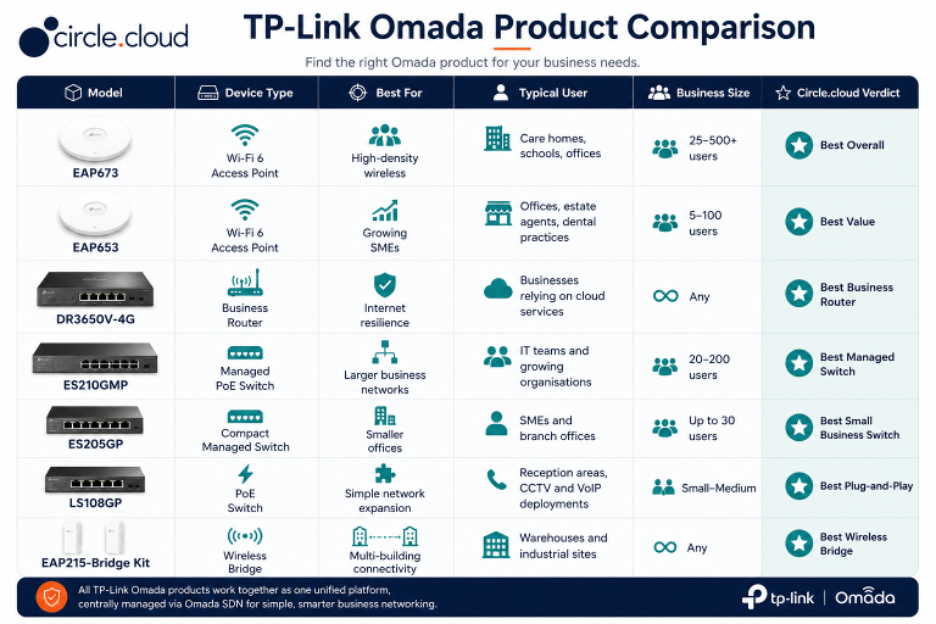
Every Omada product performs a different role within the network. Choosing the right hardware depends on your operational requirements rather than simply selecting the most powerful specification. The table below provides a quick comparison of the devices covered in this guide.
Feature Comparison Matrix
Choosing the Right Combination
Rather than selecting a single product, most businesses achieve the best results by combining several Omada devices into one integrated solution. For example:
| Business Requirement | Recommended Solution |
|---|---|
| Small Office | EAP653 + ES205GP |
| Growing SME | EAP653 + DR3650V-4G + ES210GMP |
| Large Office | Multiple EAP673s + ES210GMP + DR3650V-4G |
| Care Home | EAP673 + DR3650V-4G + ES210GMP |
| Manufacturing Site | EAP673 + EAP215-Bridge Kit + DR3650V-4G |
| Multi-Building Site | EAP673 + Bridge Kit + Managed Switches + 4G Backup |
This approach creates a resilient, centrally managed network that supports cloud communications, business Wi-Fi and future expansion far more effectively than relying on standalone networking devices.
circle.cloud Recommendation
The greatest value comes from deploying TP-Link Omada as a complete ecosystem. By combining business-grade Wi-Fi, managed switching, resilient routing and wireless bridging, organisations gain a network that is easier to manage, more secure and ready to support hosted telephony, cloud applications and long-term growth. Each TP-Link Omada device performs a specific role, but together they create a unified business networking platform that delivers reliable connectivity, centralised management and exceptional scalability.
What Makes Omada Different?
Many networking products work perfectly well on their own, but managing multiple devices from different manufacturers often becomes time-consuming and unnecessarily complex. TP-Link Omada solves this by creating a unified networking ecosystem where compatible routers, switches and wireless access points operate together through one management interface. This delivers several important advantages for businesses.
- Firstly, administrators can configure and monitor the entire network from a single dashboard, reducing the need to log into individual devices.
- Secondly, network policies and security settings can be applied consistently across every location, improving both efficiency and compliance.
- Finally, new devices can be deployed quickly using centralised configuration, making expansion straightforward as the business grows.
For organisations with limited in-house IT resources, these capabilities significantly reduce ongoing administration while improving overall network reliability.
The Omada Software Defined Networking (SDN) Platform
At the heart of every TP-Link Omada deployment is the Omada SDN platform. This intelligent management layer allows all compatible networking devices to communicate as part of one integrated system. Rather than viewing routers, switches and wireless access points as separate pieces of hardware, Omada treats them as components within a unified business network.
Central management is provided by an Omada controller, and every deployment needs one. Businesses can choose the cloud-based controller, free controller software installed on a PC or server, or a dedicated hardware controller such as the OC200 or OC300. Devices continue to pass traffic normally if the controller is temporarily unavailable, but centralised monitoring, configuration changes and zero-touch provisioning depend on it. circle.cloud will advise which controller option suits the size and structure of your network.
Key capabilities include:
- Centralised cloud management
- Remote monitoring
- Zero-touch provisioning
- Intelligent roaming between access points
- VLAN management
- Advanced security policies
- Guest Wi-Fi management
- Performance analytics
- Network health monitoring
These features help businesses simplify day-to-day administration while maintaining consistent network performance across all locations.
Why Businesses Choose TP-Link Omada
Every organisation has different networking requirements, but the reasons for choosing TP-Link Omada are remarkably consistent across industries. Businesses want technology that is dependable, scalable and easy to manage while supporting long-term growth. For organisations that rely heavily on telephone communication, such as care homes, estate agents, manufacturers and dental practices, network reliability directly affects customer experience and operational performance. Omada helps deliver that reliability through intelligent hardware and centralised management.
Supports Modern Cloud Communications
Hosted business phone systems depend on stable network infrastructure. Poor Wi-Fi coverage, unreliable switching or intermittent internet connectivity can result in poor call quality, dropped calls and frustrated customers. TP-Link Omada provides the networking foundation required for cloud telephony, helping organisations maximise the benefits of hosted communications while preparing for the UK’s PSTN and ISDN switch-off.
Built to Scale
One of Omada’s biggest strengths is scalability. A small business may initially require only one wireless access point and a managed switch. As additional employees join, departments expand or new premises open, further devices can be added without redesigning the entire network. This protects investment while simplifying future expansion.
Centralised Management
Managing several networking devices individually quickly becomes inefficient. Omada allows administrators to monitor and manage compatible devices from a single interface, reducing operational overhead and making troubleshooting significantly easier. For businesses with multiple sites, this can save considerable time while improving consistency across the organisation.
Business-Grade Security
Cybersecurity has become an essential consideration for every organisation. Omada supports advanced security features including VLAN segmentation, secure guest networking, role-based administration and network monitoring. These capabilities help organisations protect sensitive business systems while providing secure access for employees, visitors and connected devices.
Reliable Wireless Performance
Business Wi-Fi must provide more than simply internet access. Employees expect seamless connectivity as they move throughout offices, warehouses, care homes and commercial buildings. Omada access points support intelligent roaming and high-performance wireless connectivity, helping eliminate coverage gaps and improving the user experience across the workplace.
Business Continuity
Network downtime affects far more than internet browsing. For organisations using hosted VoIP, cloud applications and remote collaboration tools, connectivity interruptions can quickly disrupt normal operations. Combining TP-Link Omada networking with the TP-Link Omada DR3650V-4G provides automatic 4G failover, helping businesses remain connected during broadband outages and reducing the risk of lost productivity or missed customer calls.
A Complete Networking Ecosystem
One of the greatest advantages of TP-Link Omada is that it is designed as a complete ecosystem rather than a collection of individual products. Within a single deployment, businesses can combine:
- Wi-Fi 6 Access Points
- Managed PoE Switches
- Business Routers
- 4G Backup Connectivity
- Wireless Bridge Links
- Centralised Cloud Management
This integrated approach reduces compatibility concerns, simplifies support and creates a network that is easier to manage, expand and maintain over time. TP-Link Omada enables businesses to build a secure, centrally managed networking infrastructure that supports cloud communications, improves reliability and scales as the organisation grows.
TP-Link Omada vs UniFi
UniFi and TP-Link Omada are both popular cloud-managed networking platforms aimed at businesses seeking scalable Wi-Fi, switching and routing. While UniFi offers a broad ecosystem and a loyal following, Omada provides many of the same enterprise features at a more accessible price point.
For businesses prioritising value, straightforward deployment and reliable hosted VoIP support, Omada is often the more practical choice. Its centralised management, Wi-Fi 6 portfolio and growing range of routers and switches make it particularly well suited to SMEs, care homes, estate agents and professional services.
circle.cloud Verdict: Omada delivers an excellent balance of performance, scalability and affordability for most UK businesses.
TP-Link Omada vs Cisco Meraki
Cisco Meraki is widely recognised for its enterprise networking capabilities, cloud management and advanced security features. However, these benefits are accompanied by significantly higher hardware costs and ongoing licensing requirements.
TP-Link Omada provides many of the core capabilities businesses need, including cloud management, Wi-Fi 6, VLAN support and seamless roaming, without mandatory recurring licence fees. This makes it an attractive option for organisations seeking enterprise functionality while keeping long-term costs under control.
circle.cloud Verdict: Meraki suits large enterprises with complex requirements, while Omada offers outstanding value for SMEs and growing organisations.
TP-Link Omada vs Aruba Instant On
Aruba Instant On targets small and medium-sized businesses looking for business-grade wireless networking with simplified management. It delivers reliable Wi-Fi performance but offers a smaller overall ecosystem than Omada.
TP-Link Omada combines routers, switches, wireless access points and business continuity solutions such as automatic 4G failover within a single platform. For businesses wanting one integrated networking solution rather than standalone Wi-Fi, Omada provides greater flexibility and room for expansion.
circle.cloud Verdict: Omada offers the more complete networking ecosystem, particularly for organisations planning future growth or supporting hosted communications.
Benefits of TP-Link Omada
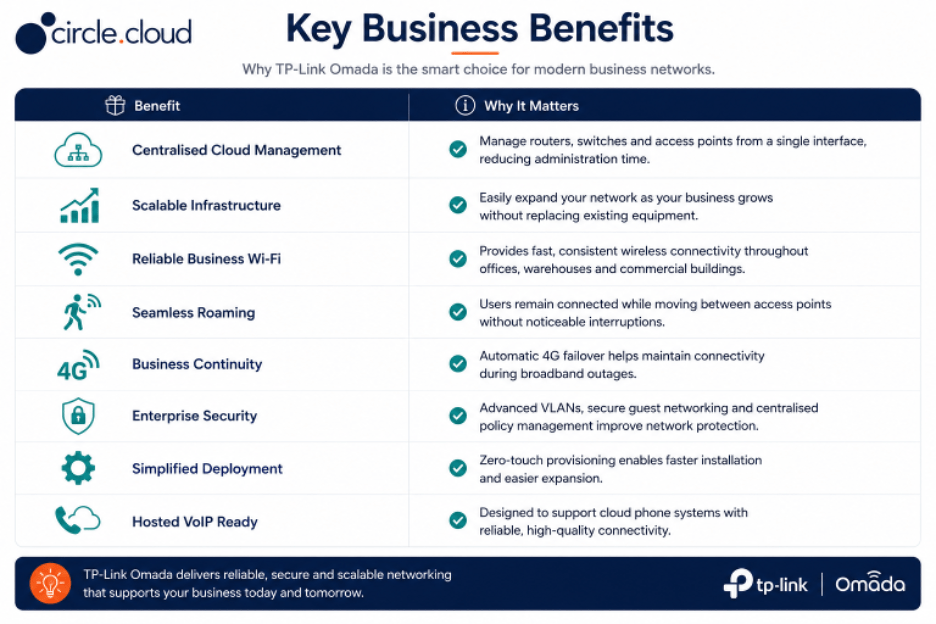
TP-Link Omada delivers real business value by combining enterprise-level security, performance, and scalability with simplified central management. Designed to eliminate downtime and support future growth, it ensures critical cloud applications like hosted VoIP, Microsoft Teams, and remote work tools operate seamlessly without overwhelming internal IT resources.
Key Business Benefits
Improved Productivity
Employees should never have to think about whether the network will keep up with their work. Slow wireless performance, unreliable connections and coverage gaps waste valuable time and create unnecessary frustration. By providing dependable connectivity throughout the workplace, TP-Link Omada allows staff to focus on serving customers, collaborating with colleagues and completing their work efficiently.
For businesses where every telephone call matters, improved network reliability also contributes to better customer experiences and fewer missed opportunities.
Supports Hybrid Working
Hybrid working has become a permanent part of many organisations. Employees now expect secure access to cloud services regardless of whether they’re working from the office, home or another business location. Omada provides the networking foundation required to support these flexible working models while maintaining performance and security.
Lower Long-Term Costs
Investing in business-grade networking often reduces costs over the lifetime of the infrastructure. Centralised management decreases administration time, scalable hardware reduces replacement costs, and improved reliability helps minimise operational disruption caused by network failures. Rather than continually replacing consumer networking equipment, businesses can build a professional infrastructure designed to grow with the organisation.
Better Support for Cloud Communications
circle.cloud specialises in hosted business phone systems, making reliable networking a critical component of every deployment. TP-Link Omada integrates seamlessly with cloud telephony by providing the stable, low-latency connectivity required for high-quality voice communications. Combined with business broadband, leased lines and automatic 4G backup, Omada helps create a resilient communications environment that supports the UK’s move towards all-IP services.
TP-Link Omada improves business productivity by delivering reliable networking, simplified management and scalable infrastructure that supports modern cloud communications.
Pros and Cons
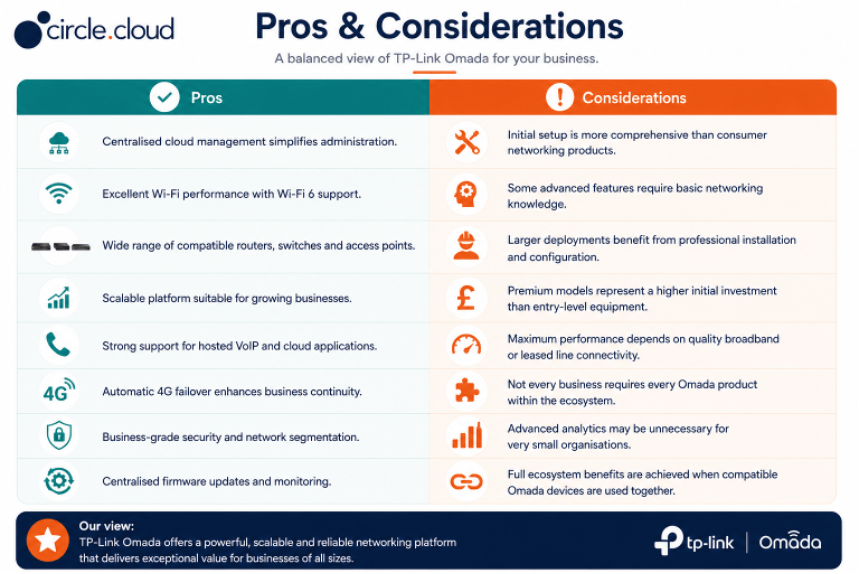
No networking platform is perfect for every organisation. Understanding both the strengths and considerations of TP-Link Omada helps businesses make informed purchasing decisions based on their operational requirements.
Overall, the advantages significantly outweigh the considerations, particularly for organisations investing in cloud communications, managed IT services and future-ready networking infrastructure.
Why the Pros Matter More Than the Cons
The considerations above reflect proper planning rather than product limitations. Omada’s greatest strength is its flexibility: smaller organisations can launch with a simple setup and unlock advanced features or expand hardware as they grow, without replacing existing equipment or learning a new platform. Supported by circle.cloud for professional installation and ongoing support, businesses can maximise their investment while minimising internal IT workload.
Typical TP-Link Omada Deployment
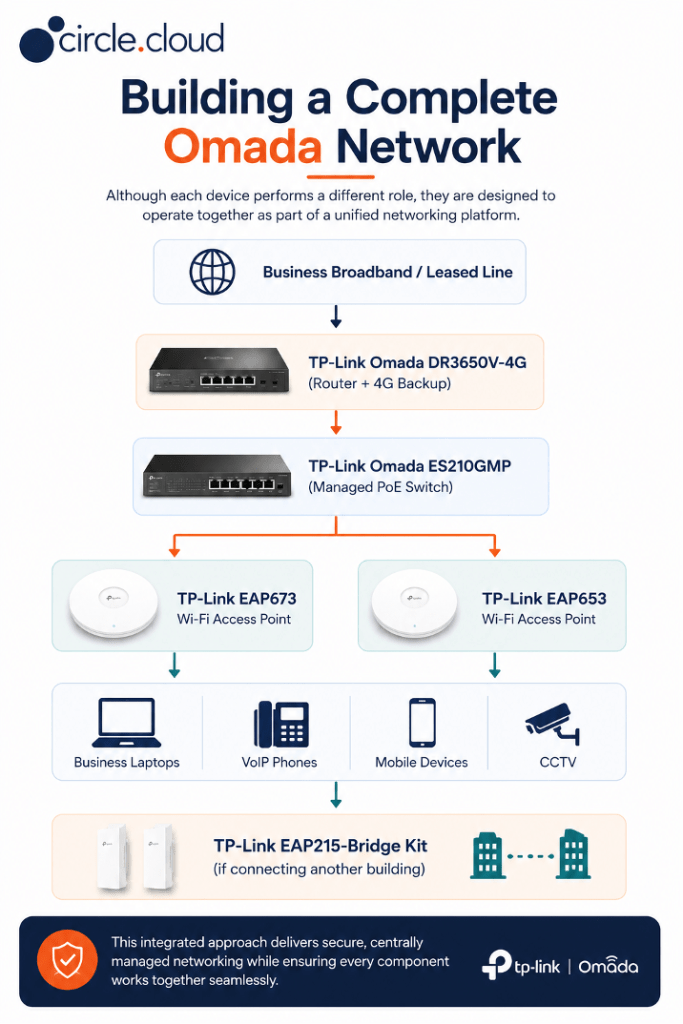
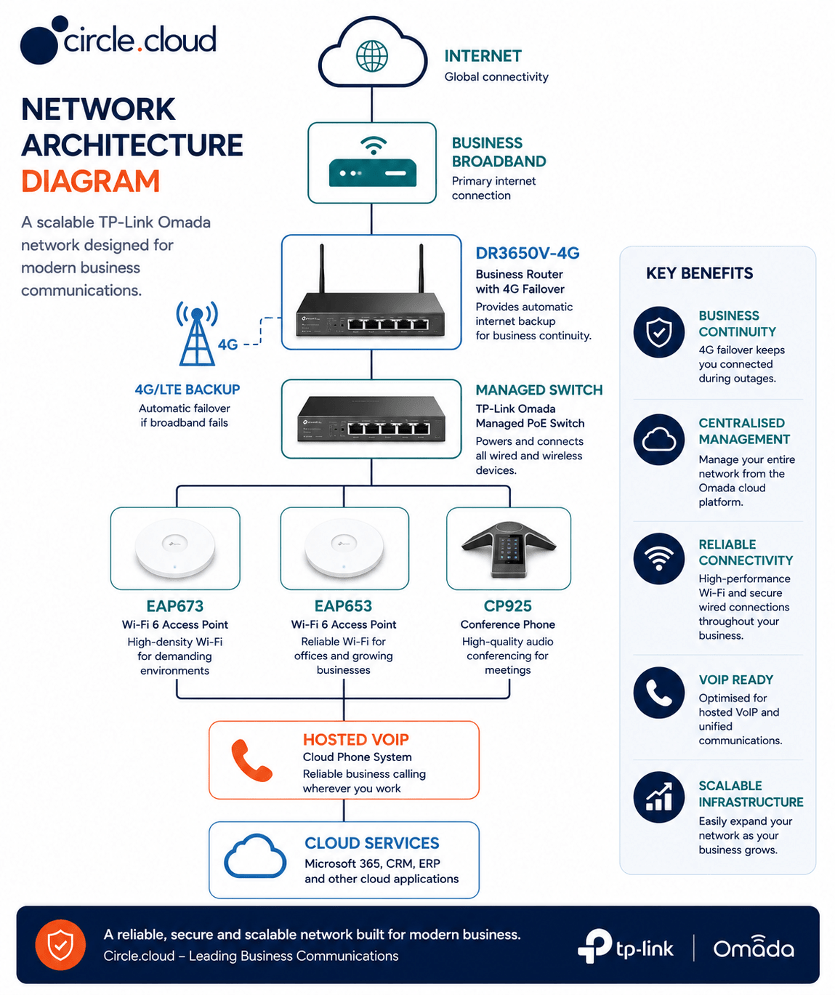
The strength of the TP-Link Omada ecosystem lies in unified central management via Omada SDN, where routers, switches, and access points operate as a single coordinated system, administered through a cloud, software or hardware controller. A typical circle.cloud deployment starts with the DR3650V-4G gateway providing secure routing and automatic 4G failover over primary broadband or leased lines.
From there, a managed PoE switch like the ES210GMP delivers power and data to EAP653 or EAP673 Wi-Fi 6 access points, VoIP phones, and IP hardware, while the EAP215-Bridge Kit connects separate buildings wirelessly. Centralised cloud management simplifies administration, firmware updates, and future network scaling across all sites.
Common Deployment Scenarios
Every organisation has different networking requirements. The flexibility of the Omada platform allows businesses to select the most appropriate combination of routers, switches and wireless access points without replacing their infrastructure as they grow.
- Care Homes: DR3650V-4G + ES210GMP + Multiple EAP673 Access Points
- Estate Agents: DR3650V-4G + EAP653 + ES205GP
- Dental Practices: DR3650V-4G + EAP653 + LS108GP
- Manufacturing: DR3650V-4G + ES210GMP + EAP673 + EAP215-Bridge Kit
- Engineering Companies: DR3650V-4G + EAP673 + ES210GMP
- Automotive Businesses: DR3650V-4G + EAP653 + ES205GP
These example deployments provide resilient connectivity, support hosted business phone systems and allow businesses to expand without replacing core networking infrastructure.
Typical TP-Link Omada Deployment Costs
The overall investment depends on the size of the premises, the number of users and the complexity of the installation. Businesses should consider the total cost of ownership rather than focusing solely on the purchase price of individual devices.
- Small Office (5–15 users): DR3650V-4G + EAP653 + ES205GP
- Growing SME (20–50 users): DR3650V-4G + EAP653 + ES210GMP + Multiple Access Points
- Multi-floor Office: DR3650V-4G + ES210GMP + Multiple EAP673 Access Points
- Care Home: DR3650V-4G + ES210GMP + Several EAP673 Access Points
- Manufacturing Site: DR3650V-4G + ES210GMP + EAP673 + EAP215-Bridge Kit
In addition to hardware, businesses should budget for professional installation, wireless site surveys where appropriate and ongoing support. Investing in a correctly designed solution from the outset often reduces future upgrade costs while improving long-term reliability.
How Long Does Installation Take?
Installation times vary depending on the size of the premises, the existing network infrastructure and the number of devices being deployed. Businesses replacing legacy equipment or upgrading to a fully managed network may require additional planning to minimise disruption.
- Small Office: Half Day
- Medium Office: 1 Day
- Large Office: 1–2 Days
- Care Home: 1–2 Days
- Manufacturing Facility: 2–3 Days
- Multi-Building Site: 2–5 Days
Working with an experienced provider helps ensure wireless coverage is optimised, devices are configured correctly, and the network is fully tested before going live. Contact our expert team today for a seamless and efficient deployment of business communication solutions.
Which TP-Link Omada Solution Should You Buy?
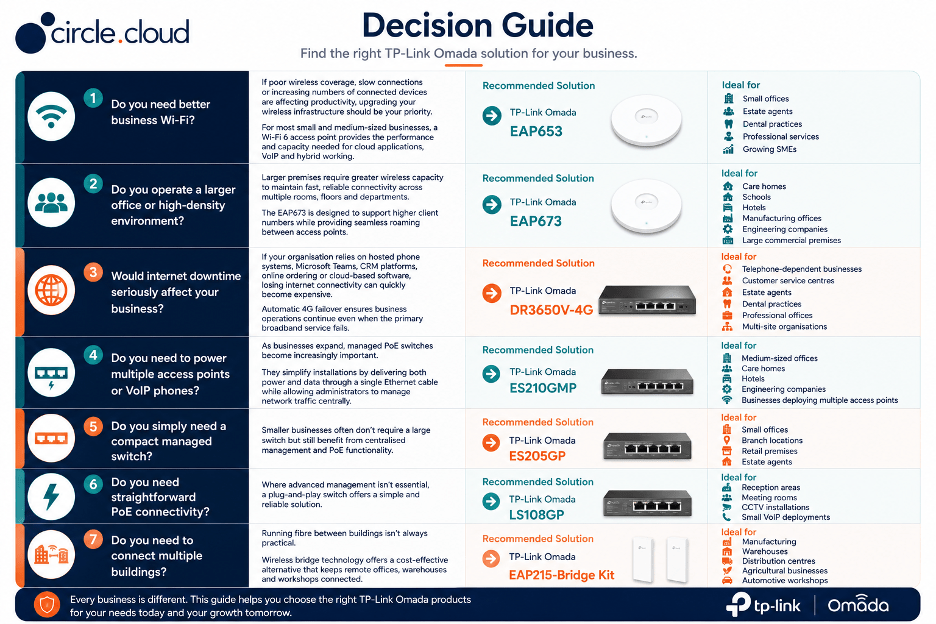
The best networking investment matches your daily operations, avoiding unnecessary complexity while leaving room for future growth. Whether your priority is seamless Wi-Fi coverage, resilient internet, secure switching, or multi-building connectivity, starting with your operational needs ensures long-term value. Based on common circle.cloud client deployments, these recommendations will help you build a reliable foundation for cloud communications and business-critical tools.
Which TP-Link Omada Solution Is Best for Your Industry?
Every industry has unique networking requirements. Choosing equipment that matches how employees work will deliver better performance than selecting products based purely on technical specifications.
Care Homes
Care homes require reliable wireless coverage throughout resident rooms, communal areas, nursing stations and administrative offices. Staff increasingly rely on cloud-based care systems, VoIP telephony and mobile devices while moving throughout the building. A strong wireless infrastructure improves communication, supports connected healthcare technology and reduces coverage gaps that could affect day-to-day operations.
Recommended Solution
- TP-Link Omada EAP673
- TP-Link Omada ES210GMP
- TP-Link Omada DR3650V-4G
Manufacturing
Manufacturing businesses require dependable networking across offices, production areas and warehouses. Wireless connectivity supports inventory management, operational systems and communication between departments, while resilient internet access helps prevent costly downtime. For sites with separate buildings, wireless bridging can eliminate the need for expensive cabling projects.
Recommended Solution
- TP-Link Omada EAP673
- TP-Link Omada DR3650V-4G
- TP-Link Omada EAP215-Bridge Kit
- TP-Link Omada ES210GMP
Engineering
Engineering companies often combine office environments with workshops, storage facilities and outdoor operational areas. Their networking infrastructure must support both administrative teams and technical staff while remaining flexible enough to expand as projects evolve.
Recommended Solution
- TP-Link Omada EAP673
- TP-Link Omada DR3650V-4G
- TP-Link Omada ES210GMP
Estate Agents
Estate agencies depend on uninterrupted communications throughout the working day. Cloud telephony, CRM platforms and property management systems all rely on fast, reliable connectivity. Reliable Wi-Fi also enables negotiators to move freely around the office while remaining connected.
Recommended Solution
- TP-Link Omada EAP653
- TP-Link Omada ES205GP
- TP-Link Omada DR3650V-4G
Dental Practices
Dental surgeries require secure and dependable networking for patient management systems, appointment scheduling, digital imaging and hosted telephony.
Reliable wireless coverage throughout reception, treatment rooms and administrative offices improves efficiency while supporting excellent patient service.
Recommended Solution
- TP-Link Omada EAP653
- TP-Link Omada ES205GP
- TP-Link Omada DR3650V-4G
Automotive Businesses
Dealerships and vehicle service centres often operate across multiple buildings, including showrooms, workshops and parts departments. Reliable wireless networking combined with resilient internet connectivity helps staff communicate effectively while supporting payment systems, diagnostics and customer service applications.
Recommended Solution
- TP-Link Omada EAP673
- TP-Link Omada EAP215-Bridge Kit
- TP-Link Omada DR3650V-4G
- TP-Link Omada ES210GMP
circle.cloud’s Recommended Complete Business Network
For organisations looking to future-proof their communications infrastructure, circle.cloud recommends deploying a complete Omada ecosystem rather than standalone networking products. A typical solution includes:
| Category | Recommended Product |
|---|---|
| Business Router | TP-Link Omada DR3650V-4G |
| Managed Switch | TP-Link Omada ES210GMP |
| Business Wi-Fi | TP-Link Omada EAP673 or EAP653 |
| Building Connectivity | TP-Link Omada EAP215-Bridge Kit (where required) |
| Edge Switching | TP-Link Omada LS108GP or ES205GP |
| Communications | circle.cloud Hosted Business Phone System |
| Connectivity | Business Broadband or Leased Line |
| Business Continuity | Automatic 4G Failover |
This approach creates a reliable, centrally managed infrastructure capable of supporting hosted VoIP, cloud applications, hybrid working and future business growth while helping businesses prepare for the UK’s transition to all-IP communications.
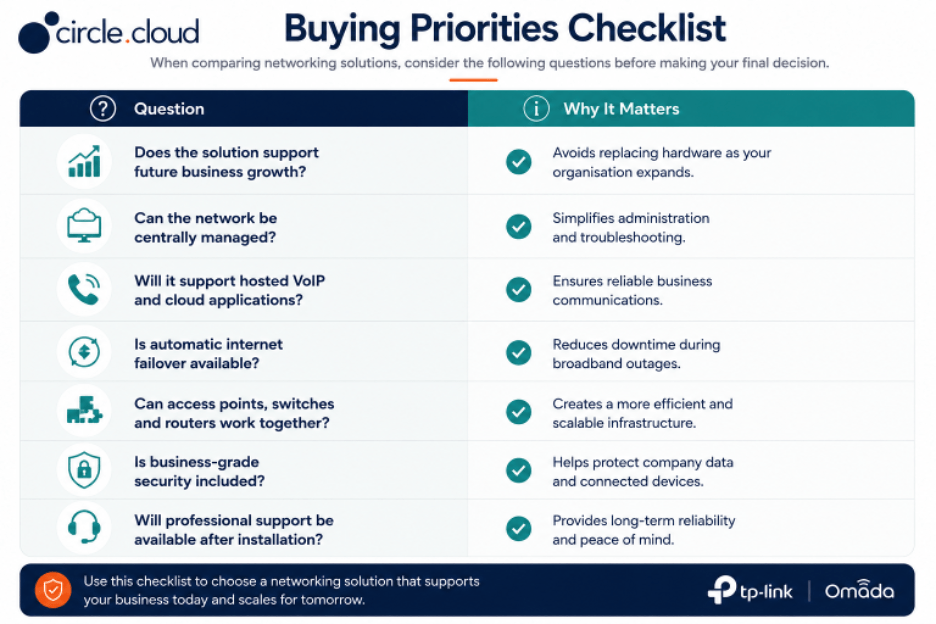
The Step-by-Step TP-Link Omada Buying Guide
Investing in business networking requires viewing your network as an integrated platform rather than replacing hardware piecemeal as it fails. Every router, switch, and access point must work together to maintain secure, high-performing connectivity for daily operations, cloud communications, and growth.
- Step 1: Assess Current Performance: Identify existing pain points, such as Wi-Fi dead zones, slow speeds, dropped VoIP calls, or management friction, to address true root causes instead of replacing the wrong equipment.
- Step 2: Align with Operational Needs: Select hardware based on actual usage, whether supporting cloud CRM software in an office, expansive coverage across a warehouse, or hosted telephony in a healthcare setting.
- Step 3: Design Physical Wi-Fi Coverage: Build around your physical site. Deploying multiple strategically positioned access points yields far better coverage, seamless roaming, and capacity than relying on a single high-power unit.
- Step 4: Select the Right Access Points: Match APs to user density and layout. The EAP653 delivers ideal value for standard SMEs, while the higher-capacity EAP673 serves demanding or larger environments.
- Step 5: Build a Strong Switch Backbone: Choose managed PoE switches to power access points, IP phones, and IP cameras over single Ethernet cables, providing centralised management and traffic prioritisation.
- Step 6: Secure Internet Resilience: Reduce costly cloud and VoIP downtime by integrating automatic 4G failover, such as the DR3650V-4G, to bring operations back online quickly during primary broadband outages.
- Step 7: Plan for Future Growth: Choose scalable architecture so you can incrementally add access points or switches as your workforce and premises expand without ripping and replacing infrastructure.
- Step 8: Centralise Cloud Management: Utilise remote cloud management to monitor performance, push security updates, and troubleshoot sites without on-site visits, streamlining multi-location administration.
- Step 9: Embed Network Security: Protect company data by enforcing secure administration, network segmentation, and isolated guest Wi-Fi networks right at the infrastructure layer.
- Step 10: Partner for Long-Term Value: Pair quality hardware with professional planning, deployment, and ongoing technical support from an experienced provider to ensure seamless integration across your broadband, hosted telephony, and IT services.
circle.cloud’s Buying Advice
Rather than replacing networking equipment one device at a time, consider planning the entire infrastructure as a single solution. Combining business broadband or a leased line, the TP-Link Omada ecosystem, hosted business telephony and proactive support provides a far stronger foundation than treating each technology separately.
For businesses preparing for the UK’s all-IP future, this integrated approach delivers better reliability, simpler management and greater long-term value.
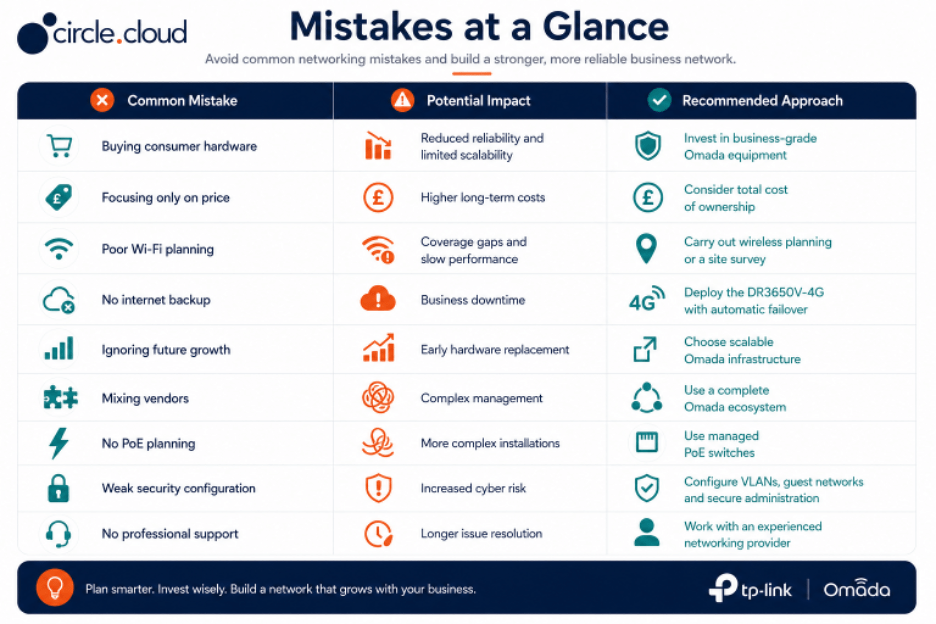
Common Mistakes to Avoid When Buying TP-Link Omada Solutions
Selecting and deploying networking hardware requires careful planning around total cost of ownership, operational needs, and long-term expansion. Avoiding these frequent pitfalls will help ensure your TP-Link Omada infrastructure delivers optimal performance, security, and ROI.
- Buying Consumer Equipment for Business Use: Consumer routers lack the device density, enterprise security, and centralised control needed to handle dozens of concurrent users, cloud telephony, and critical applications.
- Choosing Hardware Based on Price Alone: Selecting the cheapest option often leads to premature replacements, limited features, and higher long-term operational costs compared to investing in scalable, feature-rich hardware upfront.
- Underestimating Wi-Fi Coverage Requirements: Assuming a single access point can cover an entire building overlooks wall density and user volume; strategically placing multiple access points ensures reliable, site-wide coverage.
- Ignoring Internet Resilience: Relying on a single broadband line leaves your business vulnerable to complete cloud and VoIP outages, whereas adding 4G failover via the DR3650V-4G helps maintain business continuity.
- Forgetting Future Growth: Purchasing hardware that only satisfies immediate needs forces costly infrastructure overhauls as staff, IP phones, security cameras, and cloud tools expand.
- Mixing Incompatible Networking Platforms: Combining hardware from multiple manufacturers creates fragmented management, inconsistent security rules, and complex troubleshooting compared to a unified Omada ecosystem.
- Overlooking Power over Ethernet (PoE): Skipping PoE switches creates cable clutter and requires separate power adapters for every access point, IP phone, and camera, inflating installation expenses.
- Neglecting Network Security: Failing to properly configure VLANs, guest Wi-Fi isolation, and secure administrative rules exposes sensitive internal data and systems to unnecessary risks.
- Attempting DIY Deployments for Complex Networks: Larger or multi-site networks require professional site surveys, VLAN structuring, and failover testing to ensure peak performance and reliability from day one.
circle.cloud’s Expert Advice
The most successful business networks are designed with the organisation’s long-term objectives in mind rather than its immediate requirements. A professionally planned TP-Link Omada deployment should support:
- Reliable business Wi-Fi
- Hosted VoIP
- Microsoft Teams
- Cloud applications
- CCTV
- Hybrid working
- Business continuity
- Future expansion
When these elements are considered together, businesses benefit from a network that is easier to manage, more secure and capable of supporting changing operational needs for many years. Avoiding common networking mistakes ensures your TP-Link Omada investment delivers reliable performance, simpler management and long-term business value.
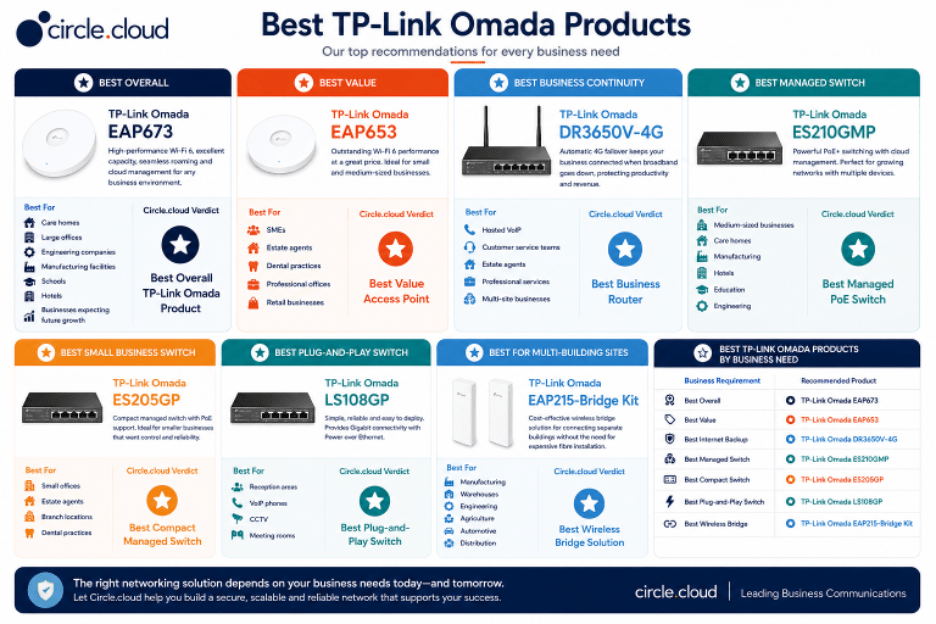
Best TP-Link Omada Solution Recommendations
After reviewing every product in the TP-Link Omada portfolio, one thing becomes clear. There isn’t a single “best” device for every organisation. The right solution depends on how your business operates, the size of your premises, the number of users and the applications your network needs to support.
A small estate agency has very different networking requirements from a manufacturing facility or a care home. That’s why circle.cloud recommends selecting products based on operational requirements rather than simply choosing the highest specification.
The recommendations below are designed to help businesses quickly identify the most suitable Omada solution for their environment.
Recommended Solutions by Business Size
Selecting the ideal TP-Link Omada deployment depends on balancing current user density with your operational requirements. To simplify your decision, we have mapped out recommended hardware configurations tailored to specific business sizes and multi-site architectures:
| Business Size | Recommended Deployment |
|---|---|
| 1–10 Employees | EAP653 + ES205GP |
| 10–50 Employees | EAP653 + DR3650V-4G + ES205GP |
| 50–150 Employees | EAP673 + ES210GMP + DR3650V-4G |
| 150+ Employees | Multiple EAP673 Access Points + ES210GMP + DR3650V-4G |
| Multi-Site Organisations | Multiple EAP673/EAP653 Access Points + EAP215-Bridge Kit + Managed Switching + DR3650V-4G |
circle.cloud’s Final Recommendation
For most organisations, the best long-term investment is not a single TP-Link Omada product, but a complete Omada ecosystem. Combining Wi-Fi 6 access points, managed PoE switching, resilient routing with automatic 4G failover and professional deployment creates a network that is secure, scalable and ready for the future.
When paired with circle.cloud’s Hosted Business Phone System, Business Broadband or Leased Line, and Managed IT Services, the result is a communications platform that supports reliable customer interactions, efficient collaboration and business growth.
circle.cloud’s Pre-Purchase Advice
Before investing in any networking infrastructure, it’s worth considering the complete technology environment rather than individual devices. For many businesses, the most effective solution combines:
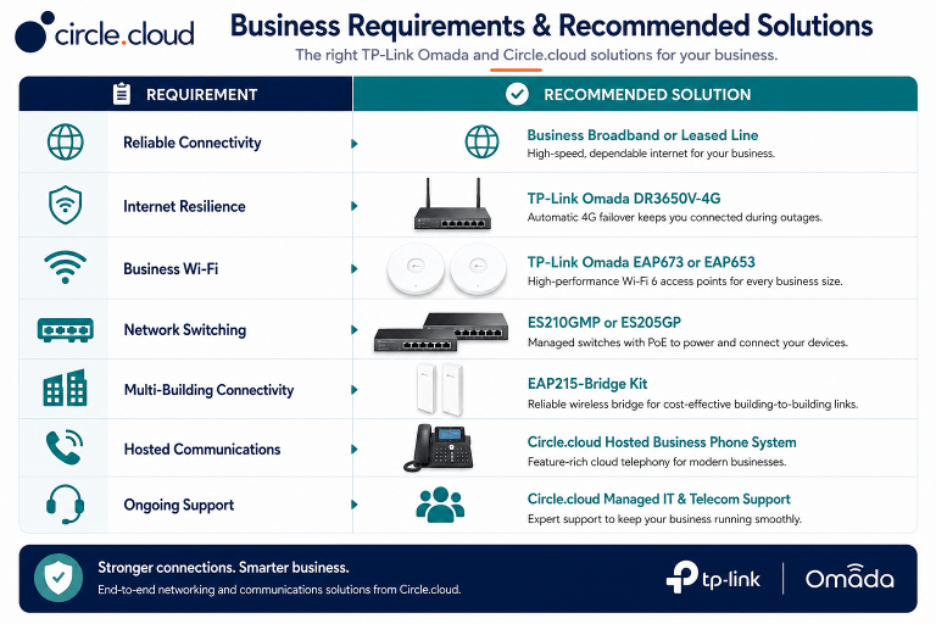
Taking this integrated approach creates a communications infrastructure that is easier to manage, more resilient and better prepared for future business growth.
Final Buying Checklist
Choosing the right networking solution goes beyond technical specifications; it must support daily operations, prevent downtime, and scale alongside your business. Before placing your order, review your strategy to ensure your infrastructure provides the capacity, PoE power budget, 4G resilience, and unified security needed to support your cloud applications, hosted telephony, and future growth. Use the checklist below to guide your final purchasing decision.
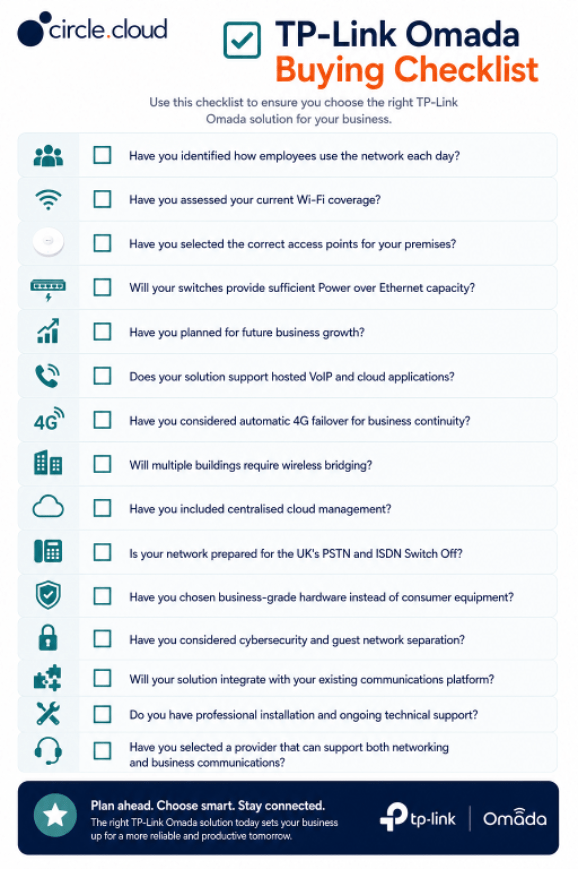
A successful TP-Link Omada deployment combines the right hardware, resilient connectivity and expert support to create a secure, scalable and future-ready business network.
Final Verdict
TP-Link Omada is one of the strongest business networking ecosystems available for organisations seeking reliable Wi-Fi, resilient connectivity, cloud management and scalable infrastructure.
When implemented as part of a complete circle.cloud communications solution, it provides an excellent foundation for hosted telephony, cloud applications and long-term business growth.
Conclusion
Modern operations demand far more than basic connectivity; every call, payment, and cloud application relies on a secure, scalable network. The TP-Link Omada ecosystem delivers enterprise-grade infrastructure without complex overhead, offering tailored solutions for sectors like healthcare, manufacturing, and automotive where downtime directly threatens productivity and revenue. As the UK transitions away from legacy PSTN and ISDN services, establishing a modern networking foundation is vital for cloud readiness and hybrid working.
circle.cloud delivers more than hardware, unifying Omada solutions with Hosted Business Phone Systems, Business Broadband, Leased Lines, and Automatic 4G Failover into a single, fully supported platform. Whether upgrading Wi-Fi, linking sites, or boosting network resilience, our team provides expert guidance, seamless deployment, and ongoing support to keep your organisation moving forward.
Not sure which TP-Link Omada solution is right for your business? Speak to the circle.cloud team for expert advice on selecting the right business communication and connectivity solution for your organisation.
Frequently Asked Questions
1. What is TP-Link Omada?
TP-Link Omada is a business networking platform that includes Wi-Fi access points, managed switches, business routers and cloud management software. It allows organisations to manage their entire network from a single platform.
2. Is TP-Link Omada suitable for small businesses?
Yes. Omada scales from small offices with a handful of users to large multi-site organisations, making it suitable for businesses of all sizes.
3. What’s the difference between the EAP673 and EAP653?
The EAP673 is designed for higher-density environments and larger deployments, while the EAP653 offers excellent performance and value for most SMEs.
4. What does the DR3650V-4G do?
It is a business router with automatic 4G failover, allowing internet connectivity to continue if the primary broadband connection fails.
5. Why is automatic failover important?
Automatic failover reduces downtime by switching to a mobile data connection during broadband outages, helping maintain access to hosted phone systems and cloud applications. The switchover takes a short time to complete, so calls in progress will usually need to be redialled.
6. What is a managed switch?
A managed switch allows administrators to monitor, configure and prioritise network traffic while supporting advanced features such as VLANs and PoE management.
7. Do I need Power over Ethernet?
If you’re deploying Wi-Fi access points, VoIP phones or CCTV cameras, PoE simplifies installation by delivering both power and data through a single Ethernet cable.
8. Can Omada support hosted VoIP?
Yes. TP-Link Omada is well suited to hosted business phone systems and other cloud communications platforms.
9. Is Omada suitable for hybrid working?
Yes. Reliable Wi-Fi, secure networking and resilient connectivity make Omada an excellent platform for hybrid and flexible working environments.
10. Can multiple offices be managed together?
Yes. Omada SDN enables centralised management across multiple business locations from a single interface.
11. What is the EAP215-Bridge Kit used for?
It creates a secure wireless connection between separate buildings where installing fibre or Ethernet cabling is impractical.
12. Which industries benefit most from TP-Link Omada?
Care homes, manufacturing, engineering, automotive businesses, estate agents, dental practices, education, hospitality and any organisation that relies on dependable communications.
13. Is TP-Link Omada compatible with Microsoft Teams?
Yes. Omada provides the networking infrastructure required to support Microsoft Teams and other cloud collaboration platforms.
14. Will Omada help prepare for the PSTN Switch Off?
Yes. Modern cloud communications rely on robust IP networking, making business-grade infrastructure an important part of preparing for the UK’s all-IP future.
15. Does Omada require a controller?
Yes. Central management is delivered through an Omada controller, which can be the cloud-based controller, free software installed on a PC or server, or a hardware controller such as the OC200 or OC300. circle.cloud will recommend the most suitable option for your network.
16. Can circle.cloud supply and install TP-Link Omada?
Yes. circle.cloud can design, supply, install, configure and support complete TP-Link Omada networking solutions alongside business connectivity and hosted telephony.
About the Reviewer & Editorial Methodology
Reviewed By: circle.cloud Technical & Solutions Team Role: Business Communications and Network Infrastructure Specialists Experience: Extensive experience designing, deploying and supporting business networking, hosted VoIP, broadband, leased lines and cloud communications for UK organisations.
Editorial Methodology
This buyer’s guide has been created using a combination of:
- Technical product specification reviews.
- Real-world business deployment experience.
- Industry best practices for networking and communications.
- Evaluation of scalability, reliability, security and business value.
- Consideration of organisations preparing for the UK’s PSTN and ISDN Switch Off.
Our recommendations are based on practical suitability for UK businesses rather than manufacturer marketing claims.
Editorial Policy
circle.cloud aims to provide accurate, impartial and practical buying guidance to help businesses make informed technology decisions. Products are assessed according to business performance, usability, scalability, value for money, deployment flexibility and long-term operational benefits.
Disclaimer
The recommendations within this guide are intended to assist UK businesses in selecting suitable networking equipment based on common deployment scenarios. Individual networking requirements vary depending on building layout, user numbers, security requirements and existing infrastructure. circle.cloud recommends carrying out a professional network assessment before purchasing business-critical networking equipment. Product specifications may change as manufacturers release updated hardware or firmware.