Published: 27th August 2026 Last Updated: 27th August 2026
Reviewed By: circle.cloud Team Last Reviewed: 27th August 2026
Reading Time: Approximately 15 minutes Revision: Version 1.0
For many UK businesses, being reachable by telephone is still directly connected to customer service and revenue. Estate agents need to respond quickly to buyers and vendors, manufacturers need to coordinate orders and production, care homes need reliable internal communication, while engineering and automotive teams often work away from fixed desks. The Yealink W56H is designed for this type of working environment. It provides cordless DECT communication while retaining the features expected from a professional business phone. Rather than being tied to a reception desk or workstation, employees can move around the premises while remaining connected to the business telephone system.
However, the W56H should not be viewed as a standalone replacement for a complete business phone system. It is a cordless handset that operates with compatible Yealink DECT infrastructure. For example, the W70B can support up to 10 compatible handsets, 10 SIP accounts and 20 simultaneous calls.
That distinction is important when budgeting and planning a deployment. The handset is only one part of the solution. Businesses also need to consider hosted telephony, business broadband or a leased line, network infrastructure, coverage and ongoing support.
Key Takeaways
- The Yealink W56H is a professional cordless DECT handset designed for business VoIP environments.
- It is a handset rather than a complete phone system, so it requires compatible Yealink DECT infrastructure.
- The W56H is compatible with the Yealink W70B and W80B DECT platforms.
- When paired with a W70B, the wider system can support up to 10 handsets, 10 SIP accounts and 20 simultaneous calls.
- Yealink specifies up to 30 hours of talk time and up to 400 hours of standby time for certain W56H hardware versions under ideal conditions.
- The handset has a 2.4-inch colour display, HD audio, hands-free functionality and a 3.5 mm headset connection.
- It is particularly useful where employees need to remain reachable while moving around a workplace.
- The right deployment depends on the handset, DECT infrastructure, hosted phone system, business connectivity and coverage requirements.
Yealink W56H at a Glance
| Feature | Yealink W56H |
|---|---|
| Device Type | Professional cordless DECT IP handset |
| Best For | Businesses needing mobile cordless communication |
| Primary Use | Hosted VoIP and business telephone systems |
| Compatible Infrastructure | Yealink W70B, W80B and compatible DECT platforms |
| Handset Capacity | Up to 10 handsets when paired with a W70B |
| SIP Accounts | Up to 10 with W70B |
| Simultaneous Calls | Up to 20 with W70B |
| Talk Time | Up to 30 hours under ideal conditions |
| Standby Time | Up to 400 hours on specified hardware versions |
| DECT Range | Up to 50m indoors / 300m outdoors under ideal conditions |
| Display | 2.4-inch colour display |
| Audio | HD voice, speakerphone and hands-free calling |
| Headset Support | 3.5mm headset connection |
| Best Business Sectors | Care homes, manufacturing, engineering, automotive, dental and estate agents |
| Rugged Protection | No, consider W59R for demanding environments |
| Business Continuity | Can form part of a solution with business broadband, leased line and 4G/5G failover, plus power protection for the DECT base station |
| circle.cloud Verdict | A practical cordless handset for mobile business users |
Note: Specifications should always be checked against the latest manufacturer documentation before deployment, as hardware and firmware capabilities can change.
Who This Guide Is For
This guide is intended for UK businesses considering the Yealink W56H as part of a professional cordless phone deployment. It is particularly relevant to organisations where employees move around the workplace but still need access to business calls, extensions and colleagues. This includes care homes, manufacturing businesses, engineering companies, automotive organisations, dental practices and estate agents, as well as other telephone-dependent businesses.
Why Trust This Guide
The guide assesses the W56H from a business deployment perspective rather than simply reproducing a manufacturer specification sheet. It considers how the handset fits into a wider hosted VoIP environment, including connectivity, DECT infrastructure, coverage, scalability and support. The aim is to help businesses determine whether the W56H is actually appropriate for their working environment and not simply whether its specifications look attractive.
Why You Can Trust Our Recommendations
circle.cloud’s recommendations are based on practical business communications requirements, including hosted telephony, connectivity and network infrastructure. The focus is on selecting technology according to how employees actually work, how customers communicate with the organisation and how important telephone availability is to day-to-day operations. Where a different Yealink handset or DECT architecture would be more suitable, this guide makes that distinction rather than recommending the W56H for every situation.
What Is the Yealink W56H?
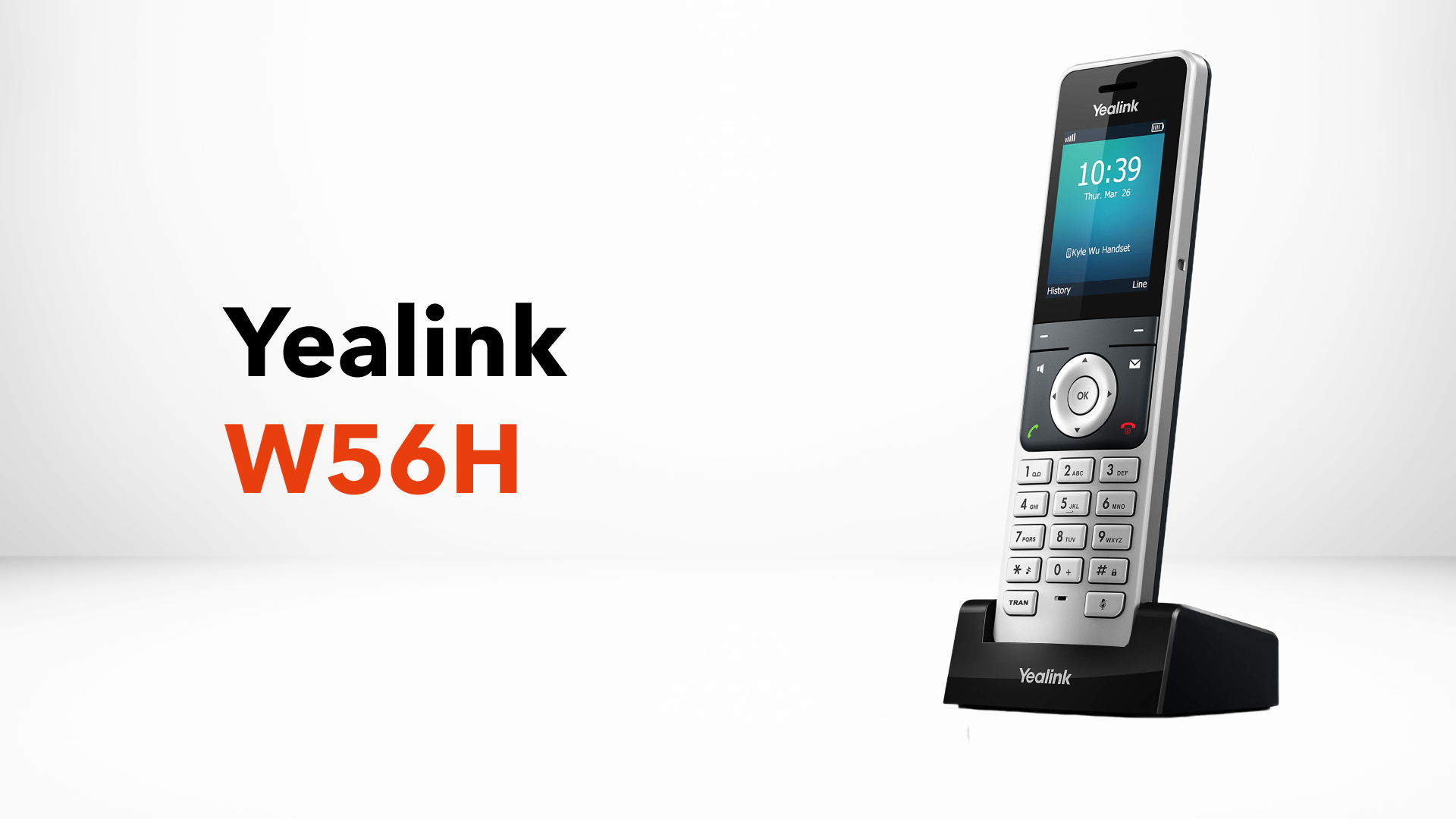
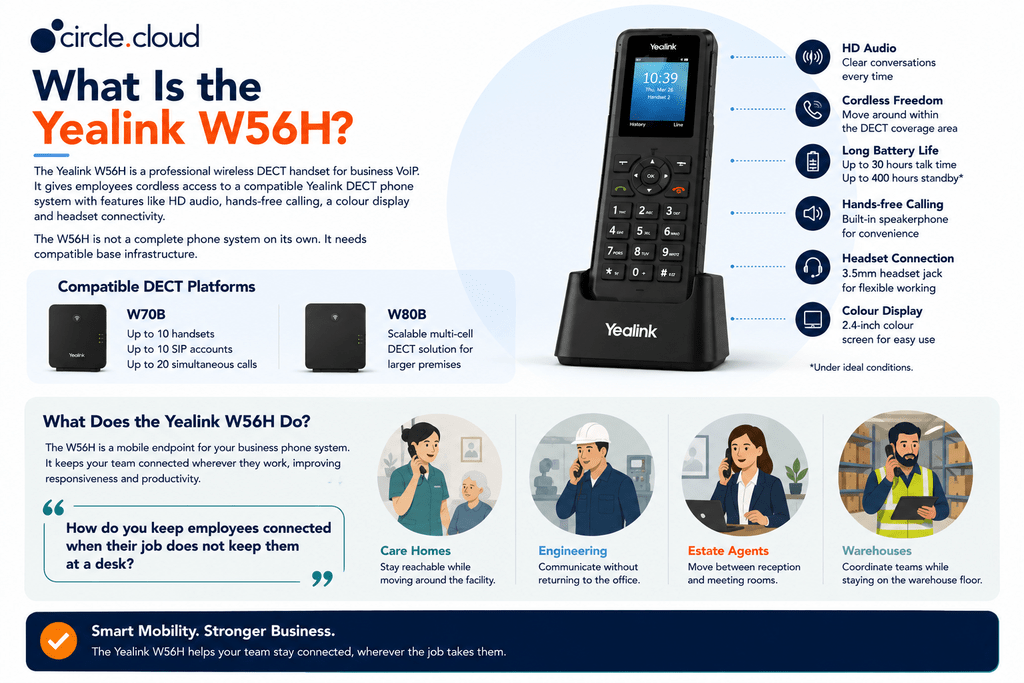
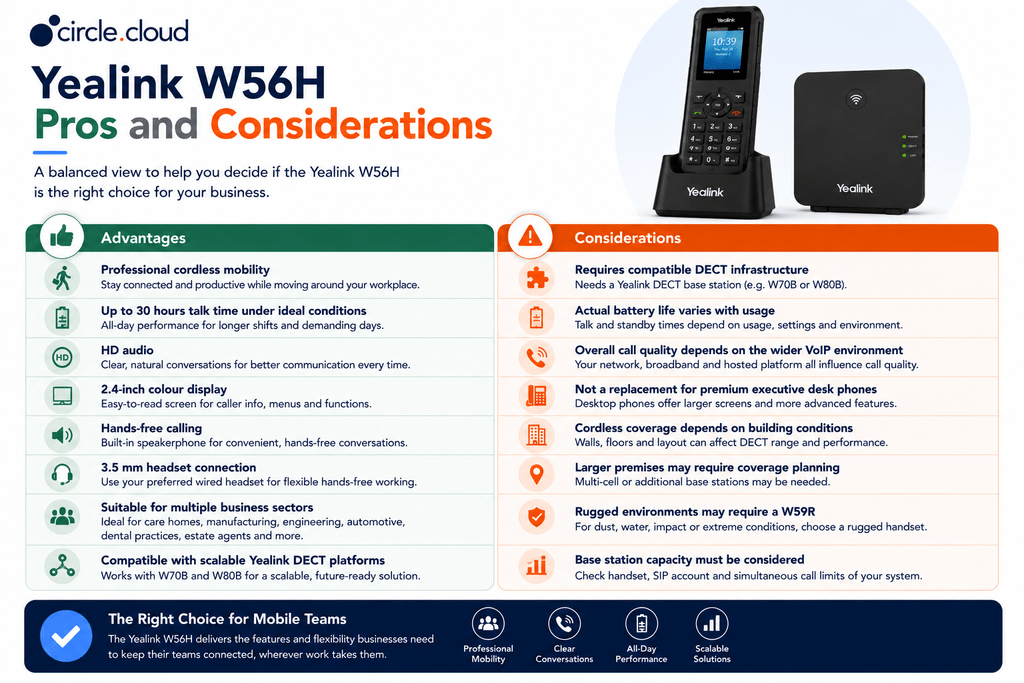
The Yealink W56H is a professional wireless DECT handset for business VoIP. It is designed to give employees cordless access to a compatible Yealink DECT phone system while providing business-focused features such as HD audio, hands-free calling, a colour display and headset connectivity. The key point is that the W56H is not a complete DECT phone system on its own. It needs compatible base infrastructure.
Yealink currently identifies the W56H as compatible with its W70B and W80B DECT platforms. The W70B is aimed at small and medium-sized businesses and supports up to 10 compatible DECT handsets, 10 SIP accounts and 20 simultaneous calls. This makes the W56H particularly interesting as either an individual cordless business handset or as part of a larger multi-handset deployment.
What Does the Yealink W56H Do?
The W56H essentially provides a mobile endpoint for a business telephone system. Instead of an employee having to return to a desk to answer or make a business call, the handset allows them to remain mobile within the DECT coverage area. That can make a meaningful operational difference in workplaces where staff are regularly moving between rooms, departments or work areas.
For example, a care worker can remain reachable while moving around a facility. An engineer can communicate without returning to an office. An estate agent can move between reception and meeting rooms. A warehouse supervisor can coordinate with colleagues while remaining on the warehouse floor.
The W56H therefore solves a relatively simple business problem: “How do you keep employees connected when their job does not keep them at a desk?”
Key Features of the Yealink W56H
The most important W56H features are those that affect usability, call quality, battery performance and deployment flexibility.
Professional DECT Wireless Communication
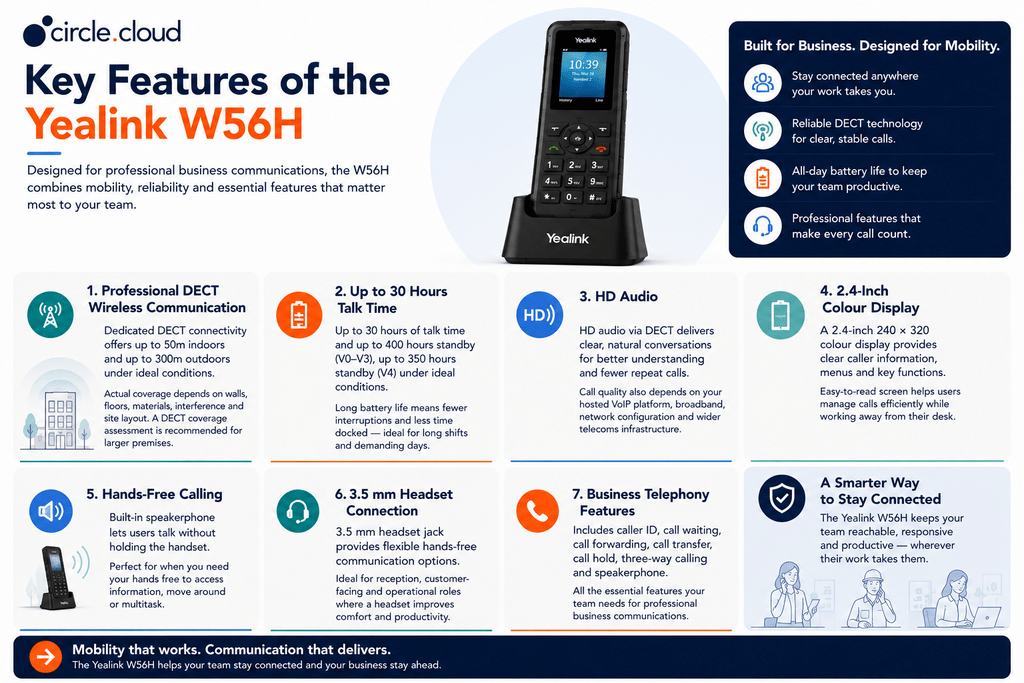
DECT provides dedicated wireless connectivity between the handset and compatible DECT infrastructure. Yealink specifies wireless coverage of up to 50 metres indoors and up to 300 metres outdoors under ideal conditions for the W56H. These figures should not be interpreted as guaranteed coverage throughout a building. Walls, floors, building materials, interference and the physical layout of a premises can all affect real-world performance.
For larger care homes, warehouses and manufacturing facilities, a DECT coverage assessment may therefore be more valuable than simply relying on the manufacturer’s maximum range.
Up to 30 Hours Talk Time
The W56H uses a lithium-ion battery, and Yealink currently specifies up to 30 hours of talk time. Standby time varies by hardware version, with Yealink listing up to 400 hours for V0 to V3 and up to 350 hours for V4 under ideal conditions. For businesses where employees work long shifts, battery life can be particularly important. A handset that can remain operational throughout a working day reduces the need for employees to repeatedly return to a charging point.
Actual battery life will depend on usage, network conditions, settings and other factors, so the quoted figures should be treated as ideal-condition specifications rather than guaranteed operating times.
HD Audio
The W56H uses DECT technology to provide HD audio and is designed for clear business communication. This matters when employees are regularly speaking with customers, suppliers and colleagues. However, handset specifications are only one part of call quality. The hosted VoIP platform, broadband connection, network configuration and wider telecoms infrastructure can all influence the final experience.
2.4-Inch Colour Display
The handset features a 2.4-inch 240 × 320 colour display. For everyday business use, this provides a practical interface for caller information, menus and telephone functions without the size and complexity of a desktop executive phone. The display is particularly useful where employees need to manage calls while working away from a fixed workstation.
Hands-Free Calling
The W56H supports hands-free communication, allowing employees to conduct calls without continuously holding the handset. This can be useful in operational environments where users need to reference information, move around or carry out another task while communicating.
3.5 mm Headset Connection
The W56H includes a 3.5 mm headset connection. This gives businesses another option for users who need hands-free communication, particularly in reception, customer-facing or operational roles. It also means businesses do not necessarily need to replace the handset with a more expensive desktop phone simply because a particular user prefers headset-based working.
Business Telephony Features
The W56H supports common business calling functions, including caller ID, call waiting, call forwarding, call transfer and call hold. It also supports three-way calling and a speakerphone. These features make the handset suitable for normal business communications rather than positioning it as a basic domestic cordless telephone.
W56H and the Yealink W70B
One of the most important considerations when buying a W56H is understanding its relationship with the DECT base station. The W70B is a professional DECT IP base station designed for small and medium-sized businesses. It supports up to 10 compatible DECT handsets, 10 SIP accounts and 20 simultaneous calls. This means a business could deploy several W56H handsets around a site while managing them through a common DECT platform. The W70B also supports Yealink’s provisioning and deployment capabilities, which can make larger deployments easier for IT teams and telecoms providers to configure and maintain.
The important purchasing point is therefore: “The W56H should be selected as part of a compatible DECT solution, not as an isolated phone.”
Which Businesses Should Consider the Yealink W56H?
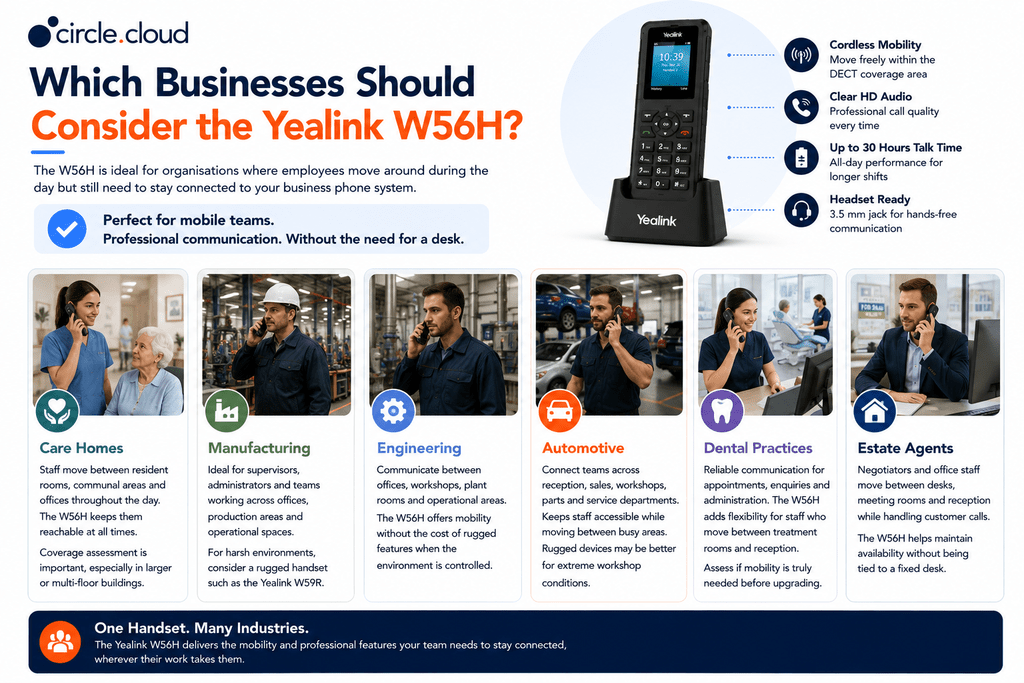
The W56H is most valuable where employees need mobility but do not necessarily require the rugged construction of a specialist handset.
Care Homes
Care homes are a strong use case for cordless business communication because employees frequently move between resident rooms, communal areas, offices and other parts of the building. A W56H deployment can help staff remain reachable without relying on personal mobiles or fixed desk phones. Coverage should be assessed carefully, particularly in larger or multi-floor buildings.
Manufacturing
Manufacturing businesses often have a combination of offices, production areas and operational spaces. The W56H can provide mobile communication for supervisors, administrators and employees working across general areas. For exceptionally demanding environments with significant dust, moisture or impact risks, however, a rugged handset such as the Yealink W59R may be more appropriate.
Engineering
Engineering companies often need communication between offices, workshops, plant rooms and operational areas. The W56H provides a practical middle ground between a fixed desk phone and a specialist rugged handset. Where the environment is relatively controlled, it can provide mobility without paying for rugged features that may not be required.
Automotive
Automotive businesses can have reception areas, sales offices, workshops, parts departments and service areas operating within the same organisation. The W56H can help employees remain accessible as they move between these areas. For workshop users exposed to particularly harsh conditions, a ruggedised device may be a better choice.
Dental Practices
Dental practices rely heavily on telephone communication for appointments, enquiries and administration. A cordless handset can provide useful flexibility for reception and administrative employees who move between rooms or workstations. However, businesses should consider whether mobility is genuinely required before replacing fixed desk phones.
Estate Agents
Estate agents are particularly telephone-dependent businesses. Negotiators and office staff may move between desks, meeting rooms and reception while continuing to handle customer calls. The W56H can provide a straightforward way of maintaining availability without requiring employees to remain at a fixed desk.
W56H vs a Standard Desk Phone
The W56H should not be viewed as universally better than a desk phone. The right choice depends on how the employee works. A fixed IP phone remains preferable for employees who spend most of their day at a workstation and need programmable keys, multiple lines, larger displays or executive features. The W56H becomes more attractive when mobility is a genuine operational requirement.
For example, a receptionist who spends most of the day at a reception desk may be better served by a desktop IP phone. A care worker, workshop supervisor or mobile office employee may gain considerably more value from a cordless handset. The best deployment may therefore combine both types.
Yealink W56H vs W74P vs W76P and W59R
The W56H sits within a wider Yealink DECT ecosystem, so businesses should consider whether they are buying an additional handset or selecting a complete cordless solution.
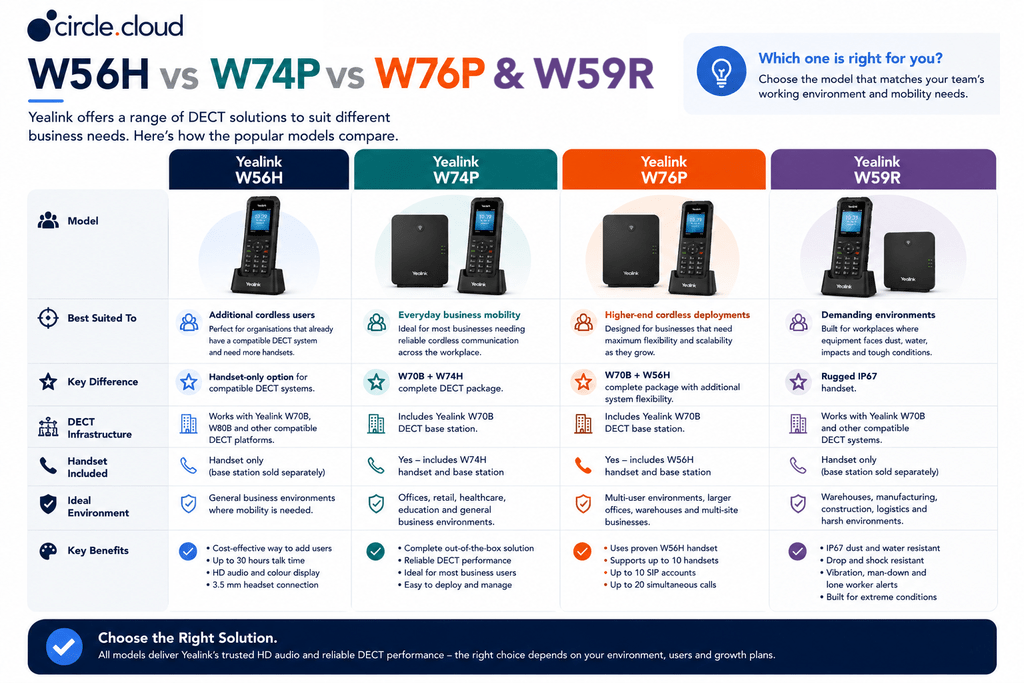
The W56H is therefore particularly useful when the business already has compatible DECT infrastructure or is building a system around a suitable Yealink base.
How Many W56H Handsets Do You Need?
The number of handsets should be based on working patterns rather than simply the maximum capacity of the base station. A business might have 10 employees who occasionally need mobility but only five who genuinely need a cordless handset. Conversely, a care home or operational environment may require more widespread handset availability because employees are distributed throughout the premises.
The key questions are:
- Which employees need to remain reachable while moving?
- Where do those employees work?
- How many people need simultaneous access?
- What areas need DECT coverage?
- Are some users better suited to desk phones or rugged handsets?
With a W70B, the overall DECT system can support up to 10 compatible handsets and 20 simultaneous calls.
DECT Coverage: What Businesses Need to Know
Coverage is one of the most important considerations when deploying cordless business phones. A manufacturer range figure is measured under specific conditions. It does not guarantee that a handset will work reliably through multiple concrete walls, across several floors or throughout a warehouse containing dense shelving and machinery.
Before deployment, consider:
- Building construction: Brick, concrete, metal and reinforced structures can affect DECT signals.
- Floor layout: Multi-floor buildings may require additional planning.
- Operational areas: Machinery, shelving and equipment can change the wireless environment.
- Required roaming area: Identify where users actually need to make and receive calls.
For larger premises, additional DECT infrastructure or a multi-cell solution may be more appropriate than simply adding handsets.
Building the W56H into a Complete Business Phone System
The W56H is an endpoint within a wider communications architecture. A typical deployment can look like:
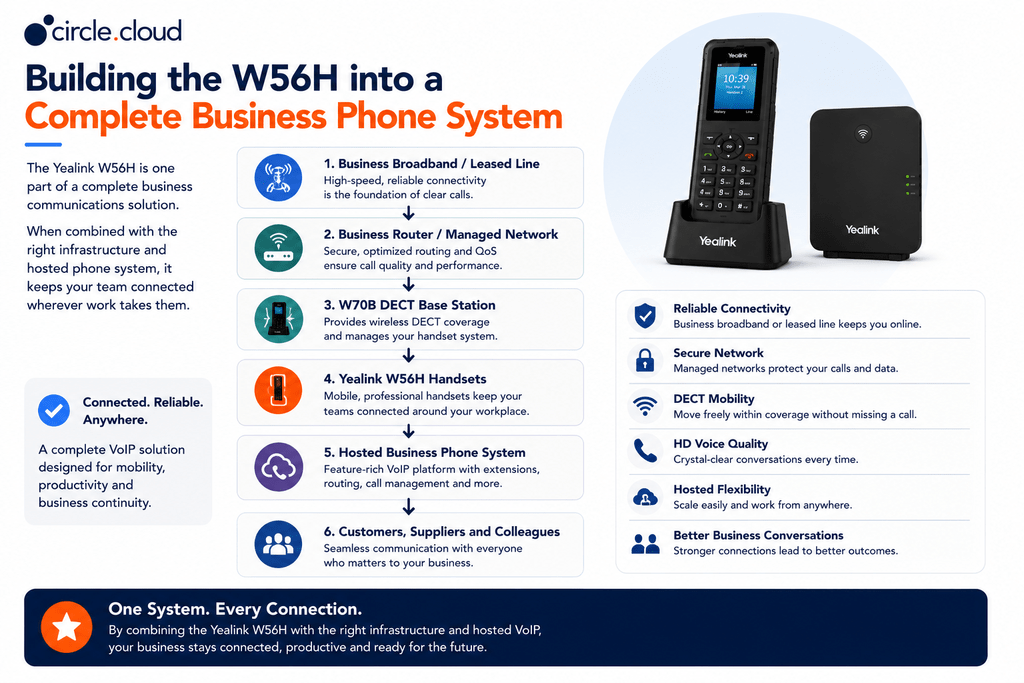
This distinction is important because the handset cannot compensate for unreliable broadband, poorly configured networking or an unsuitable hosted telephone platform. The DECT base station also depends on power, supplied either from the mains or through Power over Ethernet, so a power cut will take the base station and every handset registered to it out of service at the same time. For businesses where telephone availability directly affects revenue, connectivity and power should be treated as part of the phone system rather than as separate IT considerations. That can include business broadband, leased lines, automatic 4G or 5G failover and an uninterruptible power supply for the base station and supporting network equipment where downtime would have a significant operational impact.
Connectivity and the W56H
Hosted VoIP relies on network connectivity. A business can have a high-quality W56H handset and still experience poor calls if its broadband connection is unstable, its network is incorrectly configured, or there is insufficient resilience. This is particularly relevant for telephone-dependent organisations. An estate agent unable to receive calls can miss property instructions. A manufacturer may lose customer orders. A dental practice may struggle to handle appointment enquiries. A service centre may be unable to coordinate customers and technicians.
For these organisations, business broadband or a leased line can provide the connectivity foundation, while automatic 4G or 5G failover can provide an additional layer of business continuity.
PSTN and ISDN Switch Off Considerations
The UK’s traditional PSTN and ISDN infrastructure is being retired as businesses move towards modern digital communications. For organisations still relying on legacy analogue or ISDN-based telephone services, this transition provides an opportunity to review the entire communications architecture. A W56H-based deployment can form part of a hosted VoIP strategy, but the handset itself is not the migration solution.
Businesses should consider the complete environment:
- Hosted business phone system
- Business connectivity
- DECT infrastructure
- Phone numbers and porting
- Call routing
- Network configuration
- Business continuity
- Ongoing support
The objective should be a future-ready business telephone system rather than simply replacing an old physical phone with a new handset.
Security and Business Administration
The W70B supports security mechanisms including TLS and SRTP encryption. However, security should always be considered at system level. Businesses should also consider administrator credentials, network segmentation, hosted platform security, firmware management and access controls. This is particularly important for organisations handling commercially sensitive customer conversations or personal information. The handset is one component of a secure communications environment, not the entire security strategy.
What Should You Budget For?
The cost of a W56H deployment depends on whether the business already has compatible DECT infrastructure. A handset-only deployment may require:
- W56H handsets
- Compatible DECT base station
- Hosted phone system
- Business connectivity
- Network equipment
- Power protection for the base station and network equipment
- Installation and configuration
- Ongoing support
The handset price should therefore not be treated as the total project cost. Current UK retail listings show that W56H pricing varies by supplier and configuration. For example, Currys Business currently lists the handset separately, while other UK suppliers position it as an additional handset for compatible DECT systems.
For a business deployment, it is generally more useful to calculate the total cost of ownership than to select the lowest handset price.
Common Yealink W56H Buying Mistakes
Deploying DECT handsets like the Yealink W56H can transform workplace mobility, but missteps during procurement often lead to unexpected costs and degraded audio quality. Before placing an order, avoid these common traps:
- Buying the Handset Without Checking the Base: The W56H is an endpoint and requires a compatible DECT base station (such as the W70B or W80B). Always confirm base station compatibility and remaining channel capacity before ordering additional handsets for an existing setup.
- Assuming Maximum Range Equals Real Coverage: The published range (up to 50 meters indoors and 300 meters outdoors) reflects ideal line-of-sight conditions. Physical obstacles like concrete walls and metal framework significantly reduce coverage, making site surveys or DECT repeaters necessary for complex spaces.
- Buying a Handset for Every Employee: Desk-bound roles rarely benefit from cordless mobility. Audit employee workflows first to invest in handsets only where operational mobility provides clear value, opting for standard IP desk phones elsewhere.
- Ignoring Network Connectivity: High-end DECT hardware cannot make up for poor internet quality. Ensure your underlying network, VoIP service, and router QoS settings are fully optimised for real-time voice traffic.
- Treating the Handset as the Phone System: The W56H simply delivers the audio; it does not dictate features like call routing, auto-attendants, or extension mapping. Your overall call experience depends entirely on the hosted telephony platform supporting it.
Taking the time to evaluate your network infrastructure, physical layout, and actual user needs ensures a seamless rollout that maximises your ROI.
When Should You Choose Another Yealink Handset?
The W56H is not automatically the right choice for every cordless user.
- A Yealink W74P may be more appropriate when the business wants a newer complete cordless system built around the W70B and W74H.
- A Yealink W76P may be preferable where the business specifically wants the W70B paired with the W56H as a complete system.
- A Yealink W59R is more appropriate where the working environment requires ruggedised protection and specialist features.
- A desktop IP phone may be better for employees who spend most of their day at a fixed workstation.
The right question is therefore not simply whether the W56H is a good handset. It is whether it matches the employee’s working environment, mobility requirements and wider communications platform.
Which W56H Configuration Should You Buy?
Selecting the right Yealink W56H setup comes down to matching your physical workspace and operational growth with the correct DECT supporting structure. Use this guide to determine the best deployment approach for your operational needs:
- Existing Compatible DECT System: If your business already runs on compatible Yealink DECT infrastructure, adding individual W56H handsets is a simple, cost-effective way to expand staff mobility without extra hardware overhead.
- Small Business: Avoid over-provisioning by assigning handsets strictly based on genuine movement requirements rather than headcount. Deploying cordless units only to mobile staff keeps hardware costs down while maintaining seamless communication.
- Growing Business: Factor in long-term scalability before purchasing by checking the maximum handset capacity of your DECT base station, the licensing limits of your hosted PBX, and the expected range footprint.
- Care Home or Large Premises: Prioritise site coverage over handset count. Map out DECT base station placement and multi-cell repeaters first to guarantee reliable signal across all corridors and active staff zones.
- Manufacturing or Engineering: Evaluate site durability requirements carefully. If environments present heavy dust, liquid exposure, or frequent drop hazards, investing in ruggedised DECT models (such as the Yealink W59R) will offer far better long-term reliability than standard commercial handsets.
Matching hardware choices to actual working conditions helps build a VoIP environment that is reliable, scalable, and tailored to your everyday operations.
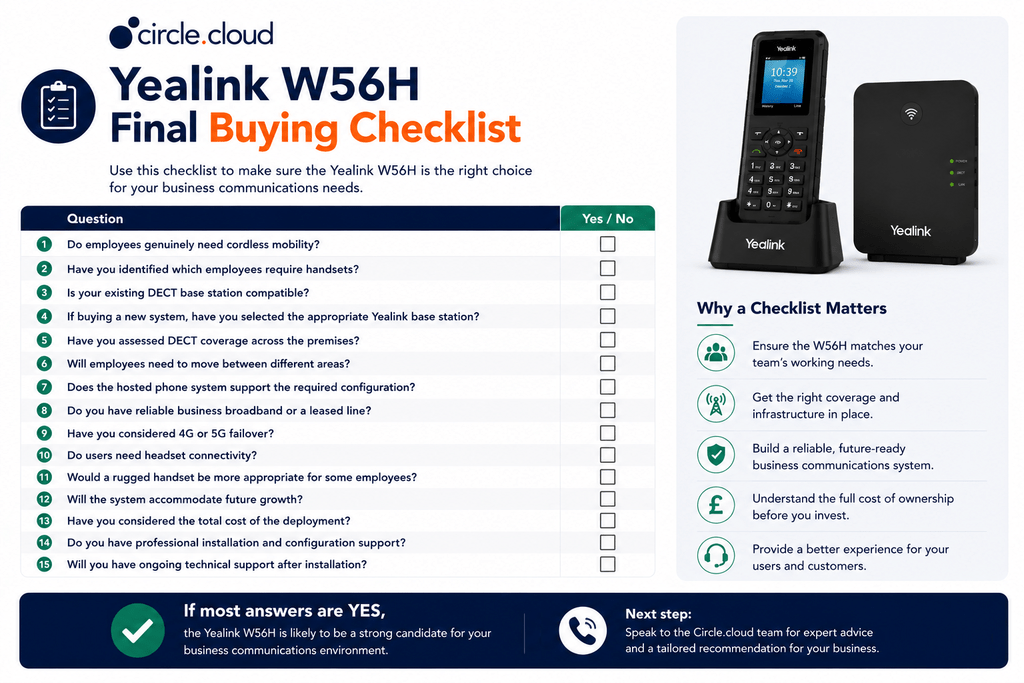
If you are still unsure which handset, base station or wider telephone configuration is appropriate, speak to our expert circle.cloud team. We can help you assess your working environment and help you choose a solution based on users, coverage, connectivity and business requirements.
circle.cloud verdict: The Yealink W56H is a practical professional cordless handset for businesses that need mobility without necessarily requiring a ruggedised device. Its strongest value comes when it is deployed as part of a properly designed Yealink DECT and hosted VoIP environment.
Why Buy the Yealink W56H from circle.cloud?
Investing in business telephony hardware requires more than just dropping a handset into your cart; it takes an infrastructure partner who understands how every piece fits together. Here is why partnering with circle.cloud ensures your deployment succeeds from day one:
- End-to-End Communications Expertise: A handset is only as good as the network behind it. circle.cloud approaches your setup as a complete project, evaluating the W56H alongside your hosted telephony, business broadband, leased lines, and network resilience.
- Mission-Critical Reliability: For industries where phone availability directly drives revenue and customer service, downtime is not an option. We ensure your underlying connectivity and failover options keep your team online 24/7.
- Sector-Specific Understanding: Organisations in care, manufacturing, automotive, dental, estate agency, and engineering face unique operational hurdles. We tailor infrastructure to keep mobile staff reachable in challenging physical environments.
- Tailored Solution Mapping: If you are unsure whether the W56H fits your workflow, we assess your wider requirements and recommend hardware configurations built around how your employees actually move and work.
Getting your communication infrastructure right the first time eliminates costly rework and keeps your business connected when it matters most. If you are unsure whether the W56H is the right handset, circle.cloud can help assess the wider requirement and recommend a configuration based on how your employees actually work.
Conclusion
The Yealink W56H is a professional cordless DECT handset designed for businesses that need mobility without being tied to fixed desks. Its HD audio, colour display, hands-free functionality, headset connectivity and long battery life make it suitable for a wide range of business environments. Yealink currently specifies up to 30 hours of talk time under ideal conditions, while compatible infrastructure such as the W70B provides a scalable platform for multiple handsets.
Its strongest use cases are organisations where employees regularly move around a defined workplace, including care homes, manufacturing, engineering, automotive and estate agency environments. However, the W56H should not be purchased in isolation. The DECT base, coverage, hosted phone system, business internet and resilience strategy all contribute to the quality and reliability of the finished solution.
The right question is not simply “Is the Yealink W56H a good cordless phone?” It is: “Is the Yealink W56H the right cordless endpoint for the way our employees work?” If the answer is yes, it can provide a practical and scalable way to keep mobile employees connected to a professional business phone system.
FAQs
1. What is the Yealink W56H?
The Yealink W56H is a professional cordless DECT handset designed for business VoIP. It provides mobile access to compatible Yealink DECT phone systems.
2. Is the Yealink W56H a complete phone system?
No. The W56H is a handset and requires compatible DECT infrastructure, such as the Yealink W70B or W80B, together with a suitable hosted or SIP-based phone service.
3. How many W56H handsets can connect to a W70B?
A Yealink W70B can support up to 10 compatible DECT handsets, alongside up to 10 SIP accounts and 20 simultaneous calls.
4. What is the range of the Yealink W56H?
Yealink specifies up to 50 metres indoors and up to 300 metres outdoors under ideal conditions. Actual coverage depends on walls, floors, building materials, interference and site layout.
5. How long does the Yealink W56H battery last?
The W56H provides up to 30 hours of talk time under ideal conditions. Standby time varies by hardware version and usage.
6. Does the Yealink W56H support HD audio?
Yes. The W56H supports HD audio for clearer business conversations. Actual call quality also depends on the hosted VoIP platform, broadband and network infrastructure.
7. Does the Yealink W56H have a colour screen?
Yes. The handset has a 2.4-inch 240 × 320 colour display for caller information, menus and telephone functions.
8. Does the Yealink W56H support a headset?
Yes. The W56H includes a 3.5 mm headset connection, providing an additional hands-free communication option.
9. Can the Yealink W56H be used with hosted VoIP?
Yes. The W56H can form part of a hosted VoIP solution when paired with compatible Yealink DECT infrastructure and a suitable business phone system.
10. Is the Yealink W56H suitable for care homes?
Yes. Its cordless design can help care staff remain reachable while moving between rooms and operational areas. Larger premises should have DECT coverage assessed before deployment.
11. Is the Yealink W56H suitable for manufacturing and engineering?
Yes, where the environment is suitable for a standard professional handset. For areas exposed to significant dust, water or physical impact, a rugged handset such as the Yealink W59R may be more appropriate.
12. Can the Yealink W56H replace a desk phone?
It can replace a desk phone for users who need mobility, but it is not necessarily the best option for every employee. Users who spend most of their day at a workstation may benefit more from a professional desktop IP phone.
13. What is the difference between the Yealink W56H and W59R?
The W56H is designed for standard professional cordless business use, while the W59R is a ruggedised handset designed for more demanding environments where dust, water or physical impacts may be a concern.
14. Does the Yealink W56H work during an internet or power outage?
The handset itself does not provide internet resilience, and the DECT base station requires mains or Power over Ethernet power, so handsets will not work during a power cut unless the base station and supporting network equipment are protected by an uninterruptible power supply. Business continuity depends on the wider phone system, connectivity and power arrangements, so businesses that cannot tolerate telephone downtime should consider business broadband or a leased line with appropriate 4G or 5G failover alongside power protection.
15. Is the Yealink W56H suitable for a growing business?
Yes. When deployed with suitable Yealink DECT infrastructure, the W56H can provide a scalable cordless solution. Businesses should plan handset numbers, DECT coverage, hosted VoIP capacity and future growth together.
About the Reviewer & Editorial Methodology
Reviewed By: circle.cloud Technical & Solutions Team Role: Business Communications and Telecoms Specialists Experience: Experience across hosted VoIP, business phone systems, broadband, leased lines, networking and cloud communications for UK organisations.
Editorial Methodology
This buyer’s guide has been developed using:
- Current manufacturer specifications and documentation.
- UK business deployment considerations.
- Practical hosted VoIP and connectivity requirements.
- Assessment of scalability, mobility, reliability and business suitability.
- Consideration of organisations preparing for the UK’s PSTN and ISDN Switch Off.
Recommendations are based on practical suitability rather than manufacturer marketing claims alone.
Editorial Policy
circle.cloud aims to provide accurate, practical and impartial buying guidance. Product suitability can vary according to building layout, user numbers, DECT coverage, existing infrastructure and the wider hosted telephony platform.
Disclaimer
Product specifications can change as manufacturers introduce new hardware revisions or firmware. Published wireless range and battery figures are based on specified or ideal conditions and should not be treated as guaranteed real-world performance. Businesses should assess their individual requirements before purchasing business-critical communications equipment.