Published: 16th September 2026 Last updated: 16th September 2026
Reviewed by: circle.cloud Team Last Reviewed: 16th September 2026
Reading time: Approximately 15 minutes Revision: Version 1.0
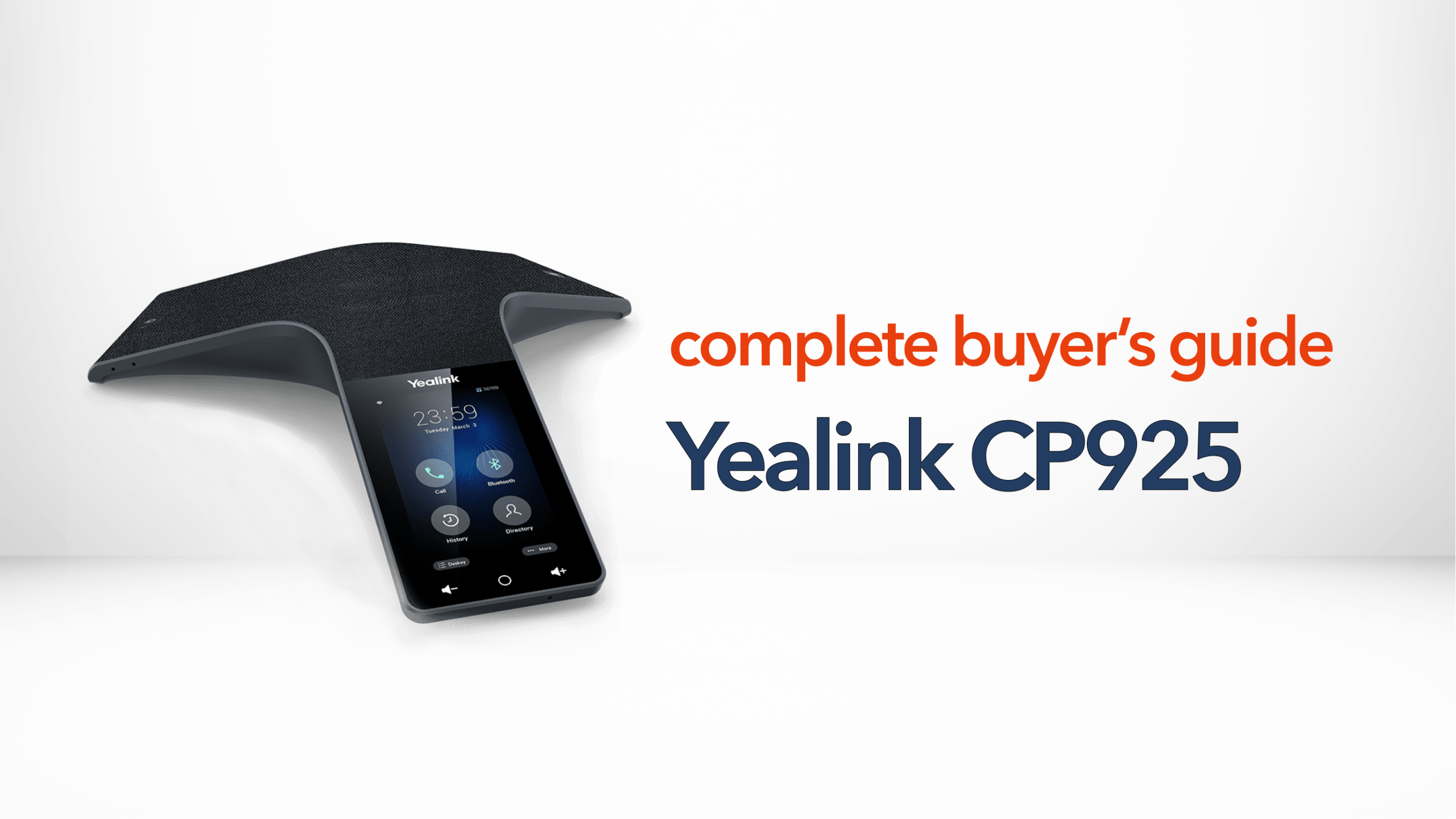
For many UK businesses, meetings still depend on reliable voice communication. A sales team may need to discuss a proposal with a customer. An engineering company may need to coordinate a project with a supplier. A care organisation may need managers and external stakeholders to communicate clearly. A conference phone needs to make these conversations straightforward without creating unnecessary technical complexity. The Yealink CP925 is designed for exactly this type of environment. It brings the conference phone, microphones, speaker, touchscreen controls and network connectivity into one dedicated device. Its 360-degree microphone pickup and HD audio are intended to make conversations easier to hear from around a meeting table, while Bluetooth and USB connectivity provide flexibility for hybrid meeting scenarios.
For circle.cloud customers, the CP925 should be viewed as one component of a complete business communications system. The conference phone sits on top of the network and connectivity infrastructure and connects into the wider hosted telephony environment. That means the right buying decision is not simply whether the CP925 is a good conference phone. It is whether it is the right conference phone for the size of your room, the way your employees communicate and the technology supporting your business.
Keep reading this guide to learn what the Yealink CP925 does, who it is best suited to, the key features and specifications to consider, potential use cases and what to check before buying. You will also understand how the CP925 can form part of a complete business communications environment, helping organisations choose a conference phone that fits their current requirements while supporting future growth.
Key Takeaways
- The Yealink CP925 is an HD IP conference phone designed for small to medium-sized meeting rooms.
- It features a 4-inch 480 × 800 multi-touch display.
- Its microphone system provides up to 6 metres of 360-degree voice pickup under specified conditions.
- The current Yealink product page highlights a 7-microphone array, combining voice pickup and noise cancellation.
- It supports HD audio, full-duplex speakerphone functionality and Yealink Noise Proof Technology.
- The CP925 supports up to five-way conference calling.
- Built-in Bluetooth and Wi-Fi provide additional connectivity options.
- Power over Ethernet can simplify installation by combining network connectivity and power.
- The CP925 can support hybrid meeting scenarios using Bluetooth or USB connectivity.
- A Yealink CPN10 can provide local three-way PSTN conferencing where required.
- It is best suited to businesses that regularly hold internal, customer or supplier meetings.
- The CP925 should be assessed as part of the wider hosted communications and network environment, rather than as a standalone purchase.
At a Glance
| Requirement | Yealink CP925 |
| Product type | HD IP conference phone |
| Primary environment | Small to medium-sized meeting rooms |
| Display | 4-inch multi-touch, 480 × 800 |
| Microphone pickup | Up to 6 metres / 20 feet, 360° |
| Audio | HD audio, full duplex |
| Conference capacity | Up to five-way conference calling |
| Connectivity | Ethernet, Wi-Fi and Bluetooth |
| Power | Power over Ethernet |
| Hybrid meetings | Bluetooth and USB connectivity |
| PSTN option | Three-way local PSTN conference with CPN10 |
| Best suited to | Meeting rooms, boardrooms and collaborative business spaces |
Note: Specifications can vary by firmware or product revision, so businesses should confirm the current configuration before purchase. Yealink’s current product documentation identifies the core features above.
Who This Guide Is For
This guide is for UK businesses considering the Yealink CP925 for meeting rooms, boardrooms or collaborative spaces. It is particularly useful for SMEs, growing businesses and multi-site organisations that regularly communicate with customers, suppliers, partners or internal teams. It is also relevant to businesses reviewing their wider hosted phone system as part of the move away from legacy PSTN services. BT plans to retire its PSTN network by 31 January 2027, making digital communications infrastructure increasingly important for organisations still dependent on traditional telephone services.
Why Trust This Guide
This guide focuses on practical business suitability rather than simply reproducing a manufacturer specification sheet. It considers the CP925 in the context of meeting-room requirements, network infrastructure, hosted VoIP, connectivity and day-to-day business communication. The objective is to help businesses understand where the CP925 adds genuine value, where another solution may be more appropriate and what should be assessed before deployment.
Why You Can Trust Our Recommendations
Our recommendations follow a role-and-environment-first approach. The most expensive or feature-rich conference phone is not automatically the right choice for every meeting room. We consider room size, expected participants, connectivity, meeting style, existing telephony infrastructure and future requirements before recommending a particular approach. This reflects circle.cloud’s wider positioning around simple, reliable communications and practical technical support.
What Is the Yealink CP925?
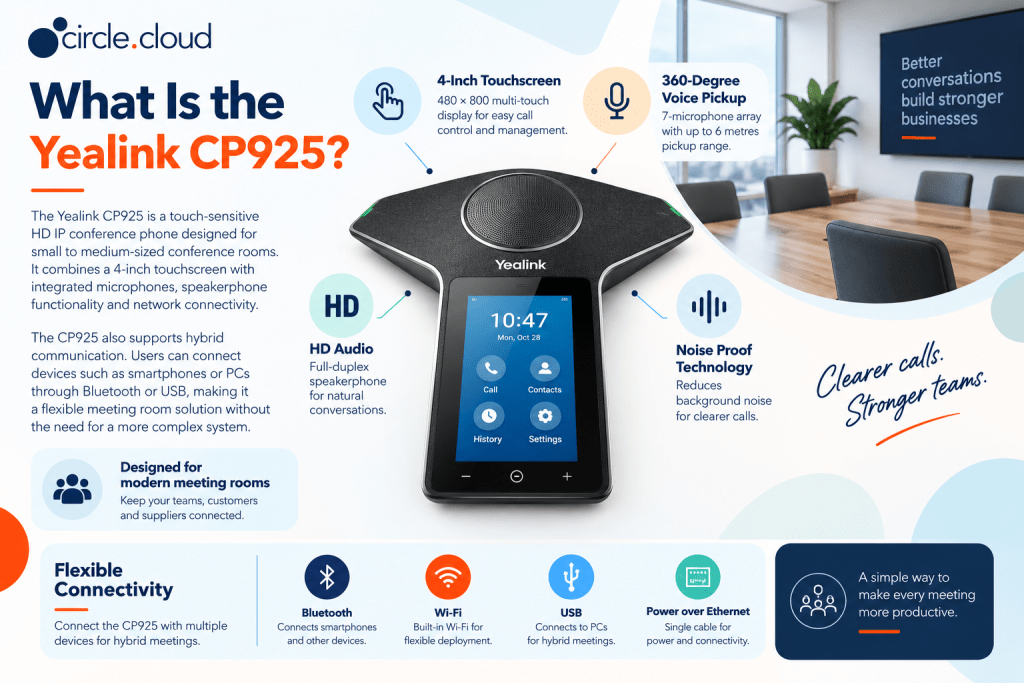
The Yealink CP925 is a touch-sensitive HD IP conference phone designed for small to medium-sized conference rooms. It combines a 4-inch touchscreen with integrated microphones, speakerphone functionality and network connectivity. The current Yealink specification identifies a 4-inch 480 × 800 multi-touch display, HD audio, full-duplex speakerphone, Noise Proof Technology, 360-degree voice pickup and a 6-metre microphone pickup range.
The CP925 is also designed to support hybrid communication. Users can connect devices such as smartphones or PCs through Bluetooth or USB, allowing the conference phone to act as part of a broader meeting setup rather than being restricted to one telephone connection. This makes it particularly useful for businesses that want a dedicated conference-room telephone without introducing an unnecessarily complicated meeting-room system.
What Does the Yealink CP925 Do?
At its simplest, the CP925 provides a central audio endpoint for business meetings. Participants sit around a meeting table and communicate through the integrated microphone and speaker system rather than passing a handset around the room. The 360-degree pickup is designed to capture voices from different positions around the table.
The touchscreen provides access to telephone functions, while Bluetooth, USB, Wi-Fi and Ethernet connectivity provide different ways of integrating the device into a business environment. The result is a more practical alternative to putting a standard desk phone in the middle of a meeting table.
Key Features of the Yealink CP925
The most useful way to assess the CP925 is to consider what each feature means for the people using the meeting room.
4-Inch Multi-Touch Display
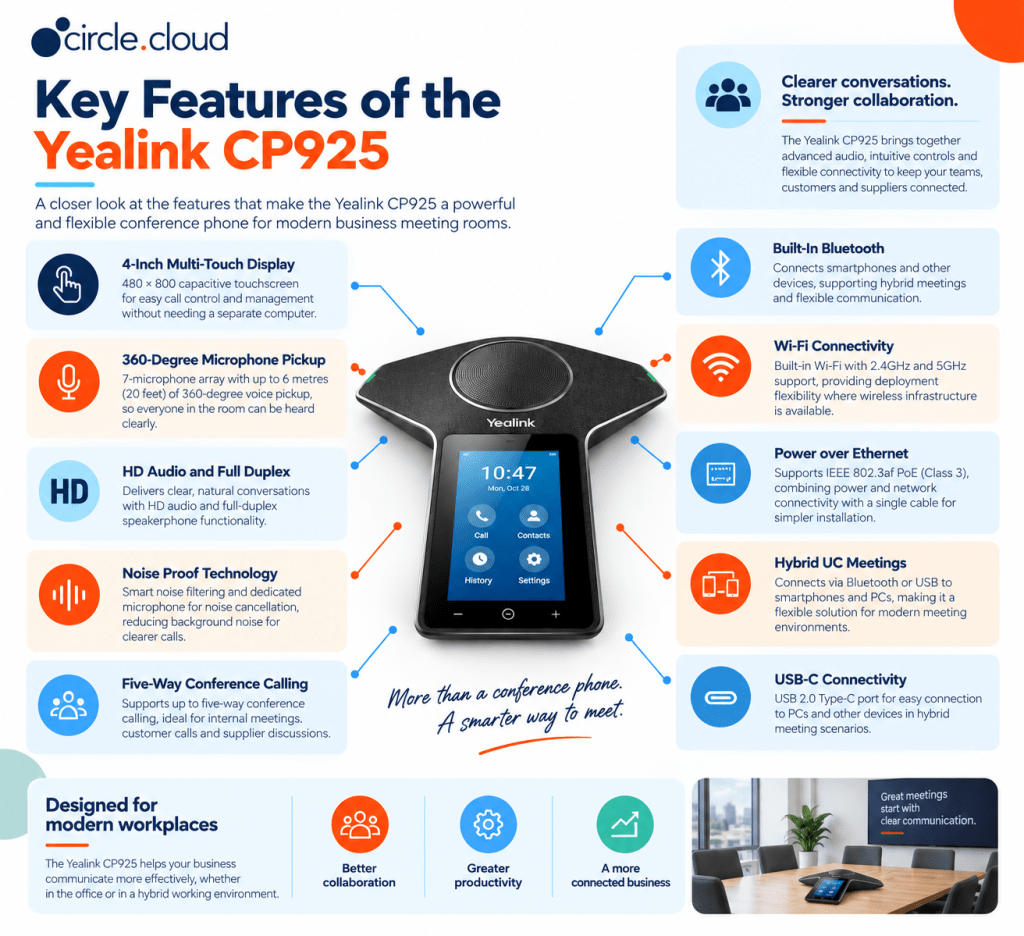
The CP925 has a 4-inch capacitive multi-touch screen with a 480 × 800 resolution. It provides a dedicated interface for controlling calls and conference functions without requiring a separate computer for basic telephone meetings. For businesses, this keeps the conference-room experience relatively straightforward. Users can interact directly with the device rather than relying on complicated controls or a separate desk phone.
360-Degree Microphone Pickup
The CP925’s microphone system is one of its most important features. Yealink specifies up to 20 feet, or approximately 6 metres, of 360-degree voice pickup. This is designed around the way people actually sit in a meeting room. Participants do not need to lean towards one microphone or remain directly in front of the device to be heard.
However, actual performance will depend on room size, furniture, background noise and the position of participants.
HD Audio and Full Duplex
The CP925 supports HD audio and full-duplex speakerphone functionality. This allows participants to hear and speak naturally during a conference call rather than relying on basic half-duplex communication. For customer meetings and internal discussions, this can make conversations more natural and easier to follow.
Yealink Noise Proof Technology
The CP925 includes Yealink Noise Proof Technology, with the current product page also highlighting Smart Noise Filtering and a dedicated microphone for noise cancellation. This is useful in meeting rooms where conversations may take place alongside office activity, air-conditioning or other background noise. Noise reduction should still be viewed as one part of the solution. Room acoustics, microphone placement, network quality and participant behaviour all affect the final experience.
Five-Way Conference Calling
The CP925 supports five-way conference calling, allowing multiple participants to join the same telephone conference. For many SME meeting rooms, this provides sufficient capacity for routine internal discussions, customer calls and supplier conversations without requiring a more complex conferencing platform.
Built-In Bluetooth
Bluetooth allows the CP925 to connect with compatible devices for hybrid meeting scenarios. Yealink specifically identifies Bluetooth connectivity as a way to connect mobile devices and support hybrid UC meetings. This can be particularly useful when a meeting involves a mixture of hosted telephony, mobile participants and PC-based communication.
Wi-Fi Connectivity
The CP925 includes built-in Wi-Fi, supporting 2.4GHz and 5GHz wireless networks. This provides an alternative to a wired network connection where the business has suitable wireless infrastructure. However, Wi-Fi should not automatically be considered preferable to Ethernet for a fixed conference phone. Where predictable connectivity is a priority, wired Ethernet and PoE may provide a simpler deployment.
Power over Ethernet
The CP925 supports Power over Ethernet, allowing compatible network infrastructure to provide both network connectivity and power to the device. Yealink identifies IEEE 802.3af PoE, Class 3, in its current product information. This can simplify conference-room installation by reducing the number of separate cables required.
Hybrid UC Meetings
The CP925 can be used for hybrid meeting scenarios by connecting devices such as smartphones or PCs through Bluetooth or USB. This makes it more flexible than a conference phone designed solely around traditional SIP calling.
USB-C Connectivity
The current Yealink product information identifies a USB 2.0 Type-C port. This supports the device’s wider connectivity capabilities and can be used as part of hybrid meeting scenarios. Businesses should confirm the exact connection requirements of the devices and meeting platforms they intend to use before deployment.
Which Business Sectors Should Consider the Yealink CP925?
The CP925 is most useful to organisations where meetings, customer discussions and multi-party telephone conversations form a regular part of business operations.
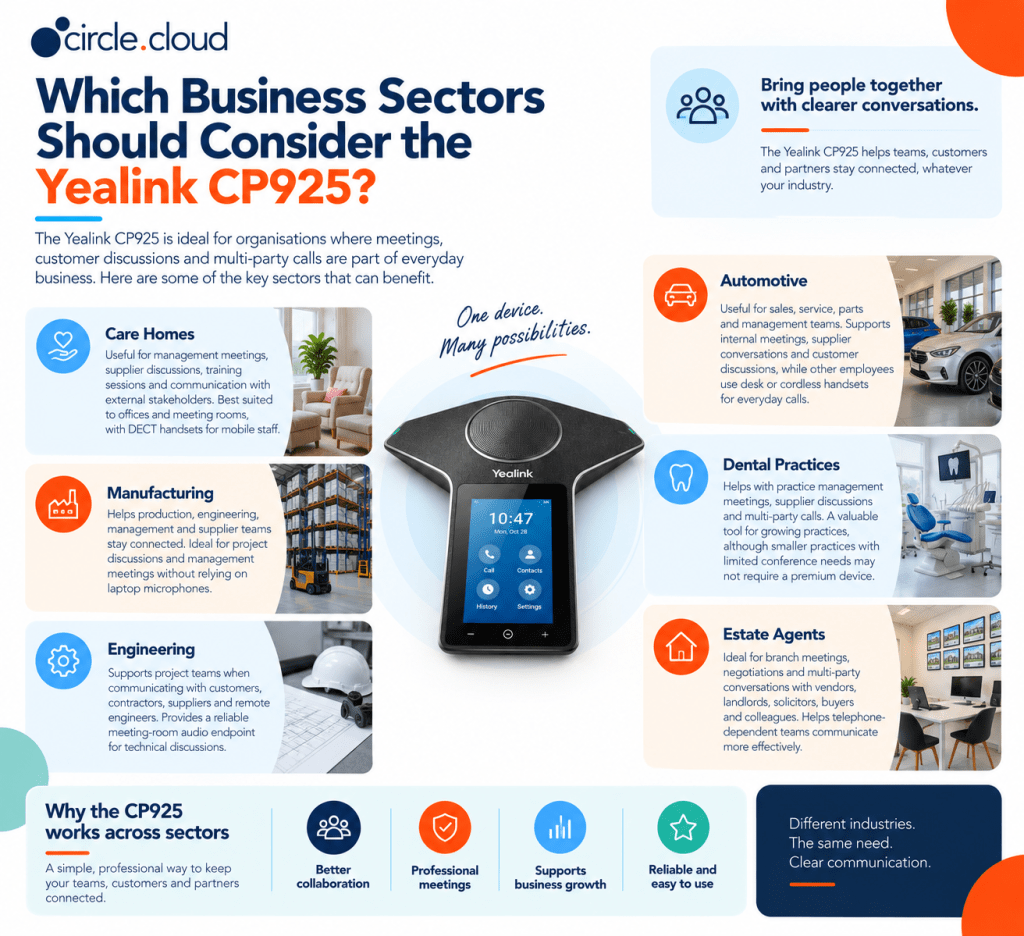
Care Homes
Care organisations may use conference facilities for management meetings, supplier discussions, training sessions and communication with external stakeholders. The CP925 is generally more appropriate for offices and meeting rooms than for care staff working throughout a building. Mobile employees may need DECT handsets instead.
Manufacturing
Manufacturing businesses often have production, engineering, management and supplier teams that need to communicate regularly. A dedicated conference phone can provide a simple way for managers and project teams to hold discussions without relying on a laptop microphone or passing around a standard handset.
Engineering
Engineering organisations can benefit from conference calling when project teams need to communicate with customers, contractors, suppliers and remote engineers. The CP925 can provide a central meeting-room audio endpoint, particularly where technical discussions involve several participants.
Automotive
Dealerships and automotive businesses often have sales, service, parts and management teams working across the same organisation. A conference phone can support management meetings, supplier conversations and customer discussions, while other employees may use desk or cordless handsets for everyday calls.
Dental Practices
Dental practices may use conference facilities less frequently than larger organisations, but a CP925 can still be useful for practice management meetings, supplier discussions and multi-party calls. For a small practice with limited conference requirements, however, a premium conference phone may not be necessary.
Estate Agents
Estate agencies are particularly telephone-dependent businesses. Branch managers may regularly communicate with vendors, landlords, solicitors, buyers and colleagues. A conference phone can make multi-party conversations more practical, particularly for branch meetings or negotiations involving several people.
When Is the Yealink CP925 a Good Choice?
The CP925 makes the most sense when a business has a defined meeting space and regularly needs to bring several people into a telephone conversation. It is particularly appropriate where users want a dedicated device rather than relying on a laptop’s built-in microphone and speaker. It can also be useful when a business wants a simple conference-room endpoint that integrates into a hosted VoIP environment while retaining Bluetooth and USB flexibility.
The CP925 becomes less compelling when meetings are rare, rooms are very large or users primarily rely on video-conferencing platforms that require cameras, displays and more advanced collaboration functionality.
Conference Room Size and Coverage
Room size is one of the most important considerations when selecting a conference phone.
Yealink specifies a microphone pickup range of up to 6 metres and 360 degrees under specified conditions. This does not mean every six-metre room will automatically produce perfect audio. Room shape, furniture, wall materials, background noise and participant positioning can all influence the experience. Businesses should therefore consider the CP925’s published range as a technical reference rather than a guaranteed room-size recommendation.
For larger rooms, a different conference solution or additional audio equipment may be more appropriate.
Building the CP925 into a Complete Business Phone System
A conference phone works best when the infrastructure behind it is properly designed.
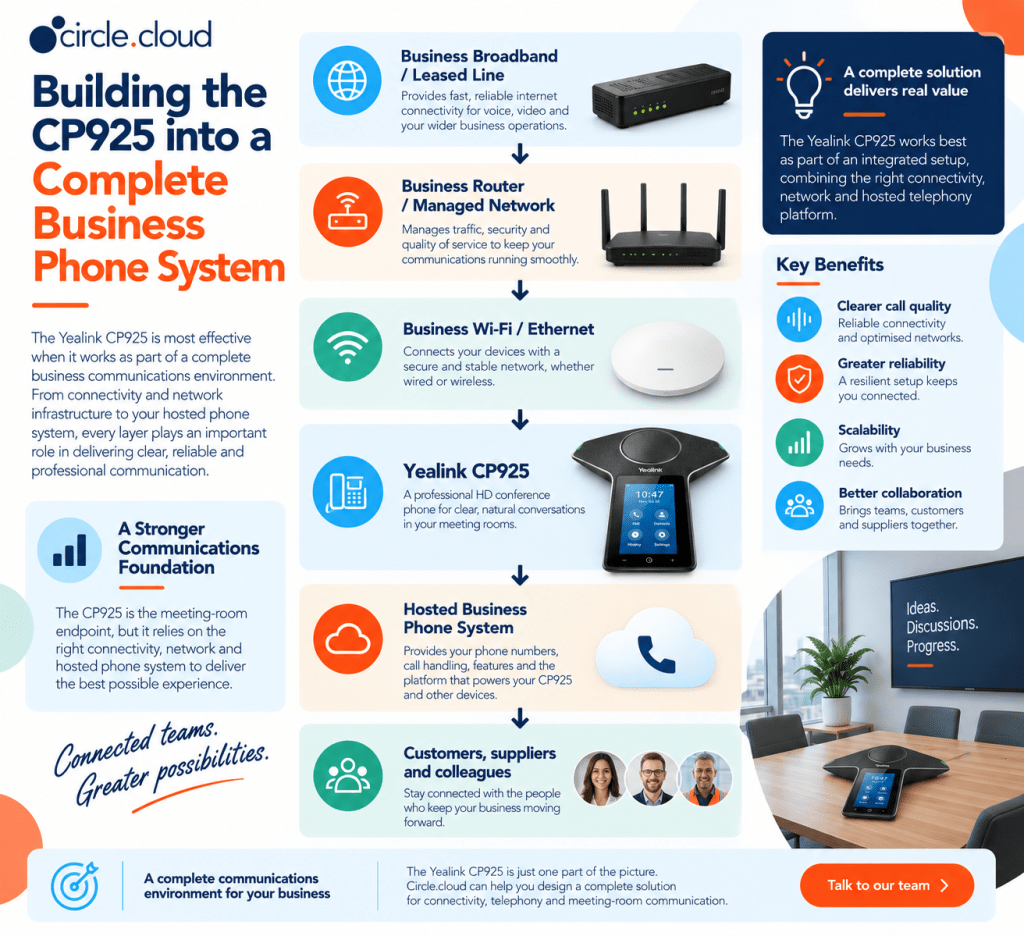
The CP925 is the meeting-room endpoint, not the entire communications system. Reliable broadband or a leased line provides connectivity, while the router and network carry the voice traffic. The hosted business phone system provides the telephone service, numbers, extensions and call-handling functionality. This wider approach reflects circle.cloud’s positioning around cloud-first communications, reliable connectivity and practical support rather than treating telecoms hardware in isolation.
Hosted VoIP and the CP925
The CP925 is designed for IP telephony, so compatibility with the hosted phone platform should be checked before purchase. This is important because the conference phone itself is only one component of the service. The hosted platform determines how numbers, extensions, call routing and conference functions are configured.
A business should therefore confirm:
- The hosted provider supports the CP925.
- Required SIP configuration is supported.
- Conference calling requirements can be met.
- Network and firewall requirements are understood.
- Firmware and provisioning arrangements are appropriate.
A managed deployment can reduce the risk of configuring the conference phone in isolation from the rest of the telecoms environment.
Connectivity: Business Broadband or Leased Line?
Voice traffic depends on reliable connectivity. For a small business with modest telephone requirements, suitable business broadband may provide sufficient connectivity. Larger organisations, multi-site businesses or businesses where communications downtime has a significant commercial impact may need a higher-resilience connectivity solution.
A leased line can provide dedicated connectivity and stronger service characteristics, depending on the provider and package selected. The correct choice should be based on the complete business requirement rather than assuming that the conference phone itself determines the connection.
Network Requirements
The CP925 can use Ethernet, Wi-Fi and PoE, giving businesses deployment flexibility. For a permanent meeting-room installation, wired Ethernet with PoE can be particularly straightforward where suitable switching infrastructure is already available. Wi-Fi may be useful where cabling is difficult, but the wireless network should be designed to provide dependable service for voice traffic.
Network configuration, traffic management, security and internet resilience should all be considered before deployment.
Yealink CP925 vs Other Yealink Devices
The CP925 should not be compared directly with a standard desk phone because it is designed for a different role.
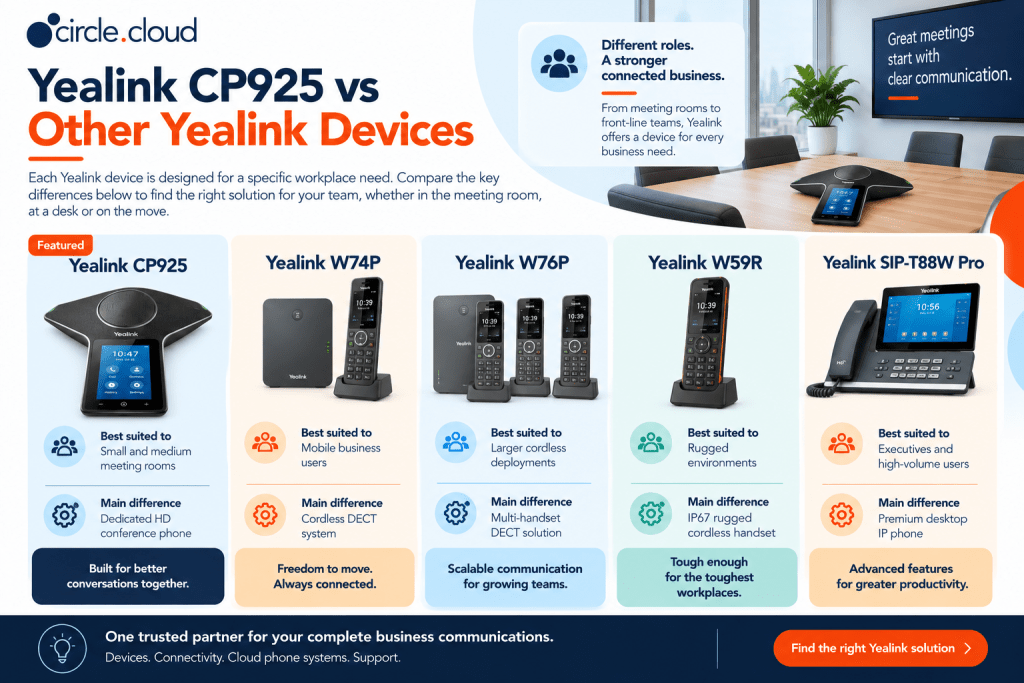
The important point is that these devices are not necessarily competing products. A business may reasonably deploy a mixture of them.
For example, an engineering company could use SIP-T88W Pro phones for management, W59R handsets for workshop employees and CP925 conference phones in meeting rooms. That role-based approach can deliver better value than standardising every employee on one device.
Common Yealink CP925 Buying Mistakes
Choosing a conference phone purely because it has a strong specification sheet can result in unnecessary cost or poor room performance.
- Choosing It Without Considering Room Size: A conference phone’s quoted microphone range does not guarantee perfect coverage in every room. Assess the room dimensions, layout, acoustics and expected participant numbers before purchasing.
- Assuming Five-Way Calling Means Five People in the Room: Conference capacity and room capacity are not the same thing. The CP925’s five-way conference capability relates to telephone conferencing, while the number of people who can comfortably participate in a physical meeting depends on the room and audio setup.
- Ignoring the Network: A conference phone is dependent on the network behind it. Poor broadband, weak Wi-Fi, incorrect configuration or inadequate switching infrastructure can affect the overall call experience.
- Treating Wi-Fi as Automatically Better: Wireless connectivity can make installation easier, but it does not automatically provide a better voice experience than Ethernet. Where possible, businesses should choose the connection method based on reliability and the existing network design.
- Buying a Conference Phone for Infrequent Meetings: If a meeting room is used only occasionally, a premium conference phone may not provide enough value to justify the investment. Consider how often the room is used and how important reliable multi-party voice communication is to the business.
- Forgetting the Hosted Phone System: The CP925 should be checked against the hosted VoIP platform before purchase. Compatibility, provisioning, SIP configuration and available calling features all need to be considered.
What Should You Budget For?
The cost of a CP925 deployment is not necessarily limited to the conference phone itself. A complete meeting-room deployment may include:
- Hardware: The CP925 and any additional compatible equipment required.
- Telephony: Hosted business phone service, numbers, extensions and conference functionality.
- Connectivity: Business broadband or a leased line.
- Network: Router, switching, Ethernet cabling, Wi-Fi and PoE where required.
- Resilience: 4G or 5G failover where telephone availability is commercially important.
- Installation: Configuration, provisioning and deployment.
- Support: Ongoing technical support and troubleshooting.
This total-cost approach gives businesses a more realistic view of what is required to create a reliable conference-room communications environment.
When Should You Consider Connectivity Backup?
For some organisations, losing internet connectivity means losing access to hosted telephone services. This can be particularly important for telephone-dependent businesses where customer calls directly influence revenue or operational continuity. A 4G or 5G backup connection can provide an additional resilience layer, depending on the wider network design and service configuration. The appropriate resilience strategy will depend on the business’s tolerance for downtime, available mobile coverage and critical communications requirements.
Why Buy the Yealink CP925 from circle.cloud?
Choosing the conference phone is only one part of creating a reliable meeting-room communications environment. circle.cloud’s approach is to consider the CP925 alongside the hosted phone system, connectivity and network infrastructure supporting it.
- Complete communications approach: Consider the CP925 alongside hosted VoIP, business broadband, leased lines and network infrastructure.
- Practical technical guidance: Assess whether the CP925 actually fits the room, users and meeting requirements.
- UK-based support: circle.cloud positions direct access to technical expertise and responsive support as a key differentiator.
- Cloud-first communications: Build around modern hosted telephony rather than legacy PSTN infrastructure.
- Scalable approach: Design the meeting-room solution alongside the wider business phone system as the organisation grows.
For businesses preparing for the UK PSTN transition, this wider approach is particularly relevant. BT’s planned PSTN retirement is scheduled for 31 January 2027, so organisations still dependent on legacy voice infrastructure should be planning their digital migration now.
Not sure whether the Yealink CP925 is right for your meeting room? Speak to the circle.cloud team about the conference phone, hosted telephony, connectivity and network requirements together.
Pros and Considerations
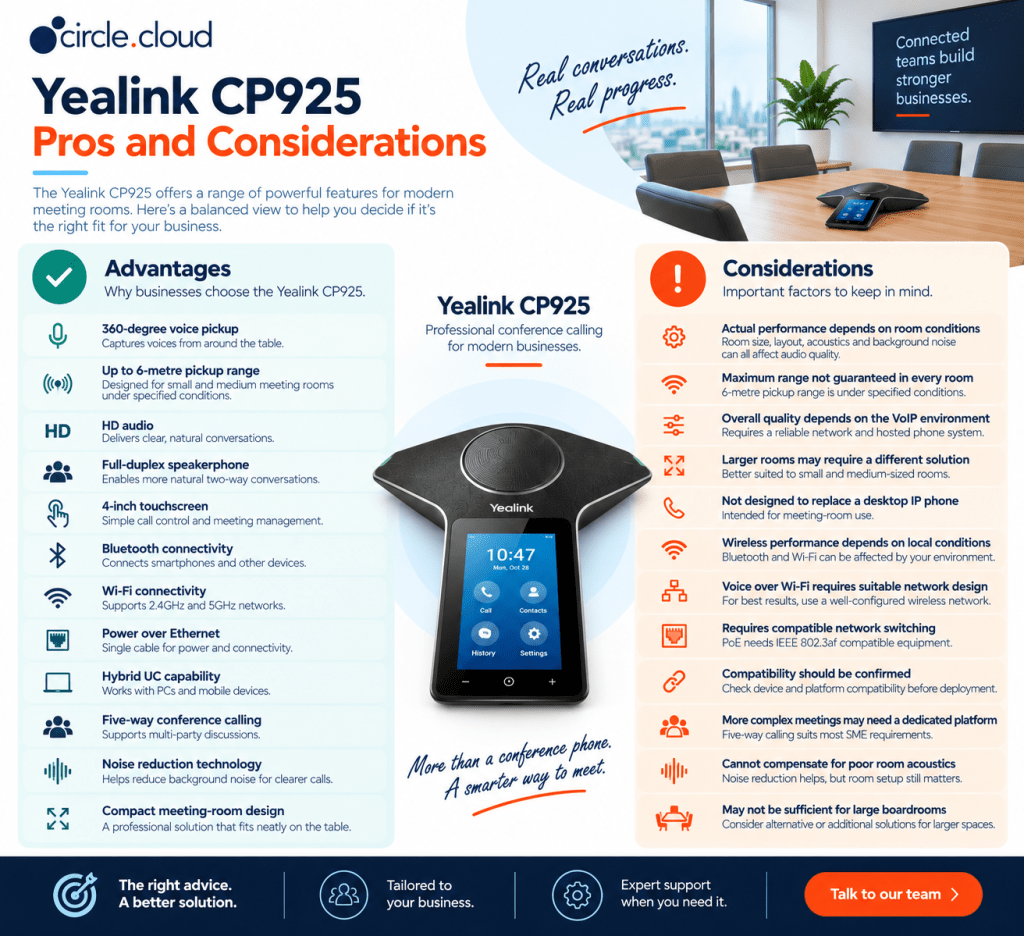
circle.cloud verdict: The CP925 is a strong option for small and medium-sized meeting rooms where businesses need dedicated, professional conference calling without unnecessarily complex equipment. Its value is greatest when the room, network and hosted telephony platform are properly matched to the device.
Which Businesses Should Choose the CP925?
The CP925 is particularly suitable where meeting-room communication is a regular business requirement. A growing SME may use it for management meetings, supplier discussions and customer calls. An estate agency could use it for branch meetings and multi-party conversations. An engineering business may use it for project discussions involving customers and contractors. For larger organisations, several CP925 devices can form part of a broader communications strategy, provided each meeting room is assessed individually.
The key is not to deploy the CP925 simply because it is a capable conference phone. Deploy it where a dedicated conference-room endpoint solves a genuine business requirement.
Final Buying Checklist
Before purchasing a Yealink CP925, ask:
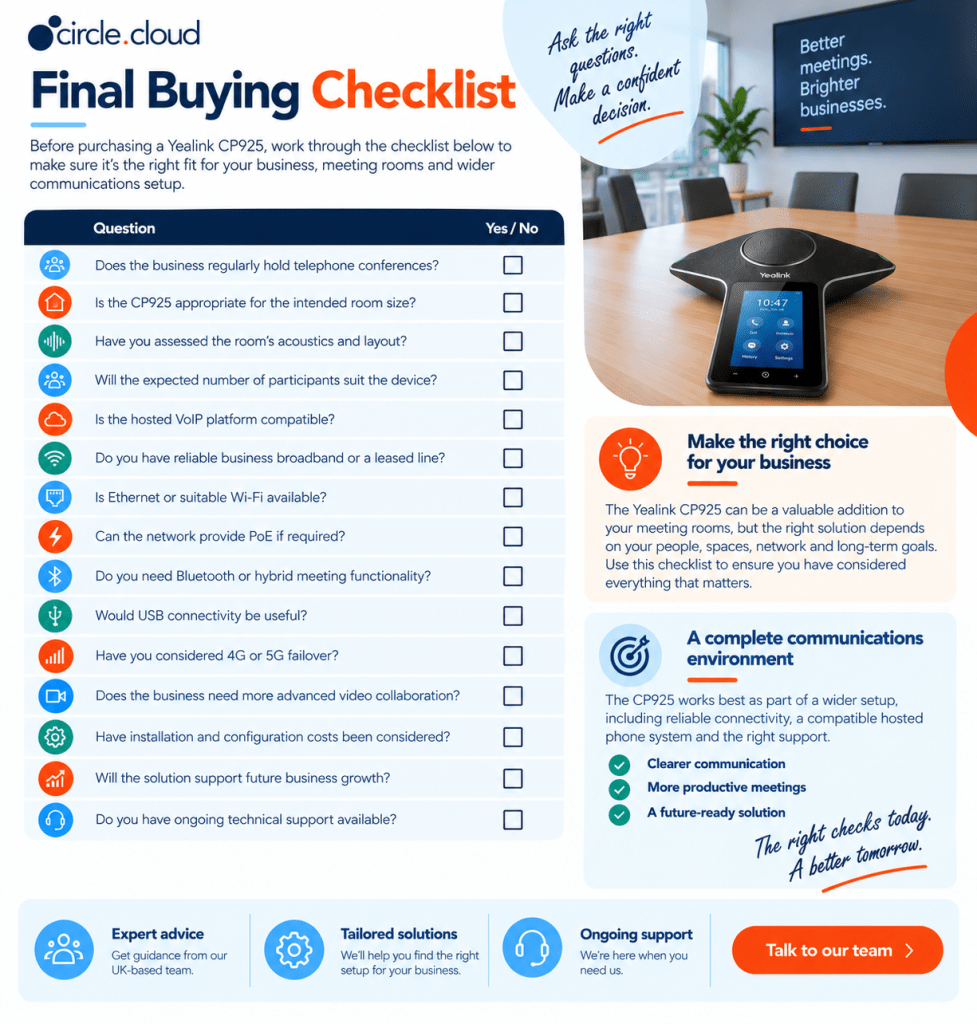
If most answers are yes, the CP925 is likely to be a strong candidate for the relevant meeting room.
Conclusion
The Yealink CP925 is a professional conference phone designed to make business voice meetings simpler and more effective. Its combination of HD audio, 360-degree microphone pickup, touchscreen controls, Bluetooth, Wi-Fi, PoE and hybrid meeting support makes it a flexible option for small and medium-sized meeting rooms. However, the device should not be evaluated in isolation. Room size, acoustics, network quality, hosted telephony compatibility and connectivity resilience will all influence the final experience.
For UK businesses, the wider transition from PSTN to digital communications also makes this an appropriate time to review the complete communications environment. BT plans to retire its PSTN network by 31 January 2027, so businesses still relying on legacy voice infrastructure should consider their migration plans now.
The right question is therefore not simply “Is the Yealink CP925 a good conference phone?”
It is: “Is the Yealink CP925 the right conference-room endpoint for how our business communicates?”
When the answer is yes, it can provide a straightforward and professional foundation for business conference calling.
FAQs
1. What is the Yealink CP925?
The Yealink CP925 is an HD IP conference phone designed for small and medium-sized meeting rooms, with touchscreen controls, 360-degree microphone pickup and multiple connectivity options.
2. How many people can use the Yealink CP925?
The CP925 supports up to five-way conference calling. Its physical room suitability depends on room size, acoustics and microphone pickup requirements.
3. What is the microphone range of the CP925?
Yealink specifies up to 6 metres, or 20 feet, of 360-degree voice pickup under specified conditions. Actual performance varies by room environment.
4. Does the Yealink CP925 support Wi-Fi?
Yes. The CP925 includes built-in Wi-Fi, alongside Ethernet connectivity.
5. Does the CP925 support Bluetooth?
Yes. Bluetooth is built in and can be used as part of hybrid meeting scenarios.
6. Does the Yealink CP925 support Power over Ethernet?
Yes. The CP925 supports PoE, which can simplify installation by supplying power through the network connection.
7. Can the CP925 connect to a mobile phone?
Yes. Yealink identifies Bluetooth connectivity for connecting mobile devices as part of its hybrid UC capabilities.
8. Can the CP925 be used with hosted VoIP?
Yes, subject to compatibility and correct SIP configuration with the chosen hosted telephony platform.
9. Is the CP925 suitable for small businesses?
Yes. It is specifically positioned for small to medium-sized conference rooms and can suit SMEs that regularly hold multi-party business calls.
10. Is the CP925 suitable for large boardrooms?
Not necessarily. Its specified microphone pickup is up to 6 metres, so larger rooms may require a different or more extensive conferencing solution.
11. Can the CP925 make PSTN calls?
The CP925 can support local three-way PSTN conferencing when paired with the optional Yealink CPN10.
12. Does the CP925 support noise reduction?
Yes. Yealink lists Noise Proof Technology, Smart Noise Filtering and a dedicated microphone for noise cancellation.
13. Is the CP925 a replacement for a desktop business phone?
No. It is designed primarily as a conference-room endpoint. Desk phones such as the Yealink SIP-T88W Pro are more appropriate for individual users.
14. Does the CP925 require business broadband?
It requires suitable network connectivity for IP telephony. Business broadband or a leased line may be appropriate depending on the organisation’s requirements.
15. Can circle.cloud help deploy the Yealink CP925?
Yes. circle.cloud can assess the conference phone alongside hosted telephony, connectivity and network requirements to help create a suitable business communications solution.
About the Reviewer & Editorial Methodology
Reviewed By: circle.cloud Technical & Solutions Team
Role: Business Communications and Network Infrastructure Specialists
Experience: Experience supporting UK organisations with hosted VoIP, business broadband, leased lines, cloud communications and telecoms infrastructure.
Editorial Methodology:
This buyer’s guide has been created using a combination of:
- Current Yealink CP925 product specifications and documentation.
- Practical business communications considerations.
- Network and hosted VoIP deployment principles.
- Assessment of scalability, reliability, usability and business value.
- Consideration of UK organisations transitioning away from legacy PSTN infrastructure.
The product-specific specifications in this guide have been checked against Yealink’s current product information.
Editorial Policy:
circle.cloud aims to provide practical and impartial buying guidance to help UK businesses make informed technology decisions. The brand’s stated approach prioritises simplicity, reliability, UK-based support and modern infrastructure rather than unnecessary technical complexity.
Disclaimer:
Product specifications, firmware capabilities and compatibility can change. Businesses should confirm the latest manufacturer specifications and hosted telephony compatibility before purchase. Conference-room performance also depends on room layout, acoustics, network infrastructure, connectivity and configuration. A professional assessment may be appropriate for business-critical deployments.