Published: 16th October 2026 | Last updated: 16th October 2026
Reviewed by: circle.cloud Technical & Solutions Team | Last reviewed: October 2026
Reading time: approximately 15 minutes | Revision: Version 1.1
Reliable business Wi-Fi is no longer simply about giving employees access to the internet. It supports cloud applications, business telephone systems, video meetings, connected devices and the everyday communication that keeps organisations operating.
For businesses that depend on incoming calls, customer enquiries, bookings or direct orders, unreliable Wi-Fi causes more than slow browsing. Staff may struggle to use cloud applications, move between work areas or stay connected to communications tools.
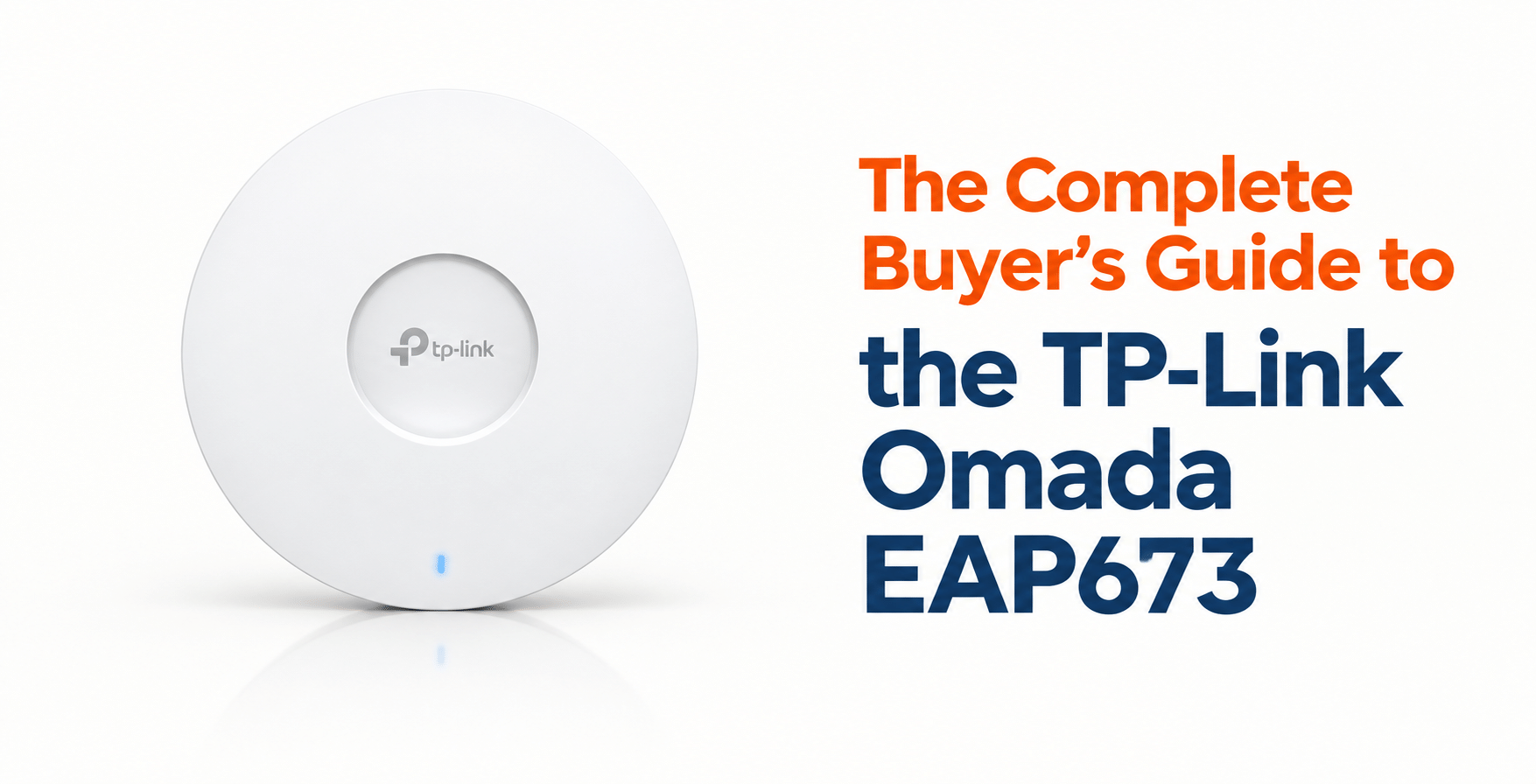
The TP-Link Omada EAP673 is a business-grade ceiling-mount wireless access point designed to provide high-performance Wi-Fi 6 within a managed network. It combines AX5400 dual-band wireless, a 2.5GbE Ethernet port, PoE+ support and integration with the TP-Link Omada management platform.
However, specifications alone do not determine whether an access point is right for a particular organisation. Coverage requirements, building layout, connected devices, network infrastructure and security policies all influence the final decision. This buyer’s guide explains what the EAP673 offers, where it fits, what to check before buying and how to assess its suitability as part of a wider communications infrastructure.
Key Takeaways
- Business-grade Wi-Fi 6: The EAP673 offers AX5400 dual-band wireless, with theoretical maximum rates of 4,804 Mbps on 5 GHz and 574 Mbps on 2.4 GHz.
- 2.5GbE wired connectivity: Its 2.5 Gigabit Ethernet port provides more wired capacity than a standard Gigabit Ethernet connection.
- Designed for managed networks: The access point integrates with the Omada ecosystem, supporting centralised management through a compatible controller.
- Flexible installation: It supports 802.3at PoE+ and 12 V DC power. The DC power adapter is not included in the standard specification reviewed.
- Security and network separation: Features include WPA3 support, access controls, client isolation and SSID-to-VLAN mapping.
- Coverage depends on the environment: Building materials, interference, device density and access point placement influence real-world performance.
- Suitable for a range of sectors: Care homes, manufacturers, automotive businesses, dental practices, estate agents and engineering firms may benefit where reliable Wi-Fi supports everyday operations.
- Works best as part of a wider network plan: The EAP673 provides wireless access, but it does not replace the router, internet connection, managed switching or hosted telephone system.
TP-Link Omada EAP673 at a Glance
The following specifications summarise the principal features relevant to business buyers. They are based on TP-Link’s published product information for the EAP673 (TP-Link specification).
| Feature | Specification |
|---|---|
| Product type | Ceiling-mount business wireless access point |
| Wireless standard | Wi-Fi 6, IEEE 802.11ax |
| Wireless rating | AX5400 |
| 5 GHz maximum rate | Up to 4,804 Mbps |
| 2.4 GHz maximum rate | Up to 574 Mbps |
| Ethernet interface | 1 × 2.5 Gigabit Ethernet port |
| Power options | IEEE 802.3at PoE+ or 12 V / 2 A DC |
| DC adapter | Not included |
| Wireless features | OFDMA, MU-MIMO, beamforming and 160 MHz channel support |
| Network management | Omada controller-based management |
| Wireless security | WPA, WPA2 and WPA3 Personal and Enterprise options |
| Network features | Multiple SSIDs, client isolation, access control and SSID-to-VLAN mapping |
| Mounting | Ceiling and wall mounting (kits included) |
| Typical applications | Offices, business premises, managed wireless deployments and multi-site networks |
Note: Specifications, supported features and compatibility may vary by hardware revision or firmware version. Confirm the latest TP-Link Omada EAP673 documentation before purchase.
The advertised wireless rates are theoretical physical-layer rates, not guaranteed internet speeds. Actual throughput depends on client capabilities, interference, network traffic, channel configuration and the wired network connecting the access point.
Who This Guide Is For
This guide is designed for UK businesses considering the TP-Link Omada EAP673 for new Wi-Fi installations or network upgrades. It is particularly relevant to SMEs, multi-site organisations, care homes, manufacturers, automotive businesses, dental practices, estate agents and engineering firms. It helps business owners, IT managers and network administrators assess the access point’s suitability for their connectivity and communication requirements.
Why Trust This Guide
This guide combines TP-Link’s published EAP673 specifications with practical business networking considerations. It examines wireless performance, connectivity, power requirements, security and network management. The aim is to help businesses understand the product’s capabilities, limitations and supporting infrastructure before making a purchasing decision.
What Is the TP-Link Omada EAP673?
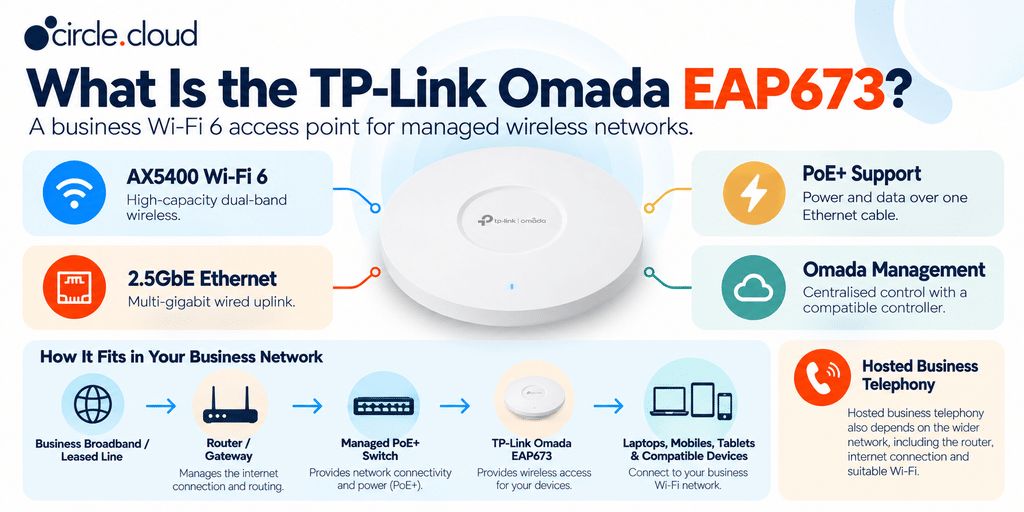
The TP-Link Omada EAP673 is an AX5400 Wi-Fi 6 ceiling-mount access point designed for business wireless networks. It features a 2.5GbE Ethernet port, PoE+ support and integration with the TP-Link Omada management ecosystem. Unlike a conventional router, it provides wireless access rather than managing the internet connection itself. Businesses can use it as part of a managed network to support staff devices, cloud applications and communications across their premises.
Where the EAP673 Fits in a Business Network
A typical business deployment may follow this structure:
Business broadband or leased line → Router or gateway → Managed PoE+ switch → TP-Link Omada EAP673 → Business devices
The router connects the premises to the internet. The managed switch distributes network connectivity and, where supported, power to the access point. The EAP673 then provides wireless access for laptops, smartphones, tablets and other compatible devices.
A hosted business telephone system may use the same underlying network. Desk phones may connect through Ethernet, while softphones and wireless devices depend on suitable Wi-Fi and internet connectivity. This is why an access point should be selected as part of the overall network design rather than as an isolated purchase.
Key Features of the TP-Link Omada EAP673
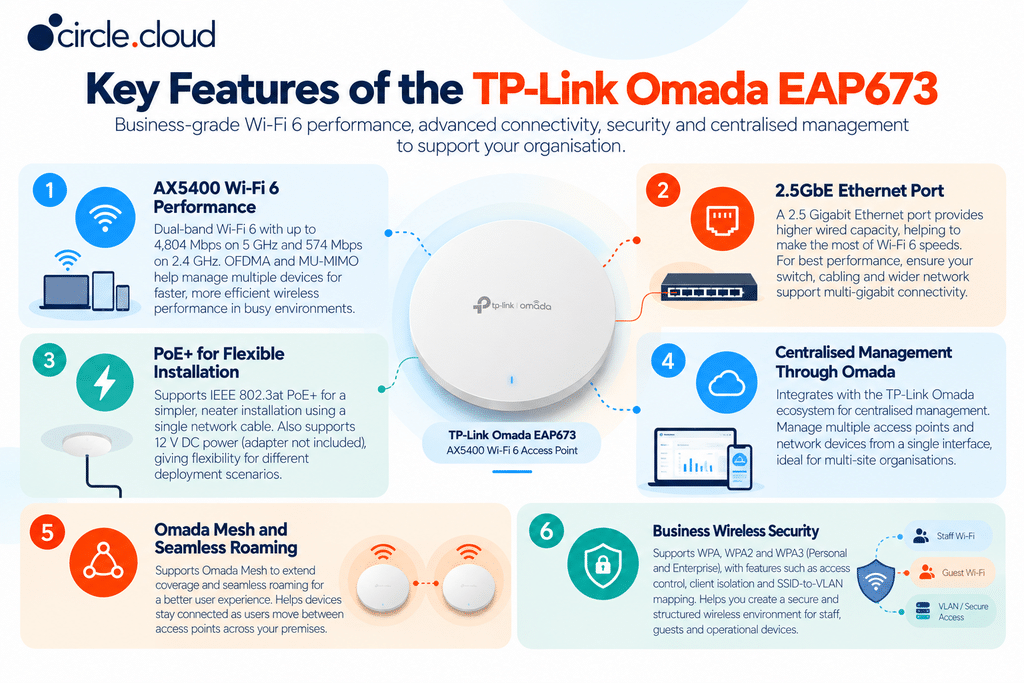
The EAP673 combines Wi-Fi 6 performance with business-focused connectivity, security and centralised management. Understanding these features helps businesses assess wireless capacity, installation requirements and fit with their network.
1. AX5400 Wi-Fi 6 Performance
The EAP673 combines two wireless bands: up to 4,804 Mbps on 5 GHz and up to 574 Mbps on 2.4 GHz. The AX5400 rating is the combined theoretical rate across both bands. It does not mean a single laptop or smartphone will receive 5,378 Mbps of usable throughput. For business buyers, the more important point is how Wi-Fi 6 manages wireless traffic for compatible devices.
Features such as OFDMA and MU-MIMO can improve how an access point serves multiple clients at once. In a busy office, employees may be accessing cloud documents, joining video meetings and using communications apps at the same time. Wi-Fi 6 can help manage that shared environment more efficiently, although performance still depends on network design and workload.
2. A 2.5GbE Ethernet Port
The EAP673 includes a 2.5 Gigabit Ethernet port, so the wired connection can carry more than the 1 Gbps maximum of standard Gigabit Ethernet under suitable conditions. This matters because an access point’s wireless capacity can exceed what a Gigabit uplink can carry, particularly when many devices are active.
However, a 2.5GbE port only delivers its full potential when the supporting network can accommodate it. Check the switch port, cabling, router or gateway and wider network capacity before investing in multi-gigabit access points. If the EAP673 connects to a 1 Gbps switch port, that link can become a bottleneck. For this reason, the access point and switching equipment should be planned together.
3. PoE+ for Flexible Installation
The EAP673 supports IEEE 802.3at Power over Ethernet Plus, so a compatible switch or injector can power it over the Ethernet cable. It also supports 12 V DC power, although the DC adapter is not included. PoE+ means a mains socket is not necessarily needed at the mounting position, which helps on ceilings, in corridors or across larger premises.
Before installation, check that the PoE switch or injector supports the required standard and has enough power budget for all connected devices. The number of PoE ports alone does not show whether a switch can power every device at once. A suitable installation plan should also account for cable routes, mounting positions and access for maintenance.
4. Centralised Management Through Omada
You can manage the EAP673 through an Omada hardware, software or cloud controller, depending on firmware and controller version. Centralised management is valuable when an organisation has multiple access points or locations. Instead of configuring each device separately, administrators manage supported equipment through one interface to keep settings consistent, check device status, apply changes and troubleshoot.
For example, an estate agency with several branches may want consistent staff Wi-Fi and guest access policies across its locations. A managed Omada deployment makes that easier to administer. Check which controller you need for the features you want, as some require extra setup or hardware.
5. Omada Mesh and Seamless Roaming
The EAP673 supports Omada Mesh and seamless roaming when used with a compatible Omada controller and supported equipment. Mesh can extend wireless connectivity into areas where running Ethernet cabling is difficult. However, a mesh link still depends on signal quality and the capacity available between access points. Where possible, a wired backhaul is preferable for business-critical networks.
Seamless roaming helps compatible devices move between supported access points more smoothly, for example as staff walk between offices, meeting rooms and reception. Roaming behaviour also depends on the client device, controller configuration and surrounding wireless environment. No access point can guarantee uninterrupted connectivity for every device in every location.
6. Business Wireless Security
Wireless security matters for any organisation handling customer information, commercial data or business-critical applications. The EAP673 supports WPA, WPA2 and WPA3 in Personal and Enterprise modes. Its published features also include access control, client isolation, SSID-to-VLAN mapping, 802.1X support and rogue access point detection.
Staff devices, guest smartphones and operational equipment may need different access permissions. Separate SSIDs and VLANs can enforce those distinctions when the wider network is configured appropriately. A guest network should never reach internal business systems simply because it shares the same physical access point.
Security also depends on sound configuration, appropriate authentication, firmware maintenance and the wider network’s firewall and access policies. The presence of security features does not remove the need for an ongoing security process.
Which Businesses Should Consider the EAP673?
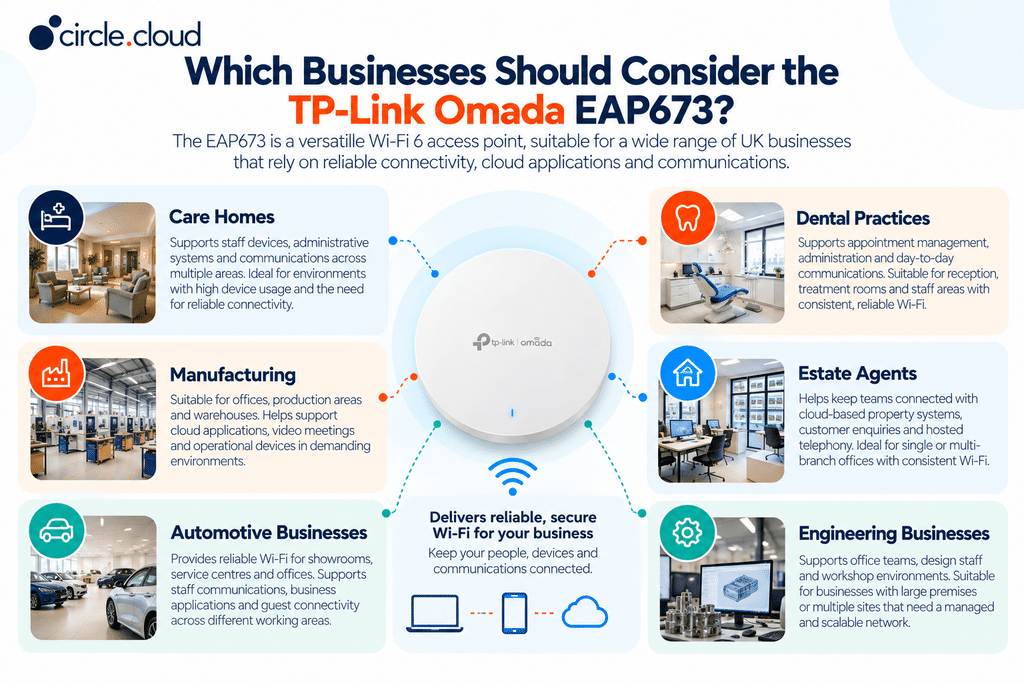
The EAP673 may suit organisations that need managed wireless connectivity, support for multiple devices and room to expand their network. Suitability depends on the building, the number and type of devices, network traffic and the consequences of connectivity problems. Employee count alone is not enough to decide.
Care Homes
Care homes may rely on Wi-Fi for staff devices, administrative systems, cloud applications and communications. Reception, management offices and shared working areas may all have different coverage requirements. The EAP673 can form part of a managed Wi-Fi deployment, but layout, construction materials and the number of areas needing coverage all matter. Additional access points may be needed across multiple floors, wings or buildings.
Where hosted telephony is important, the wireless network should be designed alongside the wider communications system. Business-critical voice services may warrant wired connections rather than relying on Wi-Fi alone.
Manufacturing
Manufacturing sites can combine offices, production areas, warehouses and engineering facilities. Office staff may need dependable access to cloud applications and video meetings, while production areas may have machinery and metal structures that block or interfere with the signal.
The EAP673 may suit appropriate indoor working areas, but a single unit should not be expected to cover an entire industrial site. A wireless survey can establish where additional access points or a different access point type are needed.
Automotive Businesses
Dealerships and service centres often combine customer-facing spaces with workshops, parts departments and offices. Reliable Wi-Fi supports staff communications, business applications and guest access. However, a showroom and a workshop may present very different wireless conditions. The EAP673 can be considered for suitable indoor areas, while the overall design should account for layout, device density and any areas needing more robust equipment.
Dental Practices
Dental practices use connectivity for appointment management, administration, communications and cloud-based systems. Reception, offices, treatment rooms and staff areas may have different wireless requirements. A carefully positioned access point can support these activities where the premises and workload suit it. Given the sensitivity of patient information, staff, guest and operational devices should have appropriate access controls.
Estate Agents
Estate agents depend heavily on communication between negotiators, buyers, sellers, landlords, solicitors and colleagues. A reliable network supports cloud-based property systems, email, online enquiries and hosted telephone services. For multi-branch agencies, centrally managed Wi-Fi can help standardise settings across locations. Each branch should still be assessed on its layout, devices and connectivity.
Engineering Firms
Engineering firms may combine office teams, design staff, workshops and remote project teams. Wi-Fi supports collaboration, cloud platforms and access to business systems. Large premises or buildings with substantial obstructions may need multiple access points and a carefully planned network. For multi-site firms, a consistent Omada deployment can simplify administration.
Is One EAP673 Enough for Your Business?
This is one of the most important questions to answer before buying. TP-Link quotes around 140 m² of coverage from lab testing and support for 250+ concurrent clients. Real coverage and capacity will vary with your building, devices and traffic, so treat these figures as reference points, not installation guarantees.
An open office with few devices behaves very differently from a care home with several corridors, a factory with metal structures or an estate agency with enclosed rooms. Coverage and capacity are also separate. An access point may provide signal throughout a space but still struggle when many devices are active.
Businesses should assess three factors:
- Physical layout. Walls, floors, metal structures and distance between the access point and devices affect signal quality.
- Wireless workload. Video meetings, cloud applications, large file transfers and numerous connected devices place different demands on the network.
- Consequences of poor connectivity. A small office using Wi-Fi for occasional browsing has different needs from a business whose phone system and customer-facing operations depend on it.
A professional wireless survey can determine the number and placement of access points. For larger or more complex sites, this is more dependable than choosing equipment by square metres alone.
EAP673 vs a Standard Business Wi-Fi Router
A wireless router and a dedicated access point serve related but different roles. A conventional router combines routing, internet gateway functions and Wi-Fi in one device. The EAP673 provides wireless access and connects to a separate wired network.
For a small office with straightforward needs, an all-in-one router may be enough. As a business grows, separating routing, switching, and wireless access lets each component be chosen and managed for its role. A dedicated access point also helps when an existing router handles internet routing well but lacks wireless coverage or management features. The EAP673 does not replace the business router, broadband connection or managed switch.
EAP673 vs Wi-Fi 7 Access Points
The EAP673 uses Wi-Fi 6 rather than Wi-Fi 7. It remains a relevant option for a managed Wi-Fi 6 deployment, particularly where compatibility with existing equipment and cost matter. Wi-Fi 7 access points offer newer capabilities, but the practical benefit depends on the connecting devices, the wired network and the applications in use.
A business should not upgrade simply because a newer standard exists. If most devices support Wi-Fi 6 and performance is adequate, a well-designed EAP673 deployment may be the better choice. If a major infrastructure refresh is planned and Wi-Fi 7 devices are expected, compare the EAP673 with current alternatives before committing.
How the EAP673 Supports Hosted Business Telephony
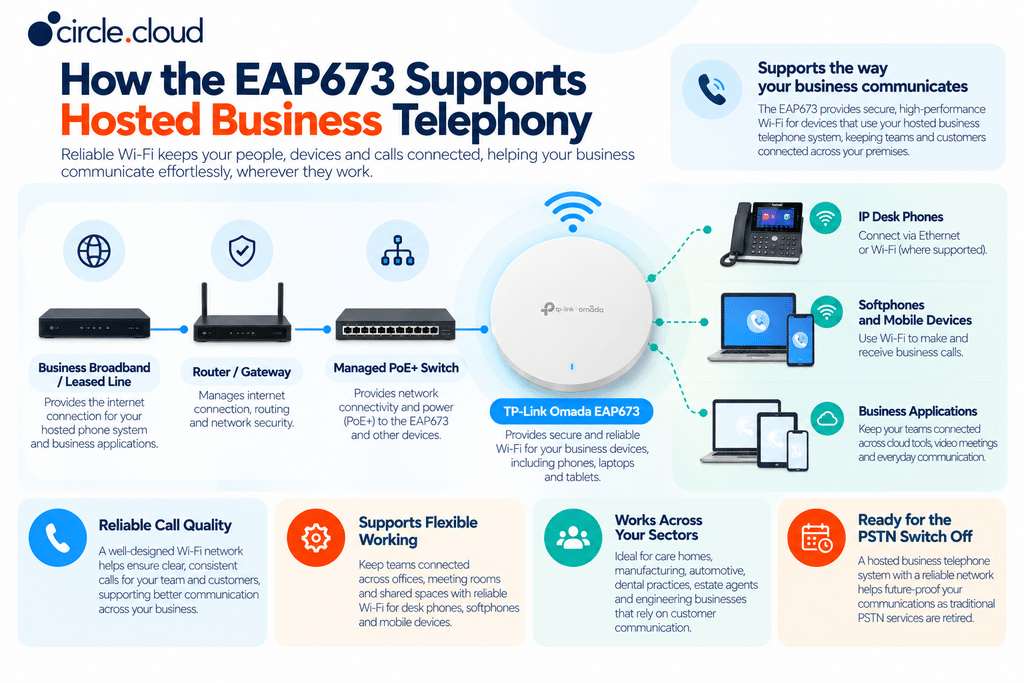
For many UK businesses, wireless networking is closely tied to customer communication. Care homes coordinate staff and external contacts. Estate agents respond to property enquiries. Dental practices depend on appointment communication. Automotive businesses and manufacturers rely on incoming calls to arrange work, confirm orders and support customers.
A hosted business telephone system runs on an internet-based platform rather than a traditional on-premises exchange. It still depends on the wider network: the internet connection, routing, switching and any Wi-Fi used by softphones or wireless handsets. The EAP673 provides Wi-Fi for these devices, but it does not provide the hosted telephone platform itself.
Plan how voice traffic will travel across the network, whether wireless devices suit the calls required, and how traffic prioritisation (QoS) and network segmentation should be configured. Where telephone availability is commercially important, consider the complete arrangement: the hosted phone system, broadband or leased line, router, switches, access points and any resilience measures. This is particularly relevant as UK organisations prepare for the retirement of traditional PSTN services.
What to Check Before Buying
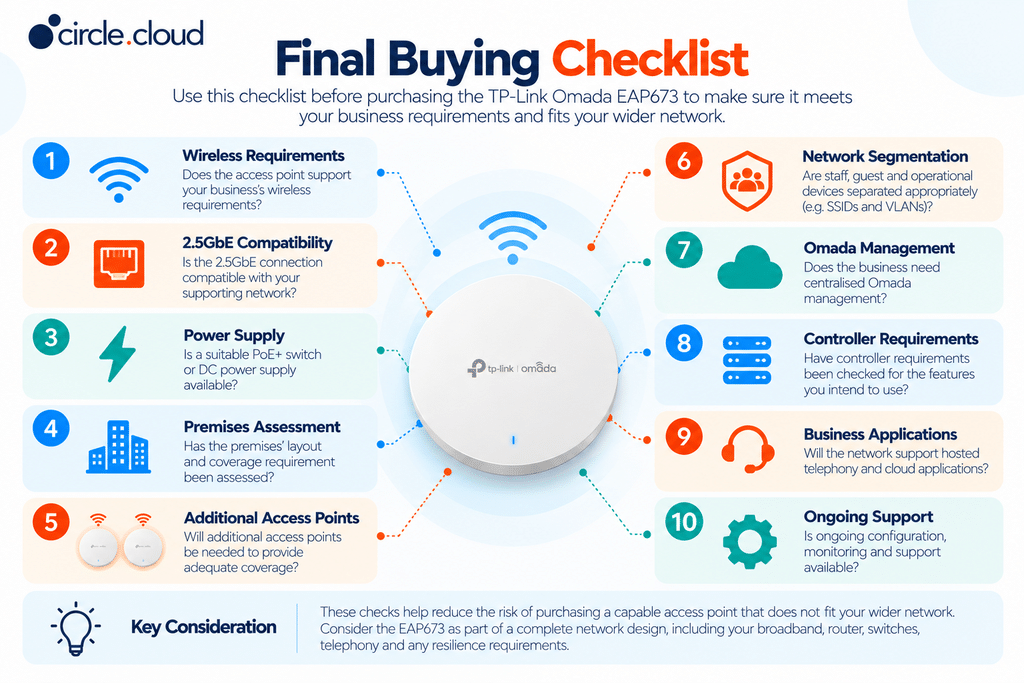
The EAP673’s specification is only one part of the decision. Check that the supporting network can accommodate the access point and that its features match your requirements.
- Wired infrastructure. Confirm the switch and cabling support 2.5GbE if you want the full uplink speed. If using a PoE+ switch, check its power budget as well as available ports.
- Physical environment. Consider ceiling height, wall construction, interference, working areas and where users sit. A survey may be appropriate for larger or complex premises.
- Security and segmentation. Decide whether staff, guests and operational devices need separate SSIDs or VLANs, and confirm the wider network supports this.
- Management. If you want centralised administration, remote visibility or multi-site control, check the relevant Omada controller options.
- Ongoing support. A managed wireless network needs configuration, firmware maintenance, troubleshooting and periodic review as devices and requirements change.

circle.cloud’s Expert Advice
For businesses that depend on reliable customer communication, choosing an access point should start with the operational requirement, not the product specification. The real question is not how fast the EAP673 can transmit data. It is whether the proposed wireless network will support the applications, devices and communications the business relies on throughout the working day.
circle.cloud recommends assessing connectivity, networking and telephony together. A well-designed solution may combine a broadband or leased line service, a business gateway, managed switching, access points and a hosted telephone system. The right arrangement differs between a dental practice, a care home, an automotive workshop and a multi-site estate agency. Some premises need a single access point, while others need several, separate wireless networks or more extensive planning.
Businesses should also plan for internet outages. The EAP673 provides wireless access, but it does not replace a suitable internet connection or a separate resilience strategy.
Why Get the TP-Link Omada EAP673 from circle.cloud?
Choosing the right business access point involves more than comparing Wi-Fi specifications. circle.cloud takes a consultative approach to business connectivity, helping organisations understand how wireless networking fits into their wider IT and communications infrastructure. The EAP673 can form part of a solution designed around your premises, devices and operational requirements.
By considering access points alongside business broadband, leased lines, network infrastructure and hosted telephony, circle.cloud can help you plan a more joined-up approach to connectivity. This is particularly valuable for care homes, manufacturers, automotive businesses, dental practices, estate agents and engineering firms that depend on reliable communication with customers, suppliers and colleagues.
With circle.cloud, you can benefit from:
- Business-focused advice: Guidance on whether the EAP673 suits your wireless requirements and existing infrastructure.
- Connectivity planning: Consideration of how Wi-Fi, broadband, leased lines and network equipment work together.
- Business communications expertise: Support in understanding how network performance affects hosted VoIP and cloud applications.
- A solution tailored to your organisation: Recommendations based on your premises, users, devices and operational priorities.
- PSTN switch-off planning: Help aligning your network and hosted telephone system with the UK’s move away from traditional PSTN services.
Looking to improve your business Wi-Fi? Contact the circle.cloud team to discuss your connectivity requirements and whether the TP-Link Omada EAP673 is the right fit for your organisation.
Final Verdict: Is the TP-Link Omada EAP673 Right for Your Business?
The TP-Link Omada EAP673 is worth considering for UK businesses seeking a managed Wi-Fi 6 access point with AX5400 wireless, 2.5GbE connectivity, PoE+ support and Omada integration. It is particularly relevant where businesses want more wireless capacity, a more consistent network across their premises or a managed environment that can expand over time.
However, its suitability depends on more than the access point itself. Coverage, connected devices, switching capacity, power, security and management requirements all influence the outcome. Where connectivity supports customer calls, appointments, orders and cloud applications, evaluate the EAP673 as part of the wider communications infrastructure.
circle.cloud’s recommendation is to assess the complete business requirement before choosing the hardware. The most effective deployment connects reliable internet access, suitable networking and hosted business telephony into a practical, supportable solution.
FAQs
1. What is the TP-Link Omada EAP673?
The TP-Link Omada EAP673 is an AX5400 Wi-Fi 6 business access point designed to provide wireless connectivity through a managed network.
2. Is the TP-Link Omada EAP673 suitable for business use?
Yes, it is designed for businesses that need high-performance Wi-Fi, centralised management and support for multiple devices. Whether it suits a specific site depends on layout, device numbers and the wider network.
3. What is the maximum speed of the EAP673?
It offers theoretical wireless rates of up to 4,804 Mbps on 5 GHz and 574 Mbps on 2.4 GHz, although actual performance varies by environment and device.
4. Does the EAP673 support PoE+?
Yes, it supports IEEE 802.3at PoE+ and 12 V DC power (adapter not included).
5. Does the TP-Link Omada EAP673 require a router?
Yes, it normally connects to a separate router or gateway to provide internet access to wireless devices.
6. Can the EAP673 be centrally managed?
Yes, it supports management through the TP-Link Omada ecosystem using a compatible controller.
7. How much area can one EAP673 cover?
TP-Link quotes around 140 m² from lab testing, but real coverage depends on building layout, walls, interference and device density. A wireless assessment can determine how many access points you need.
8. Is the EAP673 suitable for multi-site businesses?
Yes, it can form part of a centrally managed Omada network, helping businesses keep wireless settings consistent across locations.
9. Can the EAP673 support hosted VoIP?
It can provide Wi-Fi for devices using hosted VoIP, but call quality also depends on the internet connection, network configuration and telephone system.
10. Why get the EAP673 from circle.cloud?
circle.cloud can help businesses assess the EAP673 alongside broadband, leased lines, network infrastructure and hosted telephony, and plan a solution around their operational needs.
About the Reviewer & Editorial Methodology
Reviewed by: circle.cloud Technical & Solutions Team
Role: Business Communications and Network Infrastructure Specialists
Experience: Supporting UK organisations with hosted VoIP, business broadband, leased lines, cloud communications and business network infrastructure.
Editorial methodology: This guide draws on current TP-Link EAP673 specifications and manufacturer documentation, practical business Wi-Fi and network infrastructure considerations, and an assessment of security, scalability, centralised management and support for hosted VoIP and cloud applications. Product specifications have been checked against TP-Link Omada product information.
Editorial policy: circle.cloud aims to provide practical, transparent buying guidance to help UK businesses make informed technology decisions. circle.cloud supplies business connectivity and communications services, and recommendations consider the wider business environment rather than individual product specifications alone.
Disclaimer
Product specifications, firmware capabilities, hardware revisions and compatibility requirements can change. Confirm the latest manufacturer documentation before purchase. Actual wireless speeds and coverage depend on building layout, interference, connected devices and network configuration. The EAP673 provides wireless access but does not replace a router, internet connection or hosted telephone system. A professional assessment may be appropriate for business-critical or multi-site deployments.