Published: 29th October 2026 | Last updated: 29th October 2026
Reviewed by: circle.cloud Technical & Solutions Team | Last reviewed: 29th October 2026
Reading time: approximately 15 minutes | Revision: Version 1.0
If your team relies on cloud apps, phone calls and a building full of connected devices, your Wi-Fi has to keep up all day. From answering calls to managing appointments, processing orders and coordinating staff, it’s the network that keeps everything moving. The TP-Link Omada EAP653 is an AX3000 Wi-Fi 6 access point built for business. It combines dual-band Wi-Fi, PoE+ power, central management through Omada and the features you need to keep lots of devices connected.
Choosing an access point isn’t just about comparing headline speeds, though. You also need to think about coverage, the layout of your building, how many devices you’ll connect, security, installation and the network that sits behind it.
This guide explains what the EAP653 does, where it fits, which businesses it suits and what to check before you buy.
Key Takeaways
- Wi-Fi 6 speeds: the EAP653 is an AX3000 dual-band access point, with theoretical rates of up to 2,402 Mbps on 5 GHz and 574 Mbps on 2.4 GHz.
- Flexible power: it runs on 802.3at PoE+, 48 V passive PoE or a 12 V DC adapter, so you can choose what suits your installation.
- Simple or central management: set it up on its own through a web browser or the Omada app, or manage it centrally with an Omada controller.
- Built for business: it supports staff devices, cloud applications and compatible communications tools.
- Security features: WPA3, access control, client isolation and SSID-to-VLAN mapping help you keep your wireless network properly structured.
- Coverage depends on your building: walls, interference, the number of devices and where the access point goes all affect real-world performance.
- Suits many sectors: care homes, manufacturing, automotive, dental practices, estate agents and engineering firms can all benefit from properly planned business Wi-Fi.
- Part of a wider network: the EAP653 provides Wi-Fi, but it doesn’t replace your router, internet connection, network switch or hosted phone system.
TP-Link Omada EAP653 at a Glance
Here are the main specifications that matter to business buyers, based on TP-Link’s published product information.
| Feature | Specification |
| Product type | Ceiling-mount business wireless access point |
| Wireless standard | Wi-Fi 6, IEEE 802.11ax |
| Wireless rating | AX3000 |
| 5 GHz maximum rate | Up to 2,402 Mbps |
| 2.4 GHz maximum rate | Up to 574 Mbps |
| Ethernet port | 1 × Gigabit Ethernet |
| Power options | IEEE 802.3at PoE+, 48 V passive PoE or 12 V DC |
| DC adapter | Sold separately |
| Wireless features | OFDMA, MU-MIMO, beamforming and 160 MHz channels (5 GHz only) |
| Network management | Standalone (web browser or Omada app), or centrally via an Omada controller |
| Wireless security | WPA, WPA2 and WPA3 (Personal and Enterprise) |
| Network features | Up to 16 SSIDs (8 per band), client isolation and SSID-to-VLAN mapping |
| Mounting | Ceiling, wall, junction box and T-bar (kits included) |
| Typical uses | Offices, business premises and managed wireless networks |
TP-Link has released more than one hardware version of the EAP653, and some specifications (including power) vary between them. Check the documentation for the exact version you’re buying.
The advertised wireless rates are theoretical maximums, not guaranteed internet speeds. Real performance depends on your devices, the wireless environment, how it’s configured, and the network behind it.
Who This Guide Is For
This guide is for UK businesses thinking about the TP-Link Omada EAP653 for a new Wi-Fi installation or an upgrade. It’s especially useful for SMEs, multi-site businesses and anyone who relies on cloud apps and communication tools. Whether you’re in healthcare, manufacturing, automotive, professional services or engineering, it’ll help business owners, IT managers and network administrators decide whether the EAP653 fits their premises and wider set-up.
Why Trust This Guide
We’ve combined TP-Link’s published EAP653 specifications with the practical things that matter when you’re planning business Wi-Fi: performance, power, security, management and where it’ll actually be installed. We look at how access points, broadband, switching and hosted phone systems work together, rather than judging the hardware on its own. Our recommendations are practical guidance, not a guarantee of coverage or speed in every building.
What Is the TP-Link Omada EAP653?
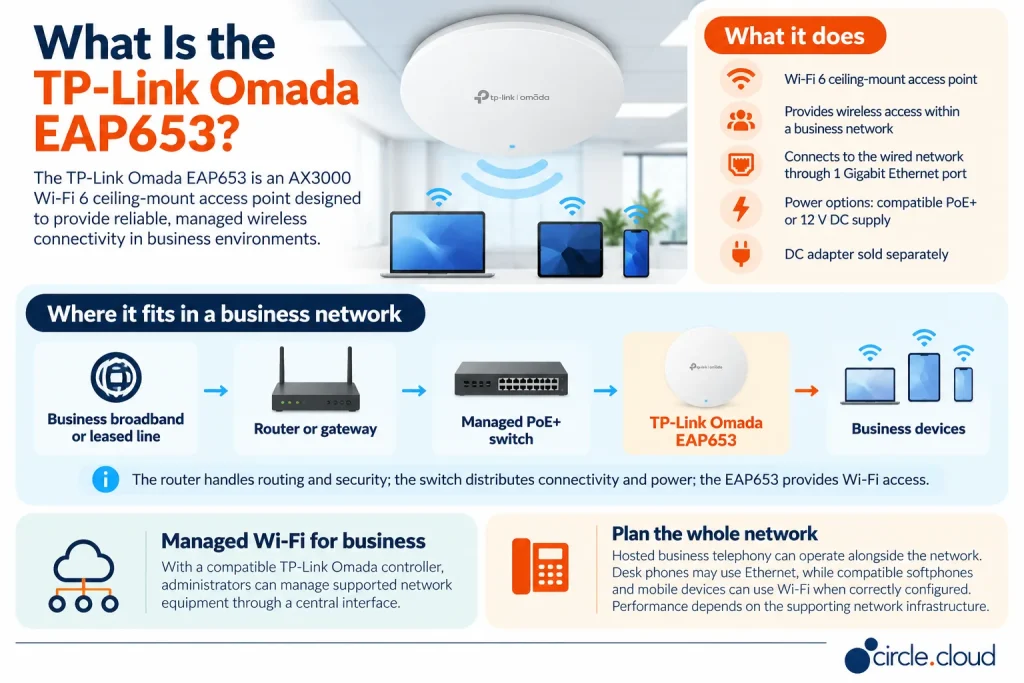
The TP-Link Omada EAP653 is a ceiling-mount Wi-Fi 6 access point that provides wireless connectivity across your business network. It connects to your wired network through a Gigabit Ethernet port and can be powered by compatible PoE+ equipment, 48 V passive PoE or a 12 V DC supply. The DC adapter is sold separately, so factor that in if you plan to use it. Unlike a standard wireless router, the EAP653’s job is to provide Wi-Fi. Your router or gateway handles the internet connection and routing, while switches connect your wired equipment and access points.
You can set up a single EAP653 on its own through a web browser or the Omada app. With an Omada controller, you can manage several access points and other Omada network equipment from one central dashboard. That makes it a good fit if you want a properly managed Wi-Fi network rather than a collection of consumer routers dotted around the building.
Where the EAP653 Fits in a Business Network
A typical business network looks like this:
Business broadband or leased line → Router or gateway → Managed PoE+ switch → TP-Link Omada EAP653 → Business devices
The broadband or leased line provides your internet access, and the router manages routing and security. A PoE+ switch supplies both data and power to the EAP653, which then provides Wi-Fi to laptops, phones, tablets and other devices. Your hosted business phone system can run alongside all of this. Desk phones can connect by Ethernet, while softphones and mobile devices can use Wi-Fi when the network is set up for it.
The key point is that the EAP653 should be chosen as part of your overall network design. How well it performs depends partly on the quality of the network behind it.
Key Features of the TP-Link Omada EAP653
The EAP653 combines Wi-Fi 6 performance with business-grade management, flexible installation and security. Here’s what each feature means for you.
1. AX3000 Wi-Fi 6 Performance
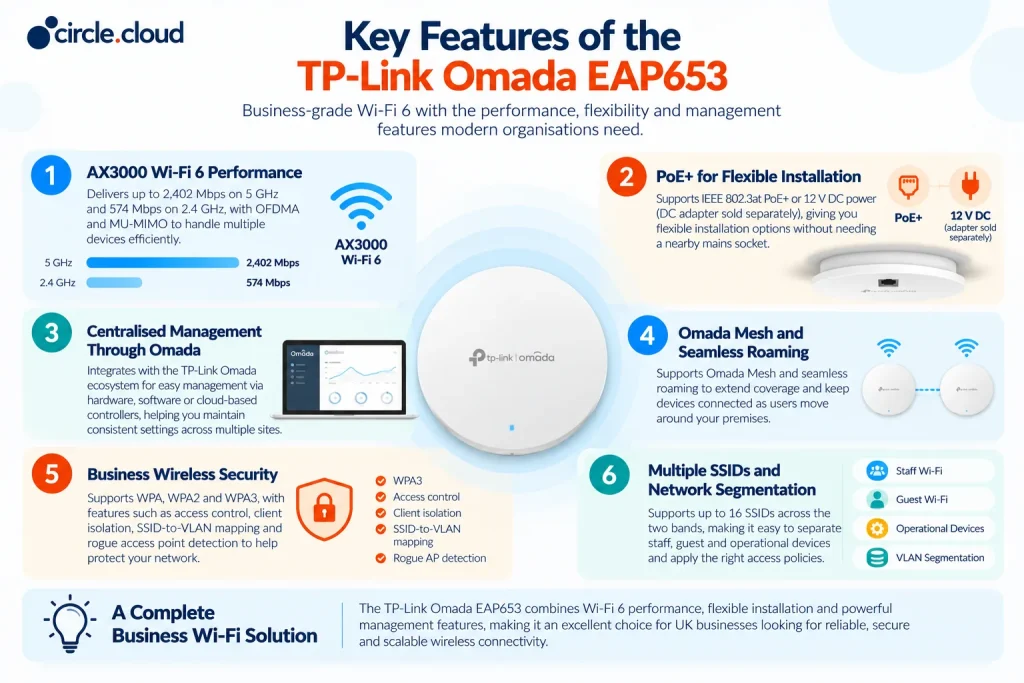
The EAP653 supports theoretical wireless rates of up to 2,402 Mbps on 5 GHz and 574 Mbps on 2.4 GHz, giving it its AX3000 rating. Wi-Fi 6 technologies such as OFDMA and MU-MIMO help the access point share capacity more efficiently between lots of devices. That’s useful in offices where people are using laptops, phones, video calls and cloud apps all at once.
AX3000 doesn’t mean a single laptop or phone will get 3,000 Mbps, though. Real speeds depend on the device, signal strength, interference and how the network is set up. The more useful question is whether the access point can handle your expected workload across the area you need to cover.
2. PoE+ for Flexible Installation
The EAP653 supports IEEE 802.3at PoE+, so a compatible switch or injector can power it through the network cable. It also accepts 48 V passive PoE or a 12 V DC adapter (sold separately). PoE+ makes installation simpler because you don’t need a mains socket where the access point is mounted. That’s especially handy on ceilings or anywhere power sockets are awkward to reach.
Before you buy, check that your PoE+ switch supports the right standard and has enough power budget for everything connected to it. The number of PoE ports doesn’t tell you whether the switch can power every device at once. It’s also worth planning cable routes, mounting positions and access for maintenance before installation.
3. Simple or Centralised Management Through Omada
You can manage a single EAP653 on its own, or bring it into the TP-Link Omada ecosystem with a hardware, software or cloud-based controller. Central management helps you keep Wi-Fi settings consistent, monitor the network and look after multiple access points from one place. For example, an estate agency with several branches can keep the same staff Wi-Fi and guest access rules across every office.
Some features, including mesh, seamless roaming and captive portals, need an Omada controller, and some depend on firmware. Check which option is right for the features you want.
4. Omada Mesh and Seamless Roaming
With an Omada controller, the EAP653 supports Omada Mesh and seamless roaming. Mesh can extend Wi-Fi to areas where running cables is difficult, but a wireless mesh link depends on the signal between access points and shares the available wireless capacity.
For business-critical connections, a wired link back to the network is usually the better option where it’s practical. Seamless roaming helps devices move between access points more smoothly, for example when people walk between offices or meeting rooms. It works best with devices that support the 802.11k and 802.11v roaming standards.
5. Business Wireless Security
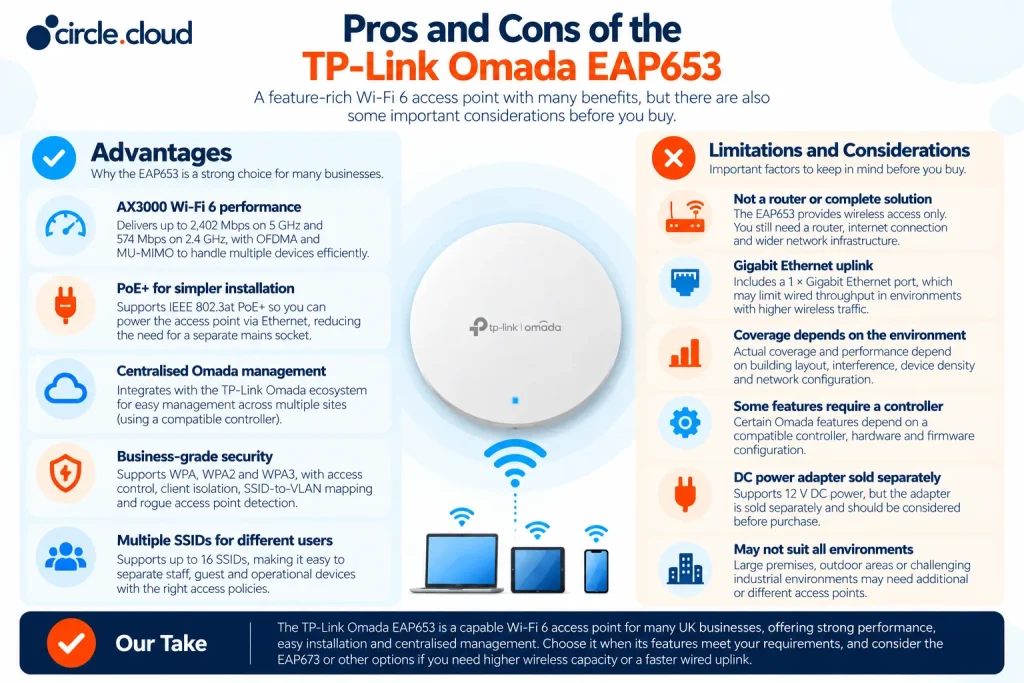
Wireless security matters if you handle customer information, commercial data or business-critical apps. The EAP653 supports WPA, WPA2 and WPA3, plus access control, client isolation, SSID-to-VLAN mapping and rogue access point detection. These let you separate wireless access for different users and devices. For example, staff might need access to internal systems, while visitors only get internet access and can’t reach anything sensitive. Separate SSIDs and VLANs make this possible when the wider network is set up correctly.
Good security also depends on authentication, firmware updates, firewall rules and ongoing management. Having the features doesn’t replace a proper security policy.
6. Multiple SSIDs and Network Segmentation
The EAP653 supports up to 16 SSIDs (8 on each band). Multiple SSIDs are useful when you need separate Wi-Fi networks for staff, guests and specific operational devices.
Creating several wireless networks isn’t the same as securing them, though. You’ll need the right VLANs, firewall rules and access policies to control how devices talk to each other and what they can reach. Only create the networks you actually need. A clear, simple design is much easier to manage than lots of overlapping SSIDs.
Which Businesses Should Consider the EAP653?
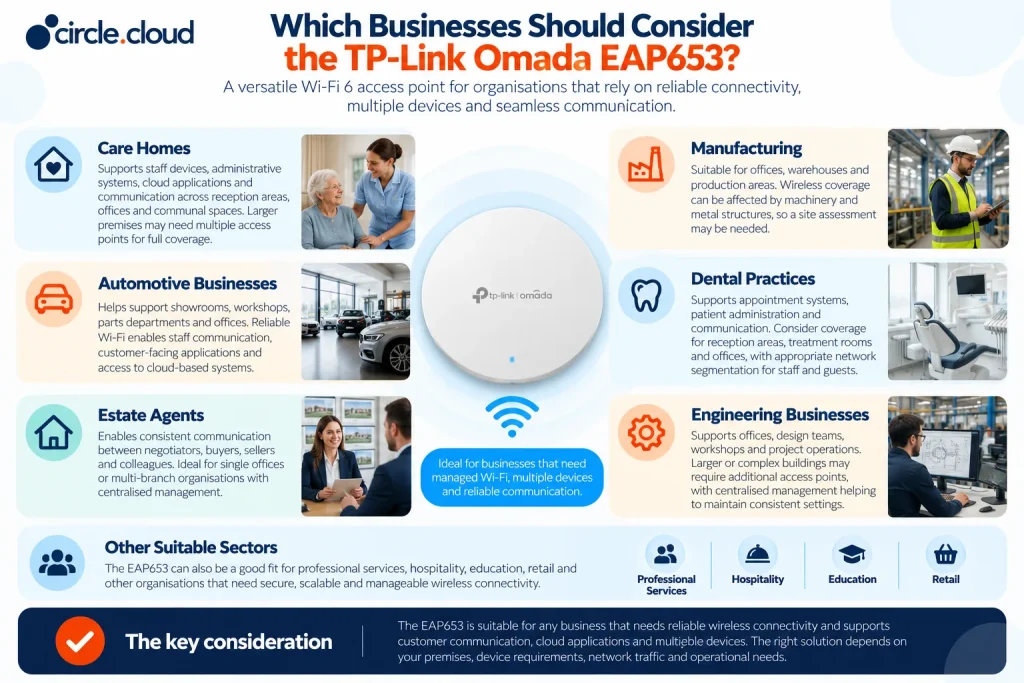
The EAP653 is a good fit if you need managed Wi-Fi, support for lots of connected devices and room to expand. The right set-up depends on your building, the number and type of devices, how much traffic you expect and what happens if the Wi-Fi goes down. Headcount alone won’t tell you how many access points you need.
Care Homes
Care homes use Wi-Fi for staff devices, admin systems, cloud apps and communication. Reception areas, offices, communal spaces and separate wings can all need different coverage. The EAP653 can form part of a managed Wi-Fi network, but think about the building’s layout and construction first. Larger homes will usually need several access points.
If your hosted phone system supports important calls, plan the Wi-Fi alongside the phone system and internet connection.
Manufacturing
Manufacturing sites often combine offices, warehouses, production areas and engineering spaces, each with different needs. Machinery, metal structures and other obstructions can affect wireless coverage. The EAP653 works well in indoor office and working areas, but a site survey will tell you whether you need extra or more specialised access points.
It’s also worth deciding which operational devices need Wi-Fi and whether they should be kept separate from the office network.
Automotive Businesses
Dealerships and service centres usually combine showrooms, workshops, parts departments and offices. Reliable Wi-Fi supports customer-facing apps, staff communication and cloud-based systems. A showroom and a workshop can behave very differently for Wi-Fi, though, especially where building materials or equipment get in the way.
The EAP653 is a good fit for suitable indoor areas, as long as coverage and capacity are checked before installation.
Dental Practices
Dental practices increasingly rely on connected systems for appointments, patient records, cloud apps and communication. The EAP653 can provide Wi-Fi for staff devices and business apps. Think about the layout of reception, treatment rooms and offices, and how sensitive the information on your network is. Staff, guest and operational devices should each have the right access, rather than everyone sharing one open network.
Estate Agents
Estate agents depend on constant communication with buyers, sellers, landlords, solicitors and colleagues. Reliable connectivity supports property management systems, email, online enquiries and hosted phone services. If you have several branches, central management helps keep network settings consistent across every office. The EAP653 can suit individual branches or form part of a wider managed network.
Engineering Businesses
Engineering firms often combine offices, design teams, workshops and remote project work. Wi-Fi supports collaboration, cloud apps and access to business systems. Larger buildings or sites with lots of obstructions may need extra access points or a different wireless design.
If you work across several sites, central management helps keep configuration consistent and makes day-to-day admin simpler.
Other Sectors
The EAP653 also suits professional services, hospitality, education, retail and other businesses that need managed Wi-Fi. What matters isn’t the sector, but whether the access point and the network behind it can meet your coverage, capacity, security and management needs.
How Much Coverage Does the EAP653 Provide?
TP-Link quotes a reference coverage figure of around 140 m² for the EAP653, and says it supports more than 250 connected clients, based on lab testing. Treat these figures as manufacturer reference points, not a guarantee of what you’ll get in your building.
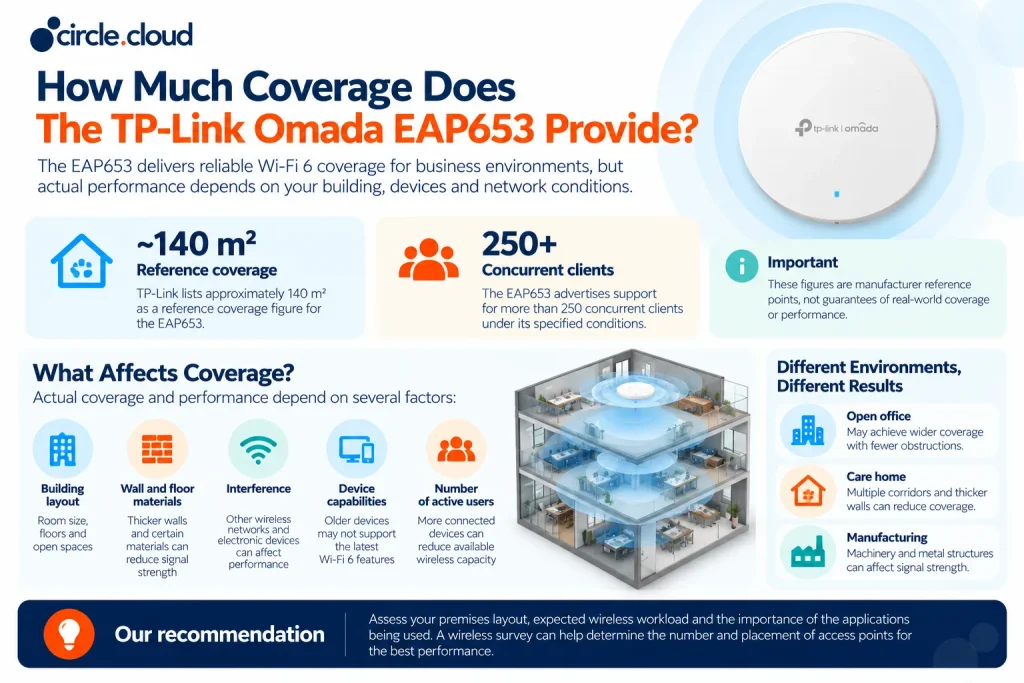
Real coverage depends on your building layout, wall and floor materials, interference, your devices and how many people are connected. An open-plan office will perform very differently from a care home with long corridors or a factory full of metal structures. Coverage and capacity are also different things. An access point can provide a signal across an area but still struggle when lots of devices are busy at once.
Before deciding how many access points to buy, look at your layout, the expected Wi-Fi workload and how important the apps you use are. A wireless survey will show you the best positions and any areas that need extra equipment.
EAP653 vs EAP673: Which Should You Choose?
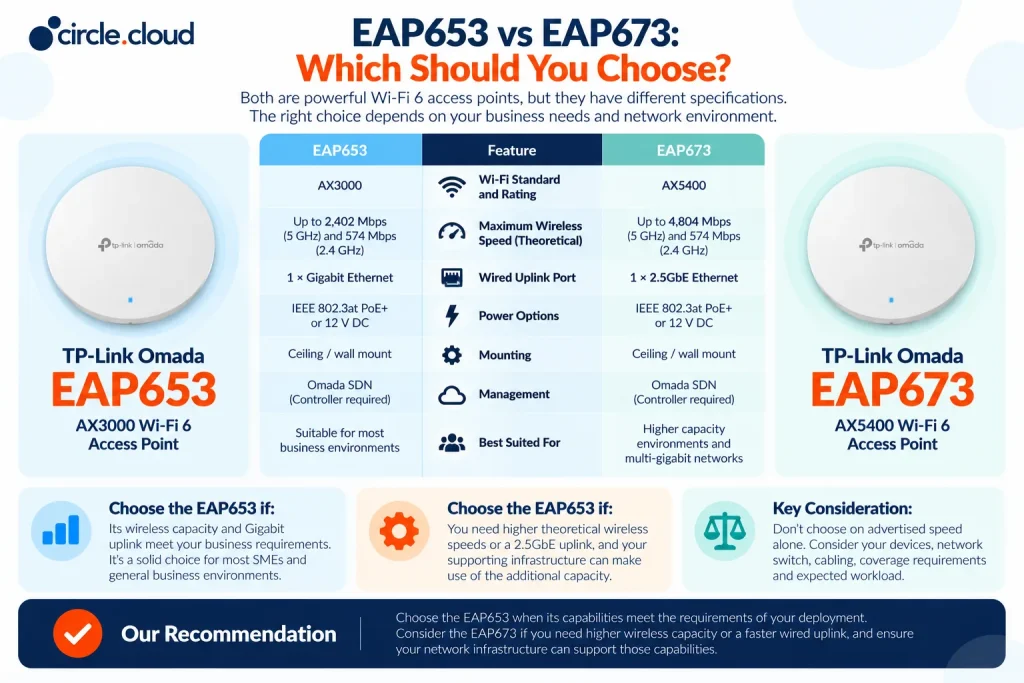
The EAP653 and EAP673 are both TP-Link Omada Wi-Fi 6 access points, but they have different wireless and wired specifications.
- The EAP653 is rated AX3000 and has a Gigabit Ethernet port. The EAP673 is rated AX5400 (up to 4,804 Mbps on 5 GHz) and has a 2.5GbE port. That difference matters if you have heavy wireless traffic or want more capacity on the wired connection.
- The EAP653 is the right choice when its wireless capacity and Gigabit uplink meet your needs. The EAP673 is worth considering if higher wireless speeds and multi-gigabit wired connectivity are priorities.
- Don’t choose either one on advertised speed alone. Your devices, switch, cabling, coverage and expected workload all decide whether the extra capacity will make a real difference.
Our recommendation: choose the EAP653 when it meets the needs of your installation. Look at the EAP673 or other options if you need more wireless capacity or a faster wired uplink, and make sure the rest of your network can make use of it.
How the EAP653 Supports Hosted Business Telephony
For many UK businesses, Wi-Fi is directly tied to how you talk to customers. Care homes need to coordinate staff and outside contacts. Estate agents need to respond to property enquiries. Dental practices rely on appointment calls, and automotive and manufacturing businesses depend on calls to arrange work, confirm orders and support customers. A hosted phone system runs over the internet, but it still depends on the wider network: your broadband or leased line, router, switches and any Wi-Fi used by softphones.
The EAP653 can provide Wi-Fi for devices using these services, but it doesn’t provide the phone system itself. Think about whether wireless devices are right for your calls, and make sure the network is set up to prioritise voice traffic. If your phones are business-critical, it makes sense to look at the hosted phone system, internet connection, routing, switching and Wi-Fi together.
This matters even more as the UK’s traditional phone network is switched off. Openreach is retiring the PSTN on 31 January 2027, so now’s the time to review your phone system and any equipment that still relies on analogue lines.
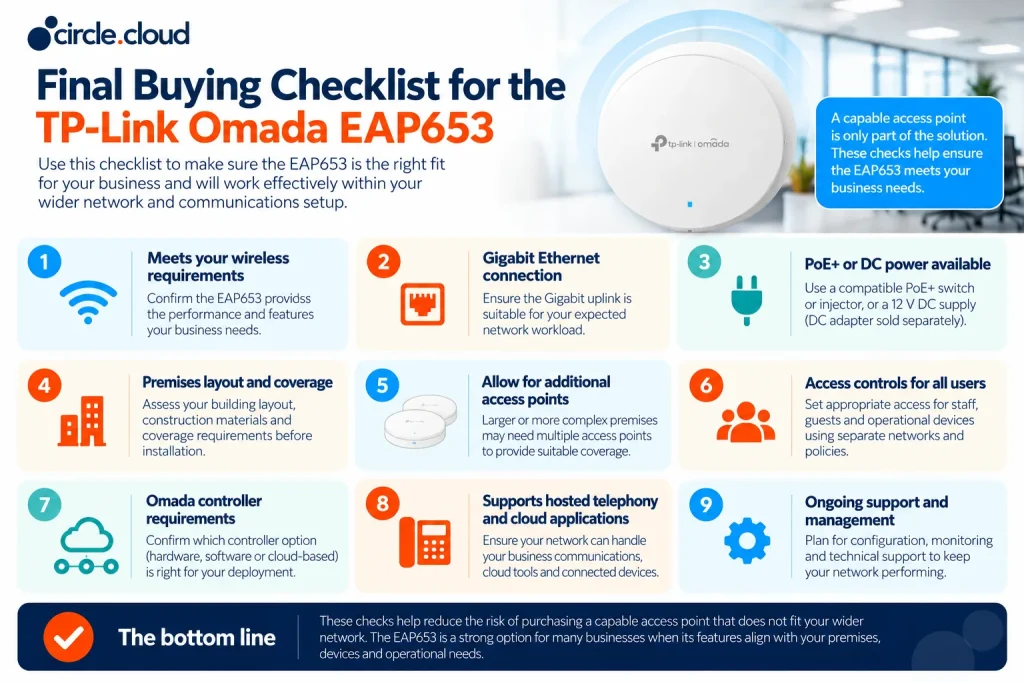
What to Check Before Buying
The specifications are only part of the decision. You’ll also want to check that your existing network can support the EAP653 and that its features match your premises. Start with the wired side. The EAP653 has a Gigabit Ethernet port, so make sure your switch, cabling and upstream network can handle the expected workload.
Next, check the power. If you’re using PoE+, make sure your switch or injector supports IEEE 802.3at and has enough power budget. If you’re using DC power, remember the adapter is sold separately and check the requirements for the hardware version you’re buying. Then look at the building itself: walls, floors, ceiling height, likely interference and where you need Wi-Fi. For larger or more complex sites, a survey is a good idea.
Finally, think about security, management and support. Decide whether staff, guests and operational devices need separate access, whether you want central Omada management and who will look after the network as your business changes.
circle.cloud’s Expert Advice
Start with what your business does every day, the calls, the orders, the people, then choose the Wi-Fi to match, rather than starting with the spec sheet. Make sure your network supports the apps you use daily by planning Wi-Fi alongside broadband, routing, switching and your hosted phone system. The EAP653 is a great fit for many SMEs, but bigger or busier spaces will usually need more than one access point. We’re happy to help you work out what you need.
Why Get the TP-Link Omada EAP653 from circle.cloud?
Choosing the right access point is about more than comparing specs. We look at how Wi-Fi fits into your wider network and communications, so the whole set-up works together.
That’s especially important for care homes, manufacturers, automotive businesses, dental practices, estate agents and engineering firms, where reliable communication with customers, suppliers and colleagues really matters. We can help you plan the EAP653 alongside broadband, leased lines, networking equipment and hosted phone systems, with recommendations based on how your business works. One team owns it from survey to support, and you’ll always reach a real person when you need help.
Looking to improve your business Wi-Fi? Contact the circle.cloud team to talk through your connectivity needs and find out whether the TP-Link Omada EAP653 is the right fit for you.
Final Verdict: Is the TP-Link Omada EAP653 Right for Your Business?
The TP-Link Omada EAP653 is well worth considering if you’re a UK business looking for a managed Wi-Fi 6 access point with AX3000 speeds, PoE+ power and Omada integration. It suits SMEs, professional offices and multi-site businesses that need dependable Wi-Fi and want to manage their equipment from one place. The right choice still depends on your premises, workload, network and coverage needs. And remember, the EAP653 doesn’t replace your router, internet connection or hosted phone system.
Our recommendation is to look at the EAP653 as part of your complete communications set-up. By planning Wi-Fi, broadband or leased lines, network infrastructure and hosted phone systems together, you’ll make a better decision about the equipment and support you need.
FAQs
1. What is the TP-Link Omada EAP653?
It’s an AX3000 Wi-Fi 6 ceiling-mount access point that provides managed wireless connectivity for business networks.
2. Is the TP-Link Omada EAP653 suitable for business use?
Yes. It suits most offices and commercial spaces that need managed Wi-Fi, lots of connected devices, central management and business-grade security.
3. What is the maximum speed of the TP-Link Omada EAP653?
It offers theoretical wireless rates of up to 2,402 Mbps on 5 GHz and 574 Mbps on 2.4 GHz, giving it an AX3000 rating.
4. How much area can the TP-Link Omada EAP653 cover?
TP-Link quotes around 140 m² as a reference coverage figure, but real performance depends on your building layout, obstructions, interference and connected devices.
5. How many devices can connect to the EAP653?
TP-Link quotes support for more than 250 connected clients based on lab testing. Real capacity is usually lower and depends on network traffic, device activity and the wireless environment.
6. Does the TP-Link Omada EAP653 need a PoE+ switch?
No. It can run on PoE+, 48 V passive PoE or a 12 V DC adapter, but the DC adapter is sold separately.
7. Does the EAP653 work as a router?
No. The EAP653 provides Wi-Fi rather than internet routing, so you’ll still need a separate router or gateway.
8. Can the TP-Link Omada EAP653 be managed centrally?
Yes. You can manage it through an Omada hardware, software or cloud-based controller. You can also set up a single unit on its own through a web browser or the Omada app.
9. Does the EAP653 support mesh Wi-Fi and seamless roaming?
Yes, with an Omada controller. Mesh performance depends on signal quality and available capacity, and roaming works best with devices that support 802.11k and 802.11v.
10. Is the TP-Link Omada EAP653 secure enough for business networks?
Yes. It supports WPA, WPA2 and WPA3, plus client isolation, access control and SSID-to-VLAN mapping. Secure deployment still needs the right network policies and configuration.
11. What’s the difference between the EAP653 and EAP673?
The EAP653 is an AX3000 access point with a Gigabit Ethernet port, while the EAP673 is AX5400 with a 2.5GbE port, so the EAP673 is worth a look for higher-capacity networks.
12. How many EAP653 access points does a business need?
It depends on the size of your premises, building materials, number of devices and performance needs. A wireless site survey will tell you how many you need and where they should go.
About the Reviewer & Editorial Methodology
Reviewed by: circle.cloud Technical & Solutions Team
Role: Business communications and network infrastructure specialists
Experience: Supporting UK organisations with hosted VoIP, business broadband, leased lines, cloud communications and business network infrastructure.
Editorial Methodology
This buyer’s guide was put together using:
- Current TP-Link Omada EAP653 product specifications and manufacturer documentation.
- Wi-Fi 6 performance, wireless coverage and business network infrastructure.
- PoE+ installation, power requirements and deployment flexibility.
- Omada central management, mesh, roaming and wireless security features.
- A comparison with alternative access points, including the TP-Link Omada EAP673.
- Wireless requirements across UK businesses, including care homes, manufacturing, automotive, dental practices, estate agents and engineering firms.
- How business Wi-Fi supports hosted telephony, cloud applications and connected devices.
The product specifications in this guide have been checked against TP-Link’s current product information. Coverage figures and wireless speeds are manufacturer reference figures, not guaranteed real-world performance.
Editorial Policy
circle.cloud aims to provide practical, honest buying guidance to help UK businesses make informed technology decisions. Our recommendations look at the wider network, not just individual product specifications, with particular attention to reliability, security, scalability, installation and compatibility with your existing set-up.
Disclaimer
Product specifications, firmware features and hardware compatibility can change over time, so always check the latest manufacturer documentation before buying. Real wireless speeds, coverage and capacity depend on your environment, interference and network set-up. The EAP653 is an access point and doesn’t replace a router, internet connection or complete communications system. For large or business-critical installations, we recommend a professional network assessment.